
Lightweight and portable application that makes your computer sound like a traditional typewriter, integrating other sound effects as well. #Typewriter sound #Typing sound effect #Sound scheme #Keyboard #Typewriter #Sound

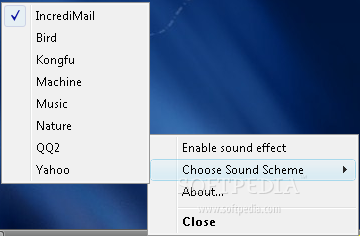
Tiper is a lightweight and portable application that add sounds to the keys you type. It's a nice addition to any user's utility belt, who wants to personalize their computer by giving it unique features.
Since installation is not a prerequisite, you can drop the program files somewhere on the hard disk and run the executable immediately.
An alternative is to save Tiper to a USB flash disk, external hard drive or similar device, in order to run it on any workstation with minimum effort.
An important factor to consider is that the Windows registry is not updated with new entries, and files are not left behind on the HDD after eliminating the utility.
Tiper creates an icon in the system tray area and immediately enables the sound effects at initialization. It puts at your disposal several choices when it comes to the sound types, such as IncrediMail, Bird, Machine, Music, Nature, and Yahoo. It is possible to disable the sound effects without exiting the application.
We have noticed a minimal CPU and RAM consumption during Tiper's runtime. It is very responsive to commands and integrates smoothly into newer operating systems, although the program has not received updates for a very long time. Thanks to its general ease of use, Tiper can be handled by anyone who want to put a special emphasis on keyboard sounds.
Tiper 1.6
add to watchlist add to download basket send us an update REPORT- runs on:
- Windows All
- file size:
- 322 KB
- filename:
- tiper1.6.zip
- main category:
- Desktop Enhancements
- developer:
- visit homepage
Bitdefender Antivirus Free

Context Menu Manager

7-Zip

Zoom Client

Windows Sandbox Launcher

IrfanView

calibre

ShareX

4k Video Downloader

Microsoft Teams

- ShareX
- 4k Video Downloader
- Microsoft Teams
- Bitdefender Antivirus Free
- Context Menu Manager
- 7-Zip
- Zoom Client
- Windows Sandbox Launcher
- IrfanView
- calibre