
Provides you with a small set of themes and skins for your computer's Start menu that not only change its appearance but its functionality as well. #StartMenu replacement #7 StartMenu #Application launcher #StartMenu #Launcher #Start Menu


Ever since the classic start menu was replaced with the Start Screen in Windows 8, the Windows start menu was a subject of controversy. Users were panicked by what some considered the most drastic change to Windows itself and removing the familiar Start button proved to be a mistake that made Microsoft rethink its design in Windows 8.1 and, later on, in Windows 10.
The negative feedback for the Start Screen and the nostalgia of users who were simply too accustomed to click the left side corner of the taskbar after powering up the PC brought the familiarity of the Windows 7 start menu back to Windows 10 and 11.
Today, applications such as ViStart can help you return to the old-style start menu in Windows, even if you are running the latest Windows editions. At the same time, ViStart can bring the full featured Start Menu in Windows Vista, 7 or 8 on a PC that is still running on Windows XP. In other words, using this application enables you to switch between all these looks of the Start button and menu, regardless of the Windows edition you are using.
The application applies its changes as soon as it is installed. Consequently, you will notice that the start menu button is replaced with the default Windows 7 skin. The new menu works flawlessly, responding to commands, regardless of the look and feel you opt for.
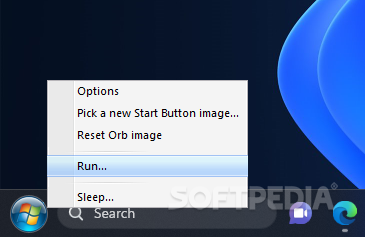
The ViStart control panel can be accessed by right-clicking on the start button. Here, you can configure the application’s settings and change the default skin of the start menu and the start orb. There are multiple variants for the Windows XP and Vista start menu, as well as Windows 8.
By default, ViStart uses the skin’s default orb, but you can also import your own image and use it instead. While enough to some, the available options are limited so, if you get bored of the built-in skins and orbs, you can go on and download new skin packages from the developer’s website. Changes are visible as soon as you make your selection: there is no need for a system restart.
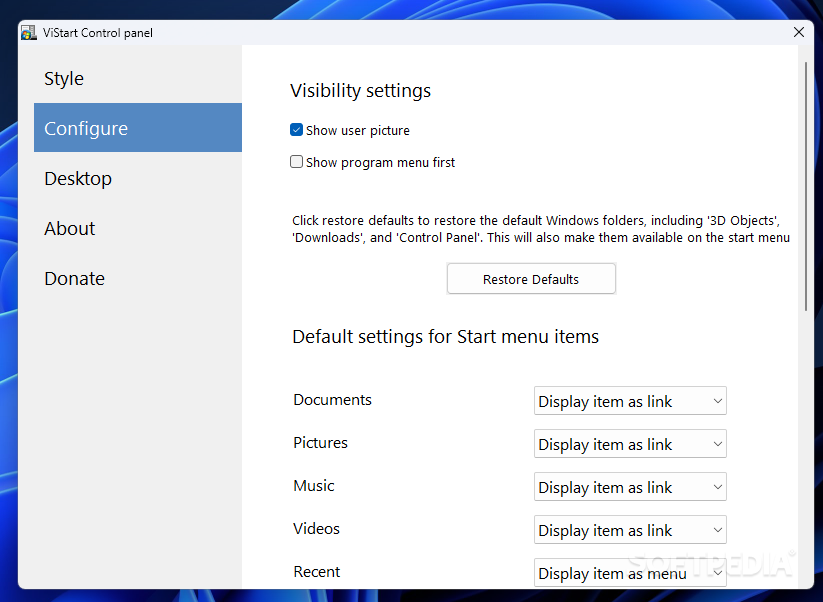
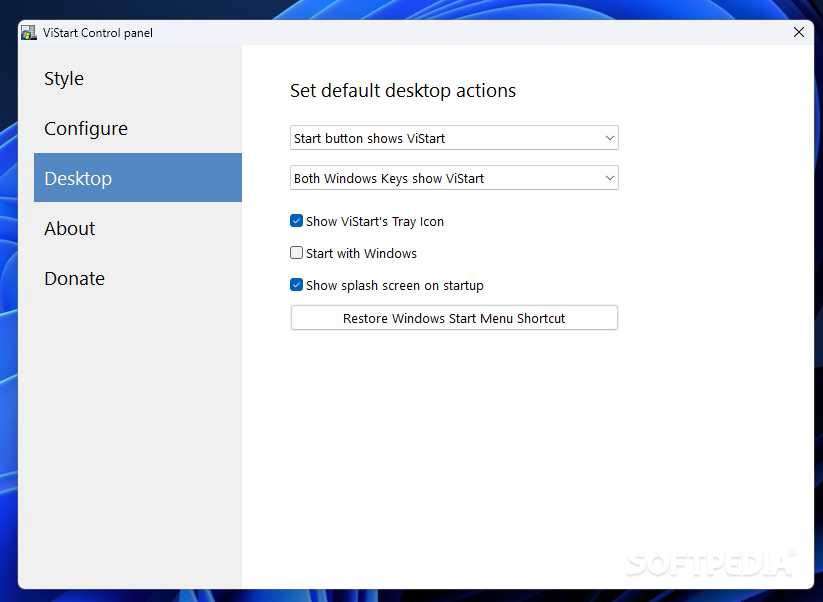
ViStart provides additional personalization options, allowing you to customize the start menu to the full extent. For instance, you can also configure the items that are shown inside the start menu, not just its appearance. The user picture can be hidden, and the program menu can be shown first. Shortcuts to Documents, Pictures, Music, Videos and other popular places on your PC can be shown as links, as menus or simply hidden from your sight. You can configure ViStart to start with Windows, which means you get the preferred look and feel of the start menu as soon as the PC is turned on and the desktop is shown.
Considering the complaints about the Metro, ViStart is a treat for Windows 8 users, as they can disable the charm bar and the hot corners, along with the default Start Screen.
ViStart works with all the Windows iterations from XP to 11, providing a quick and simple way to fully customize the appearance of the operating system. The combination of multiple styles, skins and buttons and its capability to apply the changes in real time turn it into a versatile and reliable Start Menu tweak tool.
What's new in ViStart 8.1 Build 5311:
- If you’re a fan of the classic Windows Start menu but find the new Windows 11 layout confusing, we have great news for you! Our team at ViStart has developed a new version of our popular Start menu replacement tool that not only supports Windows 11, but also comes with exciting new features that improve the user experience.
- One of the most significant improvements is the improved start-up times on all operating systems. ViStart now launches even faster, so you can access your apps and files more quickly than ever before. This improvement makes a noticeable difference in productivity, especially for those who rely heavily on their Start menu to launch frequently used applications.
ViStart 8.1 Build 5311
 Softpedia Editor's Pick
add to watchlist
add to download basket
send us an update
REPORT
Softpedia Editor's Pick
add to watchlist
add to download basket
send us an update
REPORT
- runs on:
-
Windows 11
Windows 10 32/64 bit
Windows 8 32/64 bit
Windows 7 32/64 bit
Windows Vista 32/64 bit
Windows XP - file size:
- 2.8 MB
- filename:
- windows-start-menu-vistart-8105311.exe

- main category:
- Desktop Enhancements
- developer:
- visit homepage
Microsoft Teams

calibre

Zoom Client

Context Menu Manager

Windows Sandbox Launcher

Bitdefender Antivirus Free

4k Video Downloader

7-Zip

IrfanView

ShareX

- 7-Zip
- IrfanView
- ShareX
- Microsoft Teams
- calibre
- Zoom Client
- Context Menu Manager
- Windows Sandbox Launcher
- Bitdefender Antivirus Free
- 4k Video Downloader