
Give your computer a little boost in performance by seeking out duplicate files and having them removed using this practical application. #Find duplicate #Duplicate finder #Search duplicate #Duplicate #Find #Finder

After a long period of using your computer, you might start noticing a drop in performance due to residue files left from uninstalling applications. With the help of specialized applications this issue is quickly taken care of. Duplicate File Finder is a tiny software that allows you to easily locate and delete duplicate files.
The application doesn't need to be installed, as it is portable. As such, your Windows registry entries are not touched. Also, you can place Duplicate File Finder on an external storage device and run it on any computer.
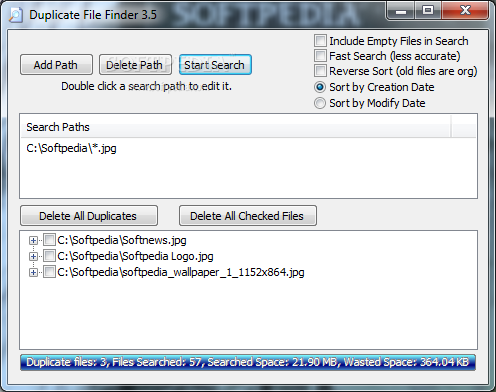
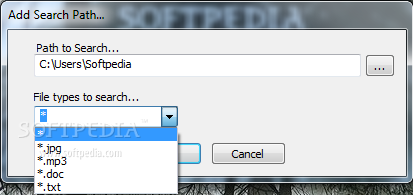
The user interface of the program in plain and simple. You can add a search path by using the file browser, set the type of files you want to look for (JPG, MP3, DOC, TXT or all) and initiate the process.
You can stop the search or delete the path. Double-clicking it brings up the path editing menu.
Configuring the application is quite a simple job. Options help you sort the results according to their creation or modification date; additionally, you can choose to include empty files in the search, enable fast search (which is less accurate) or reverse sort.
When the program is busy with a job, you can view the progress bar and current action (e.g. "Sorting by File Creation Date"). Once the task is complete, you can view the total of duplicate files, files searched, searched space and wasted space. You can delete all duplicates or all checked files.
The program uses a moderate amount of system memory and puts some stress on the CPU, but, nonetheless, manages to finish a search in a reasonable amount of time. Duplicate File Finder doesn't contain a help file but that's because it's extremely simple to work with, even for beginners.
This software does a pretty good job locating duplicate files on your hard drive, even if it packs minimum features. It's a good idea to keep it around, mostly because it requires no installation and it can be kept on a removable storage unit and it might provide a little improvement in your system's performance.
What's new in Duplicate File Finder 3.5.0.0:
- Added feature to sort by creation or modify date.
Duplicate File Finder 3.5.0.0
add to watchlist add to download basket send us an update REPORT- runs on:
- Windows All
- file size:
- 112 KB
- filename:
- dupfinder.zip
- main category:
- File managers
- developer:
- visit homepage
Zoom Client

IrfanView

Windows Sandbox Launcher

7-Zip

calibre

Microsoft Teams

ShareX

4k Video Downloader

Bitdefender Antivirus Free

Context Menu Manager

- 4k Video Downloader
- Bitdefender Antivirus Free
- Context Menu Manager
- Zoom Client
- IrfanView
- Windows Sandbox Launcher
- 7-Zip
- calibre
- Microsoft Teams
- ShareX