
A simple yet efficient software solution that helps you split and join files, calculate the MD5 signature and encrypt data if necessary. #File Splitter #File Joiner #Merge File #Split #Splitter #MD5

Occasionally, you might need to use the Internet to send large files to your friends, boss or colleagues. One way to do it is to upload the file to a sharing platform, then send the link to the receiver. Another way is to split the file into several smaller parts and send them via email as attachments. For the latter option, you can use File Splitter and Joiner.
This software application enables you to split a file into several chunks, and then join them together to recreate the original file. It somewhat resembles the principle of a compression tool - you split a file into smaller chunks, copy or move them into the desired source, then put them back together into the original piece.
Installing the tool is a straightforward process, and it enables you to integrate the software utility within the context menu of Windows Explorer, thus getting access to its features with very little effort.
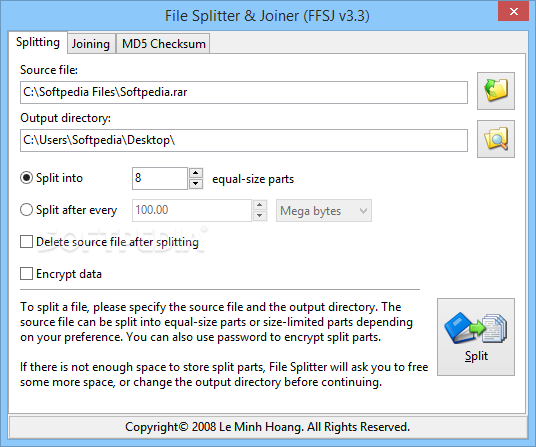
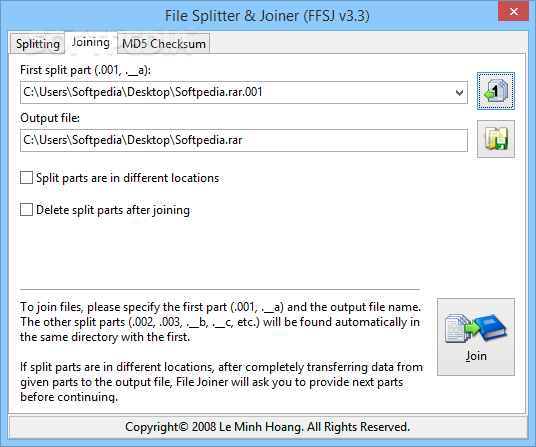
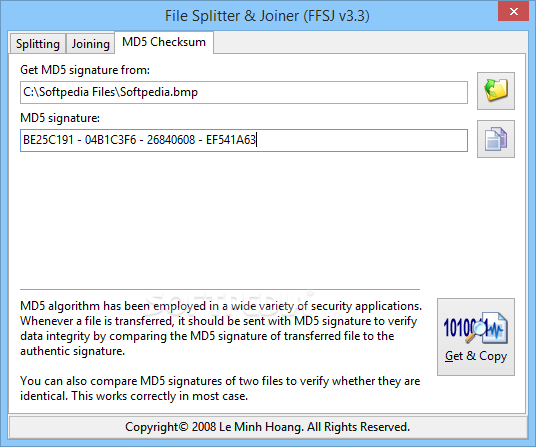
Once installed, you can view the user-friendly interface that features three tabs dedicated to specialized functions: Splitting, Joining, and MD5 Checksum.
In the first section, you can select the source file and output directory. Then you can either choose from splitting the file into the desired number of parts (which are equal in size), or splitting the file after every given number of storage units (expressed in bytes, KB, MB, or GB). This option is recommended when you know the exact size you wish to use for transferring the split file.
You can also choose to delete the source file after splitting, as well as use a password to encrypt parts to ensure no unauthorized person can access them.
In the Joining section, you can select the path of only the first part (in case all split parts are in the same location), as well as the destination for the output file. If the split parts are in separate folders, then File Splitter and Joiner compiles all the split parts found in the location of the first one, after which you are prompted to provide the path to the missing part. There is also the option of deleting split parts after joining.
The MD5 Checksum tab allows you to calculate the MD5 signature for any file, which is an algorithm that verifies data integrity of an item. Optionally, you can compare two checksums to make sure they are identical in signature, meaning they have not been altered.
To sum up, File Splitter and Joiner does exactly what you might expect, without glitches or complications.
What's new in File Splitter and Joiner 3.3:
- Bug fixed: Auto drop shadow effects
- Bug fixed: Drag n Drop behaviors
- Bug fixed: FFSJ Shell Context Menu on Vista
- FFSJ now uses Segoe UI font on Windows Vista
File Splitter and Joiner 3.3
add to watchlist add to download basket send us an update REPORT- runs on:
- Windows All
- file size:
- 1.1 MB
- filename:
- FSJSetup.exe
- main category:
- System
- developer:
calibre

Zoom Client

Bitdefender Antivirus Free

Microsoft Teams

Windows Sandbox Launcher

7-Zip

4k Video Downloader

IrfanView

ShareX

Context Menu Manager

- IrfanView
- ShareX
- Context Menu Manager
- calibre
- Zoom Client
- Bitdefender Antivirus Free
- Microsoft Teams
- Windows Sandbox Launcher
- 7-Zip
- 4k Video Downloader