
Simple program that helps you talk to your friends, voice message multiple people at the same time, and replay your conversations from the voice history #Internet Communication #Peer to Peer #Send Message #IM #Communicate #Chat


Loudtalks Lite is a lightweight software application that borrows some features found in instant messaging and VoIP tools, embeds them into a simple-to-decode layout, and provides support for a voice history with all your conversations.
You can place the program on any USB flash drive or other devices and run it directly on the target system without going through an installation process and having administrative privileges. Good news is that it doesn’t leave any configuration settings in your computer and store Windows registry entries.
You need to create an account before using the utility. This process can be carried out via its interface. You need to specify the username (and check its availability), set up a password, and enter an email address.
Logging options enable you to enter the username and password, automatically sign in when the program is started, run the tool at Windows startup, and pick a status from a drop-down list (e.g. Offline, Busy, Available).
If you are the adept of clear-cut interfaces, then this one may suit your preferences. The tool adopts a clean and minimalistic design from where you can view all your calls listed in the main window and switch between a compact and normal display mode.
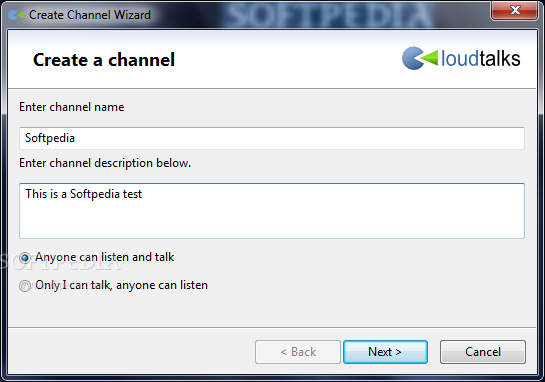
You may mark as read or unread the selected conversation, and delete all of them with a single click. You may create a new channel by providing information about its name and description, as well as allow all users to listen and talk to, or grant permission only for listening. Plus, you are allowed to add or delete contacts, create a group, change the status message, and modify the password.
Loudtalks Lite helps you display notifications while sending and receiving messages, change status to Away when based on a custom idle time (in minutes), allow multiple instances of the program, and assign hotkeys for enabling the speaking and handsfree modes, and repeating the last message.
You can use preset or user-defined audio notifications for signaling a new conversation, incoming message, connection error and other events, set up audio parameters (playback and recording devices, noise suppression mode), and tweak proxy parameters.
To sum things up, Loudtalks Lite comes with a basic suite of features for helping you talk to your friends and colleagues. Thanks to its intuitive layout, it is suitable for rookies and professionals alike. On the downside the utility hasn’t been updated for a while so you may encounter errors on newer operating systems.
Loudtalks Lite 1.9
add to watchlist add to download basket send us an update REPORT- runs on:
-
Windows 7
Windows Vista
Windows XP
Windows 2K - file size:
- 1.5 MB
- filename:
- LoudtalksSetup.exe




- main category:
- Internet
- developer:
- visit homepage
Context Menu Manager

Zoom Client

Bitdefender Antivirus Free

ShareX

calibre

4k Video Downloader

IrfanView

7-Zip

Microsoft Teams

Windows Sandbox Launcher

- 7-Zip
- Microsoft Teams
- Windows Sandbox Launcher
- Context Menu Manager
- Zoom Client
- Bitdefender Antivirus Free
- ShareX
- calibre
- 4k Video Downloader
- IrfanView