Search Perform an advanced search query SOFTPEDIA
 
SOFTPEDIA
Updated one minute ago
HomeSubmit a program for being reviewedAdvertise on our websiteGet help on surfing our websitesSend us your feedbackGet information about our XML/RSS backend and how to use itBrowse the news archiveVisit our discussion forumVizitati forumul in limba romana


Program Finder NormalFreeware onlyShareware only

MSN Messenger 7.5.0324 / 7.0.0820 Report spyware 

Click to download MSN Messenger 7MSN Messenger 7 - Softpedia Pick Award (If you developed this product, click here to download your award)
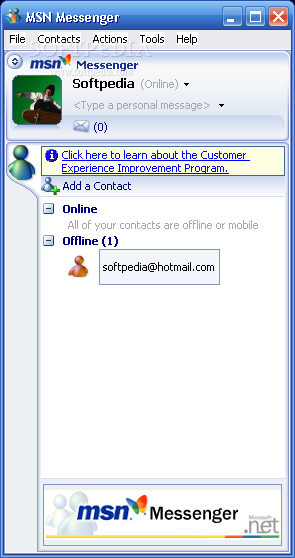
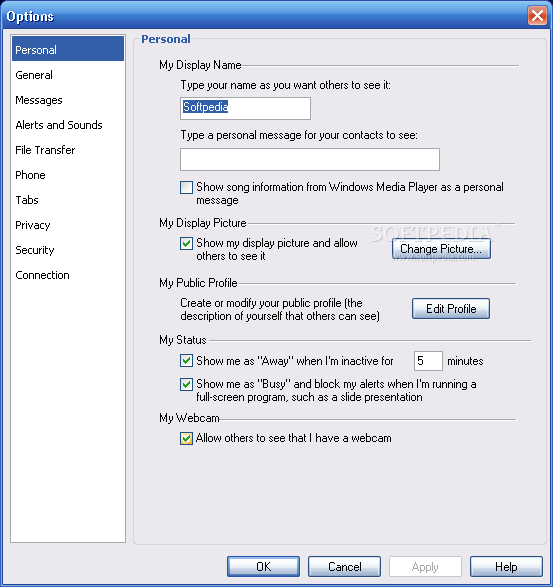
View more MSN Messenger screenshots (3)
 Downloads: 4,386,021
Rating: Very Good (4.2/5) | Rated by: 28612 user(s)
Add to download basket     Send us update information
 Developer: Microsoft Corp. | More programs by this producer
 License: Freeware  
 Size / OS: 8.97 MB, Windows All
 Last Updated: March 9th, 2007, 11:08 GMT
 Category: C: \ Internet \ Chat \ Instant Messaging
 Read user reviews (29) Add a review Refer to friend Subscribe
    Download MSN Messenger 7

MSN Messenger 7 description
Allows you to chat online, in real time, with family, friends and colleagues.

MSN Messenger allows you to chat online, in real time, with family, friends and colleagues. It's faster than e-mail, more discreet than a phone call, and best of all – it's free! MSN Messenger is more than just text, it’s a great way to collaborate with co-workers or touch base with family and friends.

You can even send an instant message to a contact’s mobile phone. Customization features help you personalize your chats and make your connections even more meaningful.

Here are some key features of "MSN Messenger 7":

Stay in touch with friends, family, and coworkers around the world.
· Send instant messages to any of your contacts who are online. Determine at a glance which friends are available to talk.
· Have a conversation with a group of friends. Invite up to 20 friends to participate in the same conversation.
· See the latest information about your contacts. Click your contacts' status icons to see a contact card that displays their current information and, if they choose to provide it, a link to their MSN Spaces site.
· See and hear your contacts. Use the new Video Conversation feature to make communicating with video clearer and sharper than ever. Use full-screen conferencing for enhanced immersion.
· Send and receive text messages with a mobile device. Use your computer to exchange instant messages with many models of mobile devices. You can also send messages to MSN Direct watch.
· Send and receive instant messages with your mobile contacts. Enhanced mobile messaging lets you chat with a mobile contact in the same way that chat with a regular PC contact. This feature varies depending upon your region, your contact's mobile carrier and mobile device.
· Send a voice clip to express yourself personally. Sometimes a message doesn't convey what you really feel. Now you can speak your instant message instead of typing it. Voice clips are small, 15-second voice clips that you send to your contacts.
· Save your conversations. Keep those
important ideas and funny exchanges as long as you want by saving all your MSN Messenger conversations automatically. This feature requires Microsoft Internet Explorer 6.

Make new friends.
· Create your own space on MSN Spaces. Easily share your thoughts, photos, and interests on the Web.
· Create a public profile. Introduce yourself by informing others about your hobbies and interests. You can also take a look at the profiles of other people in your conversation.

Access useful information.
You can rearrange the tabs in the MSN Messenger main window any way you want. Tabs that appear can include:
· The MSNBC tab delivers national and regional news.
· The Expedia tab helps you plan your travel.
· The MSN Shopping tab offers easy online shopping.
· The CNBC and MSN Money tab guides you through money management and investing.
· The MSN Autos tab offers local traffic news and gas prices.
· The MSN Games tab lets you challenge your friends to an online game no matter where they are.

Be creative and have fun!
· Share activities with family and friends. Play games. View photos. Listen to music. Transfer files. Draw pictures.
· Choose a display picture. Select from a variety of display pictures (An image associated with your display name that helps others recognize you. It appears in the main Messenger window, and in all conversation windows. ) or create your own. For an even wider variety, you can also install exclusive and unique dynamic display pictures from our partner sites.
· Express your feelings. Add emoticons (A small image that can be inserted into a message to represent a certain mood or attitude. ) to your messages or create your own. You can install a variety of emoticons from our partner sites.
· Change your personal message. Create your own personal message (A customized message that appears next to the contact name in the MSN Messenger main window.) , and change it as often as you want.
· Share your music titles. Show your contacts what song you are listening to on Microsoft Windows Media Player.
· Personalize your background images. Select a cool background (A color or image that appears as a backdrop in the conversation window, similar to wallpaper.) for your conversation window (The window you use to send and receive instant messages.) or create a background from one of your favorite photos. Use the Share option to show your background image to others and see what image they're using.
· Get Dynamic Backgrounds for animated fun and color. Dynamic Backgrounds add animation and interaction to your conversation window. You can also share your backgrounds with your friends so all of you can be on the same page.

Stay safe.
· Block messages from specific people. Don't tolerate harassment. With the click of a button, you can block a contact from sending messages to you or seeing your status (Indicates at a glance whether a contact is signed in to MSN Messenger and able to receive instant messages. Status appears in parentheses next to the display names.) .
· Block messages from people you don't know. Help protect your privacy by restricting incoming messages from people who are not on your allow list (The list of people who can see when you are online and can contact you. ) .
· Control whom your child talks to. Monitor your child's use of MSN Messenger by using the Parental Controls feature. An online activity report tells you how much time your child spends using MSN Messenger and whom your child talks to.


Requirements:

· Pentium PC with 233MHz processor or faster (500MHz recommended)
· Minimum 64MB of RAM (128MB recommended)
· Up to 50MB of hard disk space needed to install — after install, up to 15MB may be needed
· 256-color VGA or higher resolution graphics card (SVGA recommended)
· Minimum 800x600 screen resolution
· Microsoft® Internet Explorer version 6.0 or later must be installed on your computer, though it does not need to be your default browser


This software product was tested thoroughly and was found to contain some third-party components which prevent it from being marked as 100% CLEAN or 100% FREE. Details follow below.

MSN Toolbar / MSN Search (click here for more information)


Related downloads IT News Popular downloads New additions   Latest reviews  
Trillian Pro 3.1.10.0
Everything you need for instant messaging IF you have money
DKMessenger 4.6.2
An application that offeres users real-time video capabilities
Super Y! 1.0.14
Super Y! centralizes all open Yahoo! Instant Messages, providing quick access to them
TM2008 (Tencent Messenger 2008) Preview 4
Add new contacts to your list, send and recive message, view all offline messages
QuickPopup 4.2
Cross-Platform messaging utility for Local Networks
Yuuguu Beta Build 793
Interact with colleagues and friends as though they were sat right next to you
Omnik 1.1.0.12
With OMNIK you will be able to experience tomorrow's communication today
threeMessenger 1.0
threeMessenger is an instant messaging client/server solution that comes with IM features such as server side audit log, encrypt
Mica 1.21
MICA is a simple straightforward instant message application.
KangunIM 3.0.1
KangunIm is a desktop instant messenger for the Kangun members.

go to top Use the following code to link to this page:


Welcome!
Hello, Guest

Login if you have a Softpedia.com account.

Otherwise, register for one.

Main categories:
  • Antivirus
  • Compression tools
  • CD/DVD Tools
  • Office tools
  • Programming
  • Authoring tools
  • File managers
  • Desktop Enhancements
  • Internet
  • Network Tools
  • IPOD TOOLS
  • Mobile Phone Tools
  • Multimedia
  • Tweak
  • System
  • Security
  • Others
  • Science / CAD
  • UNIX
  • Windows Widgets
  • PORTABLE SOFTWARE

  • Week's best:
  • DAEMON Tools Lite 4....
  • UBCD4WIN 3.2.0
  • Adobe Reader 9.0.0 /...
  • Total Commander Ulti...
  • System Mechanic 8.0....
  • Adobe Acrobat Profes...
  • iPhone PC Suite 1.0....
  • Firefox 3.0 Final / ...
  • Portable Firefox 3.0...
  • MPlayer for Windows ...
  • Vista Codec Package ...
  • Windows Live Messeng...
  • WinBubble 1.73
  • Kaspersky Anti-Virus...
  • Malware Removal Tool...
  • WinRAR 3.80 Beta 2 /...
  • Royale Noir Theme fo...
  • IBM Lotus Symphony 1...
  • Adobe Dreamweaver 10...
  • Adobe Fireworks 10.0...
  • BitDefender Total Se...
  • McAfee Total Protect...
  • Ad-Aware 2008 7.1.0....
  • Adobe Flash Player 1...
  • Intel Chipset Softwa...
  • Uxtheme Multi-patche...
  • SRS Audio Sandbox 1....
  • SP3 UxTheme Patcher ...
  • PECompact 2.87 Beta ...
  • Sony Vegas Movie Stu...
  • Daniusoft Media Conv...
  • © 2001 - 2008 Softpedia. All rights reserved.
    Softpedia™ and Softpedia™ logo are registered trademarks of SoftNews NET SRL.
    Copyright Information | Privacy Policy | Terms of Use | Contact Softpedia | Update your software | Archive