
Easily recover your lost credentials used for your account on some of the most commonly used instant messaging applications out there. #Messenger password #Password recovery #Recover password #Password #Recovery #Messenger

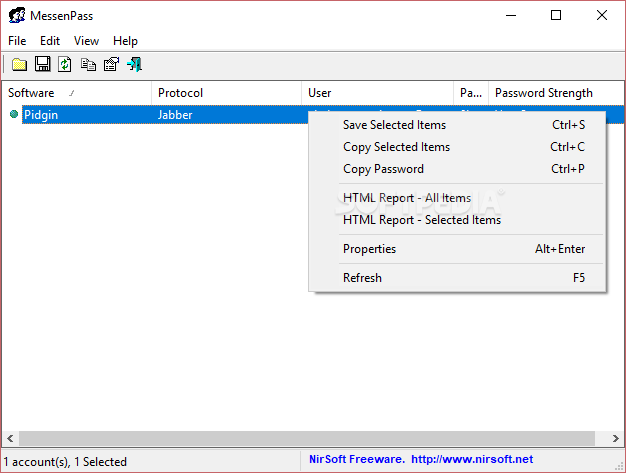
Many of those who love to chat online and use instant messengers usually choose to save the login passwords on their personal computers, although this convenience can put their accounts at risk. If not careful, someone else might take advantage of your account while you're away, or forget the password in the occurrence of an unexpected event.
A tool like MessenPass can prove just how dangerous such a practice could be even if this utility is designed to help you recover the instant messaging password you forgot. The application scans a computer for installed messaging programs and shows them along with the username.
MessenPass comes in a very lightweight package and it doesn't require installation, so it is ready to run right out of the box. The application is compatible with a wide array of software solutions, including Windows Live Messenger, the old MSN Messenger and Yahoo! Messenger as well as Google Talk, Pidgin and Trillian to name a few.
There's one thing that needs to be made perfectly clear though: MessenPass only works if the user has decided to save the username and password inside the application for a faster login. This means you cannot use it to reveal passwords for any other accounts.
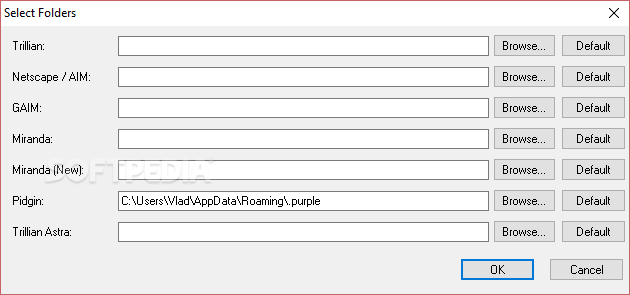
We've tested the app with a couple of the supported instant messengers and it recovered the passwords instantly. MessenPass also comes with a handy function that is designed to help you manually select the installation folders for the chat programs in case you didn't use the default location or if you're using portable versions of those apps.
MessenPass is a great solution if you don't remember your messenger password anymore and since it's delivered as a very light package, it's definitely worth a try if you find yourself in a spot of trouble because of a lost IM passphrase.
Download Hubs
MessenPass is part of these download collections: Password Unlockers
What's new in MessenPass 1.43:
- Removed the command-line options that export the passwords to a file from the official version. A version of this tool with full command-line support will be posted on separated Web page.
MessenPass 1.43
add to watchlist add to download basket send us an update REPORT- PRICE: Free
- runs on:
- Windows All
- file size:
- 70 KB
- main category:
- Internet
- developer:
- visit homepage
calibre

IrfanView

Microsoft Teams

Zoom Client

Windows Sandbox Launcher

ShareX

Bitdefender Antivirus Free

7-Zip

Context Menu Manager

4k Video Downloader

- 7-Zip
- Context Menu Manager
- 4k Video Downloader
- calibre
- IrfanView
- Microsoft Teams
- Zoom Client
- Windows Sandbox Launcher
- ShareX
- Bitdefender Antivirus Free