
Easy to use and convenient WinPopup replacement #Intranet messenger #Instant text messenger #Instant chat #Instant text #Messenger #Intranet
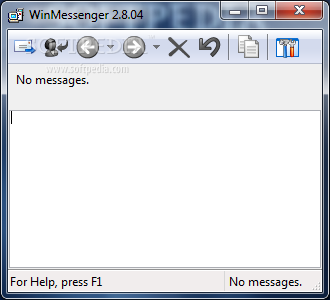
WinMessenger is a simple application built in order to replace the Windows Messenger Service, that allows you to send messages from one computer to another via the “net send” command.
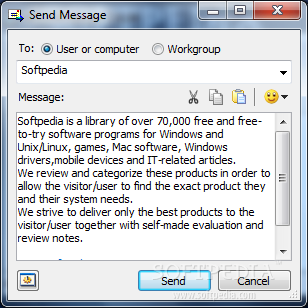
The program comes with a light and straightforward interface that basically lets you write the messages you want to send and reply to the messages you receive.
WinMessenger is an easy-to-use software that lets you communicate in real-time without the need for dedicated servers and is designed to work over any network protocol immediately after installation.
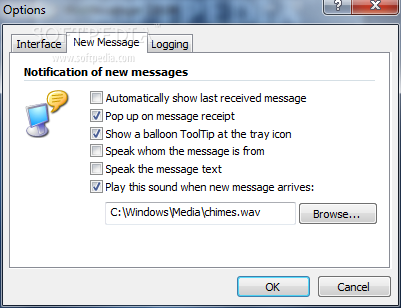
The app is stays in the system tray and displays a notification each time a new message is received. A simple mouse click allows you to read the message.
A message can be easily sent to a user, computer or workgroup. Messages can be also be sent to multiple users simultaneously, all you have to do is separate the names with a semicolon or keep the CTRL key pressed when you want to select a contact from the drop-down list.
Emoticons are also supported, and if you don't want to select them from the dedicated menu, you can just type their code from the keyboard.
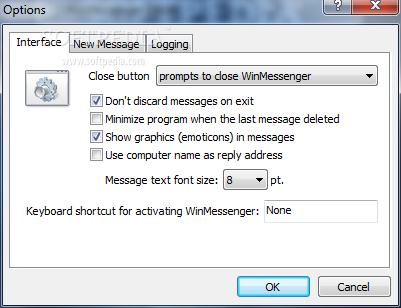
It is very easy to delete messages, however, you can use the restore function to recover the previously deleted message, in case the last message was removed by accident.
More than that, your messages don't even have to be read, as the application allows the user to listen to the received text. For this to be possible the “Speak the text massage” function has to be activated from the Options menu. The name of the sender can also be heard if the “Speak whom the message is from” option is active.
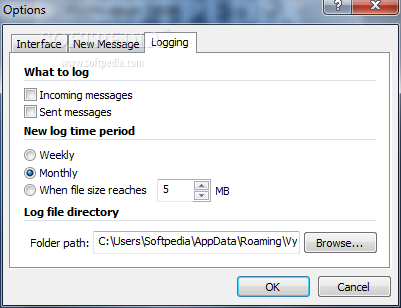
The ability to log messages, whether they are received or sent, is also included. Furthermore, the program can create new log time periods every week, month or when the log file reaches a certain size.
WinMessenger is an accessible software that can help you quickly send messages to your friends, all you have to do is start typing.
What's new in WinMessenger 2.8:
- The program has been divided in two parts service and client that work in separated processes and communicates using COM mechanism. Client and server can be run on different machines. One server can work with many clients and can listen up to 254 NetBIOS Names.
- Received messages can be read by computer immediately after receiving (text to speech feature is used) so it isn't necessary to get in touch with a PC to read a message.
- This version provides a COM server that is accessible from any other .NET applications, JavaScripts and VBScripts. Following examples help developers to add NetBIOS messages functionality to their applications and web pages. It also allows creating .NET, JavaScript, and any other COM supported applications that can send and receive messages from WinMessenger.
- Windows Forms application that uses the WinMessenger service to send and receive messages. Download example
WinMessenger 2.8.05
add to watchlist add to download basket send us an update REPORT- runs on:
- Windows All
- file size:
- 1.2 MB
- filename:
- WinMessenger2804.msi
- main category:
- Internet
- developer:
- visit homepage
Bitdefender Antivirus Free

calibre

ShareX

Context Menu Manager

Zoom Client

4k Video Downloader

Microsoft Teams

Windows Sandbox Launcher

IrfanView

7-Zip

- Windows Sandbox Launcher
- IrfanView
- 7-Zip
- Bitdefender Antivirus Free
- calibre
- ShareX
- Context Menu Manager
- Zoom Client
- 4k Video Downloader
- Microsoft Teams