Search Perform an advanced search query SOFTPEDIA
 
SOFTPEDIA
Updated one minute ago
HomeSubmit a program for being reviewedAdvertise on our websiteGet help on surfing our websitesSend us your feedbackGet information about our XML/RSS backend and how to use itBrowse the news archiveVisit our discussion forumVizitati forumul in limba romana


Program Finder NormalFreeware onlyShareware only

Outlook Connector for MDaemon 2.1.5 Report spyware 

Click to download Outlook Connector for MDaemon
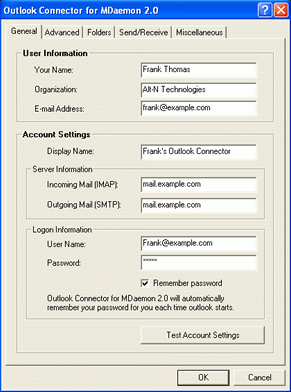
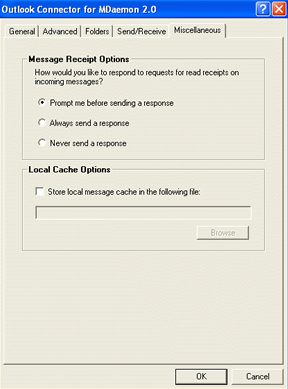
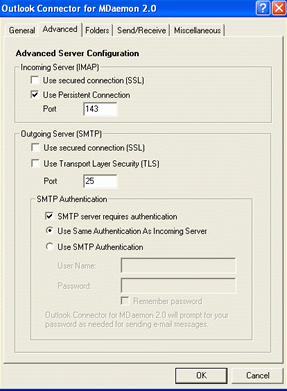
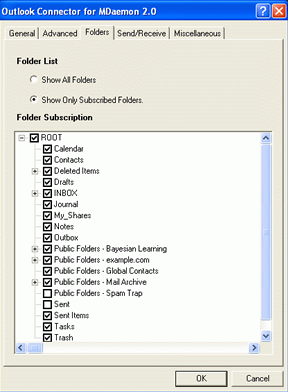
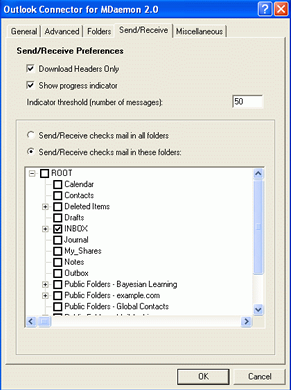
View more Outlook Connector for MDaemon screenshots (3)
 Downloads: 1,641
Rating: Good (3.7/5) | Rated by: 16 user(s)
Add to download basket     Send us update information
 Developer: Alt-N Technologies, Ltd. | More programs by this producer
 License: Demo , 120 $ to buy 
 Size / OS: 2.75 MB, Windows All
 Last Updated: July 28th, 2007, 03:31 GMT
 Category: C: \ Internet \ E-mail \ Mail Utilities
 Read user reviews (0) Add a review Refer to friend Subscribe
    Download Outlook Connector for MDaemon

Outlook Connector for MDaemon description
Share Outlook calendar, contacts, and more without the expense of MS Exchange!

Outlook Connector for MDaemon will unlock the collaborative functions of Microsoft Outlook using MDaemon as the mail server platform.

Outlook users can share Calendar, Tasks, Contacts, Notes, and Journal folders without the expense or expertise required by Microsoft Exchange Server.

Here are some key features of "Outlook Connector for MDaemon":


Groupware Collaboration Support

Groupware Functions Integration
· Outlook Connector links the content sharing functions of Outlook to the groupware functions built into MDaemon.
· This plug-in enables Outlook users to share their calendars, messages, contacts, tasks, notes, and other items using MDaemon as the email server platform.

Real time synchronization
· Additions or changes made in Outlook are synchronized in real-time on the server.
· No user synchronization is required.

Designed for Small and Mid-Sized Businesses

Easy on Budgets
· Outlook Connector and the groupware functions of MDaemon make the benefits of Outlook sharing economical for small and mid-size businesses.
· Outlook Connector is designed to be installed and configured without requiring an extensive IT background or expensive certifications. At the same time, it has fine tuning options making it popular with IT professionals.

Runs on Current and Legacy Systems
· Both Outlook Connector and MDaemon run on either legacy or current hardware and operating systems.
· There is no need to upgrade to costly hardware and operating systems to enjoy the benefits of group sharing.

Versatile Uses
· Many types of small and large businesses can benefit from Outlook Connector.
· Business types include manufacturers and service enterprises, law offices, insurance companies, hospitals and doctor offices, charities and non-profit organizations, schools and school districts, financial planners, government agencies, technology companies.

Flexible Licensing
· The Outlook Connector license is separate from the MDaemon license and may be a different
size.
· You can purchase an Outlook Connector license for the number of users who actually use Outlook Connector. It is not required for the MDaemon and the Outlook Connector license sizes to match.

Sharing Flexibility

Sharing by Degrees
· Options for sharing vary from only showing the availability of the information to allowing complete control to add, change and delete.

Outlook and Web Mail Access
· Outlook Connector uses the same shared information available through MDaemon’s built-in web mail, WorldClient.
· You can view your shared information via WorldClient or Outlook.

Apply Sharing Permissions to Subfolders
· When setting up sharing permissions, you can apply the permissions to the current folder and, optionally, all of its subfolders.

Integration with Outlook Features

Grouping Support
· Grouping support allows you to organize mail different ways within Outlook. Outlook Connector provides support for this popular capability.

Delivery Confirmation
· Outlook Connector supports Outlook’s delivery confirmation function.

“Send immediately...” Support
· Outlook Connector supports the “Send Immediately” function of Outlook.

Mailbox Convenience
· All incoming messages go to the Outlook Inbox.

Mail Folder Support
· Mail folders can be shared without needing to use an Outlook IMAP account. Users have only one Inbox, and sent messages are saved to their IMAP Sent Items folder.

Performance

Fast Message Transfer
· Moving messages among folders is fast.

Modest System Requirements
· Outlook Connector requires few system resources on the computers running MDaemon and Outlook.

Local Cache Storage
· Outlook Connector has an easy way to select a location for the local cache storage if you need to move it from the default.

Stability
· Outlook Connector uses MAPI service provider technology, which is Microsoft Outlook’s native technology.
· Outlook Connector replaces the troublesome PST files with fast and reliable local data storage.

Open Protocols
· Outlook Connector uses industry standard SMTP and IMAP protocols to facilitate cost-effective, open and secure communications.
· Outlook Connector uses the standards-compliant MDaemon for its groupware functionality.

Administration

Easy Installation
· Outlook Connector is easy to install and set up on both MDaemon and Outlook.

Easy Maintenance
· Enable sharing by server or domain.
· Add users individually or in bulk.
· Automatically add Outlook users on first use.
· Keep contact lists up to date.

Grows with Your Needs
· The default settings of Outlook Connector create an easy entry point for beginners.
· Detailed configuration options provide fine-tuning controls for experienced users and IT professionals.

User Experience

Easy Sharing
· Through Outlook, each account holder assigns content sharing options to other users.

Easy Client Functions
· Share selected folders. Set up sharing options by user.

Folder Ownership Display
· In Outlook 2003 and later, Outlook Connector displays the name of folder owners adjacent to the folder name

Multilingual Support
· Outlook Connector is localized in multiple languages. When using system-level folders —such as Drafts, Calendar, and Contacts—Outlook Connector users see these folders names in their selected language,
· Administrators of MDaemon see the names in English.

“Out of Office” Editor
· MDaemon has a function for setting up server-side auto-responder messages for individual accounts. Outlook Connector extends access to this function to Outlook.
· You can use this function for setting up “out of office” messages, for example.


Requirements:

· MDaemon 8.0 mail server
· Outlook 2000 or newer


Limitations:

· 30-day trial


Related downloads IT News Popular downloads New additions   Latest reviews  
Microsoft Office Outlook Connector 12.1 Beta
Outlook Connector Beta lets you use Outlook 2007/2003 to manage and access your Windows Live Hotmail or Office Live Mail account
GroupCalendar 1.6.85
GroupCalendar - Share your outlook calendar with others with or without exchange server
Java Outlook Connector 2.0.3
Java Outlook Connector is a Java library for the MS Outlook application
Enlista 1.0
Share and synchronize calendars, files, notes and contacts easily and securely with other users over the Internet.
OfficePax 1.9
OfficePax is a software suite that helps small and mid-sized businesses increase productivity
Calgoo Hub Plugin 2.0.0 Beta 228
Lets you easily share your calendars with friends.
AvailiTime 2.1
AvailiTime is the solution for sharing your availability with your clients, contacts, and business associates over the internet
SynchroThink 1.3.2
SynchroThink is a calendar sharing program designed to be easy to use and flexible.
CodeTwo Public Folders 4.1.0
Share your Outlook calendars, contacts, emails and tasks with others on the net.
TimeBridge Connector 1.4.168.10737
Personal Scheduling Manager designed to help busy people find a time to meet - fast

go to top Use the following code to link to this page:


Welcome!
Hello, Guest

Login if you have a Softpedia.com account.

Otherwise, register for one.

Main categories:
  • Antivirus
  • Compression tools
  • CD/DVD Tools
  • Office tools
  • Programming
  • Authoring tools
  • File managers
  • Desktop Enhancements
  • Internet
  • Network Tools
  • IPOD TOOLS
  • Mobile Phone Tools
  • Multimedia
  • Tweak
  • System
  • Security
  • Others
  • Science / CAD
  • UNIX
  • Windows Widgets
  • PORTABLE SOFTWARE

  • Week's best:
  • Adobe Media Player 1...
  • Registry Mechanic 8....
  • BitSpirit 3.3.2.263
  • AnyDVD 6.4.5.6
  • Firefox 3.0.1 / 2.0....
  • AutoCAD 2009
  • Norton AntiVirus 200...
  • Norton Internet Secu...
  • The Bat! Professiona...
  • WinRAR 3.80 Beta 3 /...
  • GMail Drive shell ex...
  • DAEMON Tools Lite 4....
  • UBCD4WIN 3.2.0
  • Adobe Reader 9.0.0 /...
  • Total Commander Ulti...
  • System Mechanic 8.0....
  • Adobe Acrobat Profes...
  • iPhone PC Suite 1.0....
  • Portable Firefox 3.0...
  • MPlayer for Windows ...
  • Vista Codec Package ...
  • Windows Live Messeng...
  • WinBubble 1.73
  • Kaspersky Anti-Virus...
  • Malware Removal Tool...
  • Royale Noir Theme fo...
  • IBM Lotus Symphony 1...
  • Adobe Dreamweaver 10...
  • Adobe Fireworks 10.0...
  • BitDefender Total Se...
  • © 2001 - 2008 Softpedia. All rights reserved.
    Softpedia™ and Softpedia™ logo are registered trademarks of SoftNews NET SRL.
    Copyright Information | Privacy Policy | Terms of Use | Contact Softpedia | Update your software | Archive