WINDOWS CATEGORIES:


NEWS ARCHIVE >>
SOFTPEDIA REVIEWS >>

WEEKLY HIGHLIGHTS

DVD Cloner45
Spyware Doctor40
1Click DVD Copy40
Apollo DVD Copy40
ABC Amber BlackBer...45
Protected Music Co...40

7-DAY TOP DOWNLOAD

#
Program
Avira AntiVir
Personal - Free
Antivirus 9.0.0.415

171,959
Windows Live
Messenger 2009
14.0.8089.726

161,417
Avira Antivir Virus
Definition File
Update November 19,
2009

143,181
FreeZ Online TV 1.31
126,591
Nexus Radio 4.2
115,026
Microsoft Office
2010 14.0.4536.1000
Beta / 2007

72,900
Y! Multi Messenger
8.x and 9.x

71,583
Windows Live
Messenger
8.5.1302.1018

57,192
RemoveWGA 1.2
47,036
AVG Free Edition 9.0
Build 707a1765

46,047

WEEK'S BEST

  • Faststone Image Vi...
  • Vuze (formerly Azu...
  • Softpedia Wallpape...
  • Softpedia Wallpape...
  • Softpedia Wallpape...
  • RSSOwl 2.0 Final
  • Internet Explorer ...
  • Online Armor ++ 4....
  • cFosSpeed 5.01 Bui...
  • SONY Vegas Pro 9.0...
  • Firefox 3.6 Beta 3...
  • Nokia Photos 1.6.434
  • Windows Server 200...
  • Skype Portable 4.1...
  • Google Chrome Port...
  • PCMark Vantage Bas...
  • Kaspersky Anti-Vir...
  • Microsoft Virtual ...
  • Messenger Plus! Li...
  • WinX DVD Author [F...
  • SoftPerfect Networ...
  • System Mechanic Pr...
  • Ad Muncher 4.8 Bui...
  • Windows 7 Upgrade ...
  • Pidgin 2.6.3
  • OpenOffice.org 3.2...
  • VirtualDub 1.9.7 B...
  • Maxthon [Softpedia...
  • Spyware Doctor 7.0...
  • SUPERAntiSpyware 4...
  • Home / Windows / Internet / File Sharing
     Report spyware

    Hamachi 2.0.1.66

    Download button

    Downloads: 247,020  Add to download basket  Tell us about an update
    User Rating:
    Rated by:
    Very Good (4.4/5)
    472 user(s)
    Developer:

    License / Price:

    Size / OS:

    Last Updated:

    Category:
    LogMeIn Inc | More programs
    Freeware / FREE
    3.1 MB / Windows 2K / XP / Vista
    November 4th, 2009, 10:48 GMT
    C: \ Internet \ File Sharing

     Read user reviews (0)  Add a review  Refer to a friend  Subscribe


    Hamachi description


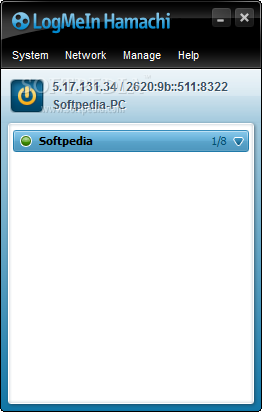
    A networking technology enabling any two computers on the Internet to talk directly to each other

    Hamachi will allow you to establish secure direct connections to PCs that are not accessible otherwise due to the restrictions in network setup.

    For example, if your home computer is connected to the Internet via Connection Sharing or Broadband Router, you will not generally be able to access it, say, from your office.

    By installing Hamachi on both computers and clicking a couple of buttons you can connect them instantly and securely. Now you can browse file shares, run remote desktop or even host a multiplayer game on one computer and join in from another. Just as if they were connected with a physical wire.

    Hamachi is a networking technology enabling any two computers on the Internet to talk directly to each other regardless of the presence of firewalls or address translation devices on the route between them.

    Most interestingly, Hamachi enables peer-to-peer communications between two computers residing behind two different connection sharing devices. In geek language - it allows for bidirectional NAT traversal.

    Peer to peer connectivity becomes possible with the help of Hamachi servers that mediate the establishment of an initial contact between peers.

    Once peers connect the traffic starts to flow directly between them. This not only ensures that data travels the best route possible, but it also minimizes latency (ping time) and maximizes transfer speeds.

    Hamachi is secure. All Hamachi communications are encrypted and authenticated using industry-standard algorithms and protocols. Nobody will be able to see what two Hamachi peers are talking about.

    However what is more important - Hamachi security architecture is completely open meaning that its detailed description is available for review to anyone interested.

    NOTE: Free for non-commercial use only. Commercial use is subject to an annual subscription fee, which allows you to network up to 256 computers, and offers fast relay.

    Here are some key features of "Hamachi":

    Network Limits:
    · Network Capacity: Create or join up to 256 Hamachi networks.
    · User Capacity: Each Hamachi network can have up to 50 concurrent users.

    Chat:
    · Peer to Peer Chat: Exchange chat messages with both on and off-line Hamachi peers.
    · Group Chat: Chat with all online network members at once in a single chat window.

    Network Protection:
    · Password Protection: Require anyone attempting to join your network to present a valid network password.
    · Network Lock: Lock your Hamachi networks to prevent any new members from joining. This preserves all other access control settings.
    · Membership Approval: Prevent new members from having full access to your network until manually approved by you or an administrator.

    Network Administration:
    · Member Eviction: Evict an existing member from your Hamachi network. This revokes their membership, but does not prevent them from re-joining the network.
    · Member Ban: Create a list of Hamachi clients (Hamachi IP addresses) that cannot join your networks under any condition.
    · Create Administrators: Assign one or more network members to be network administrators, and designate their specific capabilities.
    · Network Messages: Set a welcome or announcement messages for each network you own.

    Extended Connectivity:
    · Low-Bandwidth Relays: Use relays to connect Hamachi clients that cannot, for any reason, establish a direct communication channel. We believe the chances of requiring a relay when using Hamachi is about 5%.

    Advanced Features:
    · Routed tunneling: In addition to handling traffic between Hamachi clients, Hamachi can be set up to allow remote access to LAN computers that do not or cannot run the Hamachi client.
    · Built-in Web Proxy: Peers in your Hamachi networks may configure their Web browsers to access the Internet via your computer and therefore protect their Web traffic. This feature is typically used for securing Web surfing from untrusted locations including cybercafes, coffee houses, hotels, etc.
    · Run as a Windows System Service: Run the Hamachi client as a system service. This is typically needed when running Hamachi on servers or in setups involving Windows domain authentication.

    Limitations:

    · Limited to 16 computers per network

       Softpedia guarantees that Hamachi 2.0.1.66 is 100% CLEAN, which means it does not contain any form of malware, including spyware, viruses, trojans and backdoors. [read more >]


    TAGS:

    peer to peer | p2p communication | secure connection | p2p | connection | NAT


    HTML code for linking to this page:


    Go to top

    Windows tabGames tabDrivers tabMac tabLinux tabScripts tabMobile tabHandheld tabGadgets tabNews tab

    SUBMIT PROGRAM   |   ADVERTISE   |   GET HELP   |   SEND US FEEDBACK   |   RSS FEEDS   |   ENTER NEWS SITE   |   ENGLISH BOARD   |   ROMANIAN FORUM