
An intuitive and user-friendly application that allows you to combine two or more Internet connections in order to boost your bandwidth. #Boost Internet connection #Increase connection speed #Increase bandwidth #Connection #Speed #Bandwidth
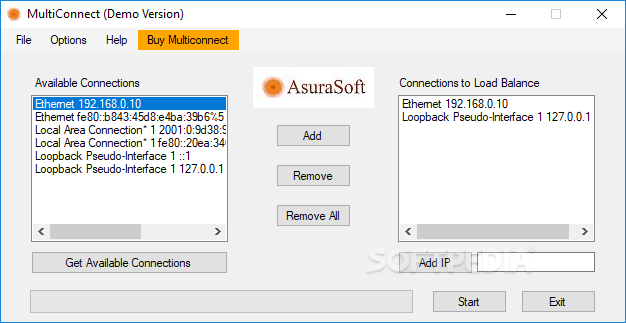
MultiConnect serves to join two or more Internet connections in order to generate a richer bandwidth, spearing you the costs that hardware able to accomplish such purposes would impose.
MultiConnect benefits scenarios where you need to download multiple files at the same time, especially torrents with multiple seeds, allowing you to enjoy increased bandwidth which results in better download speeds.
The best way to test the software is by comparing bandwidth measurements between a single Internet connection and the combination that MultiConnect arranges for. In most cases, you’ll notice that better results are achieved through it, all modesty aside.
The application deploys in under a minute, allowing you to get acquainted with its interface as soon as installation is completed. The simple GUI design is a mark of its ease of use and accessibility, making it fit for beginners and professionals alike.
In order to retrieve all the available connections, you must use the dedicated button, at which point you’ll be presented with a list that you can selectively export to the section where they’ll be combined.
There’s also an option to add one or more IP addresses manually to the list, useful for prioritizing the order of the connections. Once you’ve created the scenario, you can press the ‘Start’ button in order to begin the merging process.
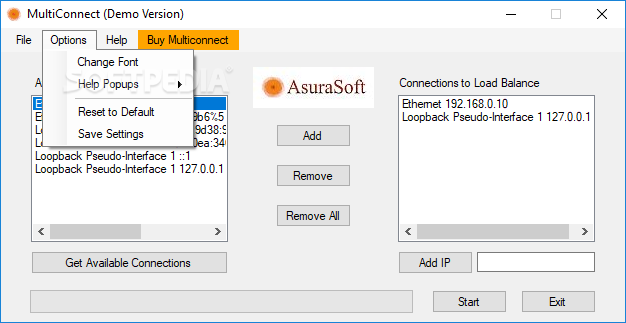
In order to restore your old settings, use the ‘Reset to Default’ feature located in the Options menu.
Overall, MultiConnect makes a good impression, despite having such a simple design. It compensates heavily through the ability to boost your bandwidth at the cost of a couple of clicks.
MultiConnect 1.0
add to watchlist add to download basket send us an update REPORT- runs on:
- Windows All
- file size:
- 1.3 MB
- filename:
- multiconnectdemosetup.exe
- main category:
- Internet
- developer:
- visit homepage
Context Menu Manager

calibre

Microsoft Teams

4k Video Downloader

ShareX

Bitdefender Antivirus Free

Windows Sandbox Launcher

7-Zip

IrfanView

Zoom Client

- 7-Zip
- IrfanView
- Zoom Client
- Context Menu Manager
- calibre
- Microsoft Teams
- 4k Video Downloader
- ShareX
- Bitdefender Antivirus Free
- Windows Sandbox Launcher