
Easy-to-configure utility that automatically reconnects an Internet connection in case of disconnection and features a built-in timer for scheduling tasks. #Reconnect internet connection #Log connection details #Automatically reconnect #Automatically #Reconnect #Disconnect


ReConnect is a small Windows software solution that lends a hand to all those browsing the web with an unstable connection, offering simple tools to automatically reconnect in case of disconnection.
It may sound like a basic application and more or less it is one, but the configuration options it sports make it a must have utility for all dial-up users.
The main window for example only shows a simple log screen with three dedicated buttons at the bottom, to connect or disconnect and to access the settings screen.
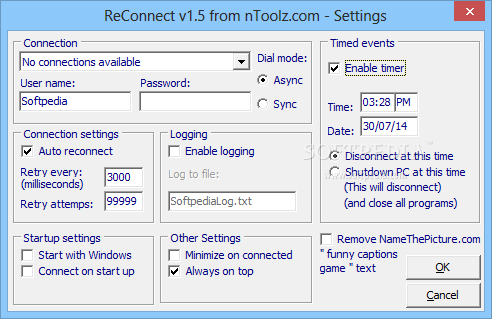
The configuration options we were talking about allow you to pick the connection you wish to control, choose the dial mode, which can be either async or sync, input the username and password and enable logging.
You are prompted to enable auto reconnect and define the interval to retry connection and the number of retry attempts.
Another good thing about the application is the fact that it comes with a built-in timer that enables you to disconnect at any user-defined time or even shutdown the computer automatically.
Also featuring a dedicated option to start the app with Windows, ReConnect runs on low computer resources and works flawlessly on all Windows versions. It doesn't need administrator privileges to run on Windows 7.
Overall, ReConnect does its job very well and even if it may seem a very simple tool at the first glance, it sports a great amount of configuration options. It places an icon in the Windows System Tray and doesn't even bother you when trying to reconnect to the Internet.
What's new in ReConnect 1.5:
- On Windows startup, ReConnect will minimize to the system tray when connected, rather than the taskbar.
ReConnect 1.5
add to watchlist add to download basket send us an update REPORT- runs on:
- Windows All
- file size:
- 210 KB
- filename:
- ReConnect.zip
- main category:
- Internet
- developer:
IrfanView

Zoom Client

calibre

Bitdefender Antivirus Free

ShareX

Context Menu Manager

Windows Sandbox Launcher

Microsoft Teams

4k Video Downloader

7-Zip

- Microsoft Teams
- 4k Video Downloader
- 7-Zip
- IrfanView
- Zoom Client
- calibre
- Bitdefender Antivirus Free
- ShareX
- Context Menu Manager
- Windows Sandbox Launcher