
Convert MDB (Microsoft Access) databases to MS SQL or vice versa, and select and rename the database objects that you want to convert, namely tables, fields, indexes, and foreign keys #Access to MSSQL #Convert database #Database converter #Converter #Convert #Access

DBConvert for Access & MSSQL is a software application whose purpose is to help you convert MDB (Microsoft Access) databases to MS SQL or vice versa. You can make a partial selection of the database objects (tables, fields, indexes, foreign keys) that you want to convert and rename them before activating the conversion task.
The utility employs a wizard-like assistant that allows you to configure the dedicated parameters using a step-by-step approach. A help manual is included in the package in case you want to find out more about the tool’s features.
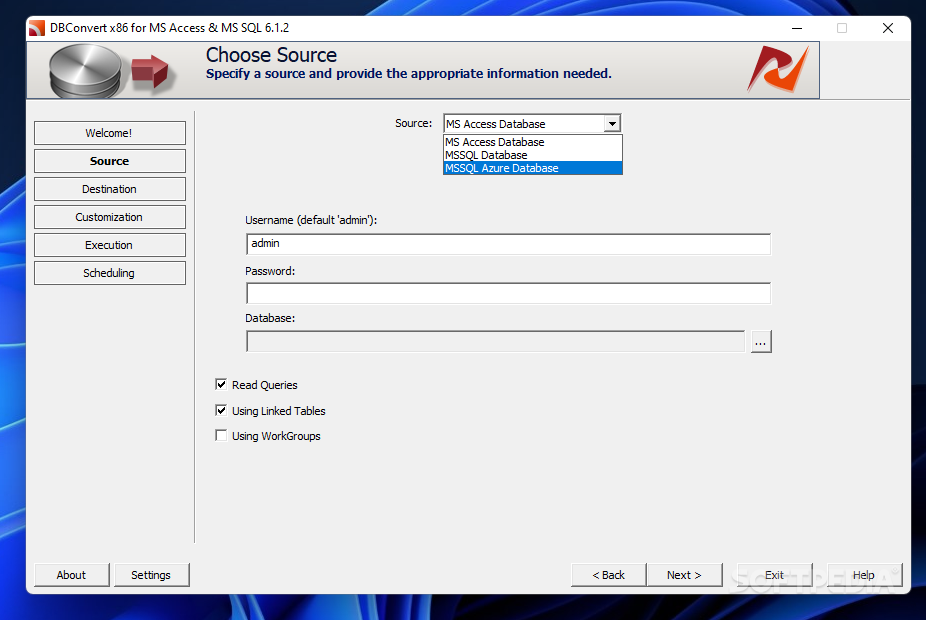
DBConvert for Access & MSSQL offers you the option to select the source database type for conversion. If you opt for MS Access database file (MDB) or MS Access WorkGroups, you need to provide the username and password.
When you select the MS SQL database as a source, you can specify the host, port number, username and password. You can connect to the SQL server through a Microsoft Windows user account and test the connection to identify possible errors.
The same configuration parameters can be configured when it comes to setting up the output destination. You are given the freedom to schedule tasks, save sessions so you can restore them later, and export data to a MS SQL Dump for saving info to MS SQL database.
DBConvert for Access & MSSQL lets you overwrite the existing database, copy or modify the database structure to the destination database, manage fields, indexes and foreign keys by renaming or excluding them, as well as check out all queries contained in a table.
All things considered, DBConvert for Access & MSSQL delivers a straightforward approach for helping you perform database conversion tasks.
DBConvert for Access & MSSQL 6.1.6
add to watchlist add to download basket send us an update REPORT- runs on:
-
Windows 11
Windows 10 32/64 bit
Windows 8 32/64 bit
Windows 7 32/64 bit
Windows Vista 32/64 bit
Windows XP 32/64 bit
Windows 2K - file size:
- 45.2 MB
- filename:
- dbconvert_access_mssql.zip
- main category:
- Internet
- developer:
- visit homepage
7-Zip

Windows Sandbox Launcher

Zoom Client

calibre

ShareX

IrfanView

Microsoft Teams

Context Menu Manager

Bitdefender Antivirus Free

4k Video Downloader

- Context Menu Manager
- Bitdefender Antivirus Free
- 4k Video Downloader
- 7-Zip
- Windows Sandbox Launcher
- Zoom Client
- calibre
- ShareX
- IrfanView
- Microsoft Teams
