
GuildFTPd is a very good free FTP server with all the necessary features. #Free ftp server #Ftp server #Ftp connection #Ftp #Server #Daemon


GuildFTPd is a full-featured FTP server that comprises a great amount of features and plenty of configuration options.
Although a FTP server isn’t quite the kind of app aimed at rookies, GuildFTPd is supposed to be very easy to use and this can be quickly noticed in the design of the main window.
The program groups most of the tools and information it provides right in this window, thus allowing users to access its features with just a few clicks.
For example, it shows current connections, a connection graph for more statistics and past connections within a tabbed layout, while downloads, uploads and messages are displayed in a separate panel.
Of course, GuildFTPd allows users to set up multiple user accounts with different permissions, but more options concerning the server are displayed right in the main window we were talking about earlier.
You can thus configure the maximum number of connections, inactivity timeout, port, permission flags, account time limit and browsing timeout with just a single click, which can only be good news for those who don’t want to spend too much time setting up the program.
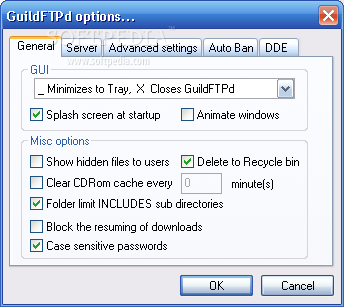
The “Options” screen doesn’t comprise so advanced settings, but it still lets you configure FTP server name and admin email, log file directory, server priority, auto-ban and passive mode.
GuildFTPd remains friendly with hardware resources most of the times, but things change a little bit as the number of connected clients is increased.
Overall however, GuildFTPd is one of the most user-friendly FTP servers on the market, providing intuitive options and a very detailed help manual to make sure users figure out which feature is which.
GuildFTPd 0.999.14
 Softpedia Editor's Pick
add to watchlist
add to download basket
send us an update
REPORT
Softpedia Editor's Pick
add to watchlist
add to download basket
send us an update
REPORT
- runs on:
- Windows All
- file size:
- 1.8 MB
- filename:
- GuildFTPd_0.999.14.exe

- main category:
- Internet
- developer:
- visit homepage
ShareX

Microsoft Teams

Context Menu Manager

calibre

Windows Sandbox Launcher

4k Video Downloader

Bitdefender Antivirus Free

7-Zip

Zoom Client

IrfanView

- 7-Zip
- Zoom Client
- IrfanView
- ShareX
- Microsoft Teams
- Context Menu Manager
- calibre
- Windows Sandbox Launcher
- 4k Video Downloader
- Bitdefender Antivirus Free