
A practical and reliable software solution that features a centralized log server and rich log viewer both carefully crafted for developers and system integrators. #Centralize data #Log data manager #Filter log data #Log data #Integrate #Integration
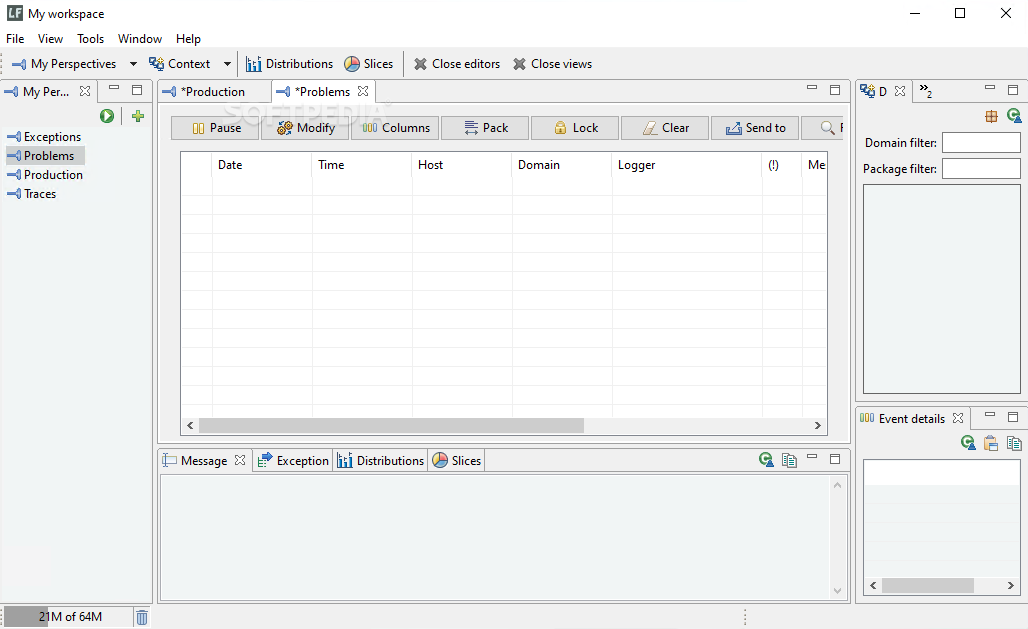
logFACES Enterprise Logging Suite is designed as a comprehensive tool that can offer you the means to create and manage a log server.
The application consists of the Server and the Client components, both suitable for a large array of users, including developers, system integrators, software testers or field-support engineers.
The Server component is designed for harnessing large amounts of log data from various sources, such as apps or hosts. The Client can help you process and present the log data in real time or it historical/analytical form.
The utility can help you create a logging interface for your server and thus easily manage the aggregated data.
The program allows you to configure a centralized logging system and control any information transfer.
You can even deploy the logging system for multiple types of applications and dispatch the log data to the desired platform.
For example, if you use a variation of the Syslog utility, logFACES Enterprise Logging Suite can help you easily integrate it into the desired application.
It supports plain TCP and UDP sockets and can retrieve logs from several hosts or programs created in J2EE, C++ or .NET environments. Apache log4j (or other variations) API appenders and Syslog RFC5424/RFC3164 sources are supported.
It can process a multitude of log statements per second, based on the system properties and the amounts of data.
Moreover, it can help you store information, with the help of the built-in database tool, which also facilitates quick logging.
The program is compatible with MongoDB, Oracle, Microsoft SQL Server, MySQL, DB2, Derby and PostgreSQL.
By integrating logFACES Enterprise Logging Suite with external databases, you may use it as a bottleneck and filter for the large volume of information.
The log information emitted by the applications is sent to the logFACES Server by the background thread and queued for processing in the Client.
Limitations in the unregistered version
- 10-day trial
What's new in logFACES Enterprise Logging Suite 5.2.3:
- Bug:
- Server, fixed race condition listing repository hosts when SQL databases used
- Server, split tigger notifications didn't respect time span and frequency parameters
- Server, unhandled NPE during log event serialization
logFACES Enterprise Logging Suite 5.2.3
add to watchlist add to download basket send us an update REPORT- runs on:
-
Windows 11
Windows 10 32/64 bit - file size:
- 103 MB
- filename:
- lfc.5.2.3.windows.win32.x86_64.exe

- main category:
- Programming
- developer:
- visit homepage
Zoom Client

ShareX

4k Video Downloader

7-Zip

Context Menu Manager

calibre

IrfanView

Bitdefender Antivirus Free

Windows Sandbox Launcher

Microsoft Teams

- Bitdefender Antivirus Free
- Windows Sandbox Launcher
- Microsoft Teams
- Zoom Client
- ShareX
- 4k Video Downloader
- 7-Zip
- Context Menu Manager
- calibre
- IrfanView