WINDOWS CATEGORIES:


NEWS ARCHIVE >>
SOFTPEDIA REVIEWS >>

WEEKLY HIGHLIGHTS

DVD Cloner45
Spyware Doctor40
1Click DVD Copy40
Apollo DVD Copy40
ABC Amber BlackBer...45
Protected Music Co...40

7-DAY TOP DOWNLOAD

#
Program
Avira AntiVir
Personal - Free
Antivirus 9.0.0.415

172,574
Windows Live
Messenger 2009
14.0.8089.726

144,415
Avira Antivir Virus
Definition File
Update November 30,
2009

130,339
Nexus Radio 4.2.2
125,058
FreeZ Online TV 1.30
94,763
Y! Multi Messenger
8.x and 9.x

75,235
Microsoft Office
2010 14.0.4536.1000
Beta / 2007

72,824
Windows Live
Messenger
8.5.1302.1018

51,138
DVD Shrink 3.2.0.15
50,317
AVG Free Edition 9.0
Build 707a1765

46,760

WEEK'S BEST

  • VirtualBox 3.1.0 r...
  • SiSoftware Sandra ...
  • Kaspersky Virus Re...
  • Faststone Image Vi...
  • Vuze (formerly Azu...
  • Softpedia Wallpape...
  • Softpedia Wallpape...
  • Softpedia Wallpape...
  • RSSOwl 2.0.1
  • Internet Explorer ...
  • Online Armor ++ 4....
  • cFosSpeed 5.01 Bui...
  • SONY Vegas Pro 9.0...
  • Firefox 3.6 Beta 4...
  • Nokia Photos 1.6.434
  • Windows Server 200...
  • Skype Portable 4.1...
  • Google Chrome Port...
  • PCMark Vantage Bas...
  • Kaspersky Anti-Vir...
  • Microsoft Virtual ...
  • Messenger Plus! Li...
  • WinX DVD Author [F...
  • SoftPerfect Networ...
  • System Mechanic Pr...
  • Ad Muncher 4.81 Bu...
  • Windows 7 Upgrade ...
  • Pidgin 2.6.4
  • OpenOffice.org Dev...
  • VirtualDub 1.9.7 B...
  • Home > Windows > Internet > Telephony / SMS & GSM
     Report spyware

    Easy Sync 2.8.8

    Download button

    Downloads: 3,841  Add to download basket  Tell us about an update
    User Rating:
    Rated by:
    Fair (2.9/5)
    39 user(s)
    Developer:

    License / Price:

    Size / OS:

    Last Updated:

    Category:
    Pocket Wizards | More programs
    Trial / USD 24.95 | BUY the full version
    972 KB / Windows 2K / XP / Vista
    June 8th, 2008, 20:56 GMT [view history]
    C: \ Internet \ Telephony / SMS & GSM

     Read user reviews (0)  Add a review  Refer to a friend  Subscribe


    Easy Sync description


    Allows you to synchronize and backup unlimited number of files and folders between your Desktop and Pocket computers

    Easy Sync enables you to automatically transfer, copy and sync any files and folders between your Windows Mobile device and your computer.

    Easy Sync is a long-awaited solution to synchronize files to Memory Card of Windows Mobile Pocket PCs and Smartphones. Allows bidirectional transferring of unlimited number of any files, docs, pdf, podcasts, photos and folders between your computer and mobile device. Supports syncing over the network. Able to sync several devices with one computer. Real-time and scheduled tasks.

    Easy Sync fills the gap in Microsoft ActiveSync and Vista Mobile Device Center, but do not replaces these software.

    Copy mp3 tracks and podcasts to the storage card of your mobile device to listen on-the-go
    Keep a full backup of your mobile device or storage card on your computer
    Move photos made with your mobile device's camera to your computer
    Create backup of important folders of your mobile device and move them to your computer
    Move audio records made with your mobile device's microphone to your computer
    Sync files and documents you often work with on your computer and on-the-go

    Here are some key features of "Easy Sync":

    Sync your Memory Card
    Easy Sync enables you to transfer files to and from memory card of your mobile device.
    Most of users found a gap in Microsoft ActiveSync (Vista Windows Mobile Device Center) which can't do such sync. Fill this gap with our solution today and become more productive or just feel the comfort of automated syncing anything you need to any location you need on your device.

    One Solution for Multiple Device
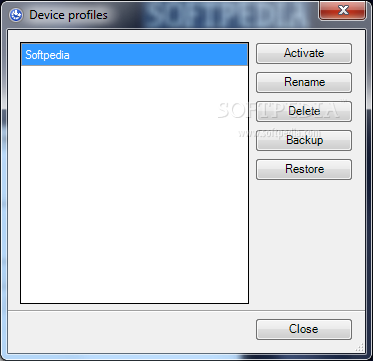
    Thanks to device profiles implemented in Easy Sync you can sync several mobile devices with one computer. When you connect device an appropriate profile with sync tasks is loaded.
    It is a good practice for those who have a Pocket PC and a Smartphone or for those who would like to use Easy Sync on a home computer, so members of your family could sync their devices, too.

    Bidirectional Sync and Transferring
    You are free to choose the direction of processing of your files for each folder. Sometimes it is required just to copy files from the device. Sometimes you need to keep documents in sync. And there are also situations when you need to move files from one folder to another, over the network, etc.
    Choose among the following modes of file processing:
    · Synchronize. Synchronize files between computer and mobile device.
    · Copy or move to computer. Copy or move files from device's card or folder to a folder on computer or over the network.
    · Copy or move to mobile device. Copy files from a folder on local or network computer to a folder or memory card on mobile device.

    Supports any files and folders
    Easy Sync is able to sync and transfer absolutely any files you need. Please note, that the conversion of office files and notes is not performed for working with these files directly on your device, unless you have special software installed. The only limitation is the amount of free space available on your device or its memory card.
    · Docs, pdf's and spreadsheets
    · MP3 music and podcasts
    · Archives and databases
    · Books and text notes, Etc...

    Flexible scheduling
    Scheduling allows to launch a task on a pre-defined basics. So you can plan your sync activities. For example:
    · Sync docs each 5 minutes
    · Download photos every day at 7pm
    · Backup each Sunday at 10am

    Unlimited number of tasks
    The whole concept of Easy Sync is in creating a list of tasks to sync, transfer and copy files and folders. For each task you define folders, file mask, an action and choosing launch condition.
    You can create as much tasks as it is required to manage all data you have to sync and transfer between your mobile device and computer.

    Launch Conditions
    For each task in Easy Sync you can define a launch condition. For example, you can transfer photos made with your camera on each connection with computer. Documents you work with are better to be synced in real time. If you need to create backups - use scheduling feature to plan such tasks for each Friday at 6pm. The choice is yours.

    Selective file syncing
    You can setup a mask to filter files to be processed under each folder . For example, only "*.pdf" files or files beginning with "Report_*".
    · *.jpg, *.gif, *.bmp, *.psd
    · *.txt, *.doc,*.odf, *.pdf, *.xls
    · *.mp3, *.wma, *.ogg, *.wav
    · *.wmv, *.avi, *.mp4, *.mov


    Requirements:

    · .NET Framework 2.0
    · Microsoft Active Sync


    Limitations:

    · 25 uses trial

    What's New in This Release: [ read full changelog ]

    · New: Online, bi-directional synchronization in real time
    · Many of you have asked for online sync - we've made it for you. Forget about syncing, just work with your docs and files, Easy Sync will do the rest. This feature means immediate reflection of changes made to files and folders. E.g. if you delete a file on your computer, it will be deleted on your device, etc.
    · Online monitoring is enabled on the computer side, yet.
    · Fixed: Now you can sync, transfer and copy to or from network paths
    · It was impossible to select folders on the network to sync files (so called UNC paths beginning with ""). We've fixed that issue and now you are free to use this feature.
    Improvements:
    · New algorithm for better comparing folders;
    · Profile Manager button now on toolbar, so you could switch faster, if you need;
    · File with profiles is now stored in "Application Data" directory to meet security etiquette;
    · Bug report now contains 5 last lines from the log to better inform us about the reason of the issue;
    Other fixes:
    · Refreshing of task status is made after each comparison of folders;
    · Small bugs were found in comparing file and folder functions;
    · Required update of product registration mechanism;
    · Sometimes default device profile was loaded (connection was broken), so you could not see your tasks;
    · All tasks were automatically launched at each device connection

     Softpedia guarantees that Easy Sync 2.8.8 is 100% CLEAN, which means it does not contain any form of malware, including spyware, viruses, trojans and backdoors. [read more >]


    TAGS:

    file synchronizer | backup file | music backup | synchronize | backup | synchronizer


    HTML code for linking to this page:


    Go to top

    Windows tabGames tabDrivers tabMac tabLinux tabScripts tabMobile tabHandheld tabGadgets tabNews tab

    SUBMIT PROGRAM   |   ADVERTISE   |   GET HELP   |   SEND US FEEDBACK   |   RSS FEEDS   |   ENTER NEWS SITE   |   ENGLISH BOARD   |   ROMANIAN FORUM