
Real disk mode for iPhone, iPad and iTouch. #File management #IPhone manager #IPad administration #Manager #IPhone #IPad


Phone Disk is a simple-to-use application that mounts iPhone, iPad or iTouch devices to the file system, in order for you to effortlessly navigate their contents through Windows Explorer.
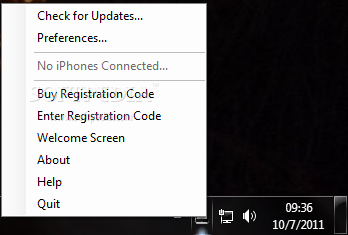
Once initialized, Phone Disk creates an icon in the system tray area and automatically mounts the Apple device if it's already plugged into the computer.
From this point on, you can access the newly created disk drive and make all the necessary adjustments to the device's contents.
For example, you can add new music to your iPhone collection, seamlessly transfer photos from the smartphone to the computer, as well as move or delete ebooks.
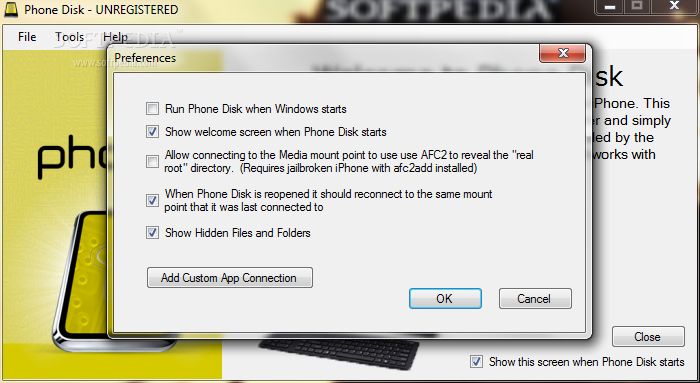
A few configuration settings are available through this tool. By bringing up the Preferences panel from the context menu of the system tray icon, you can make the app automatically run at system startup, show hidden files and folders, as well as display the welcome screen at program deployment, just to name a few.
Phone Disk uses a moderate quantity of CPU and system memory, and has a good response time. We have not experienced any issues throughout our tests, since the app did not hang, crash or pop up error dialogs. Phone Disk delivers a convenient method for managing files and folders on iPhone, iPad and iTouch devices, and it can be seamlessly figured out by all users, whether they are beginners or advanced.
Phone Disk 1.2.1.1
add to watchlist add to download basket send us an update REPORT- runs on:
-
Windows 7
Windows Vista
Windows XP - file size:
- 2.2 MB
- filename:
- Phone_Disk_Setup.exe
- main category:
- Mobile Phone Tools
- developer:
- visit homepage
calibre

Windows Sandbox Launcher

7-Zip

4k Video Downloader

Bitdefender Antivirus Free

Microsoft Teams

Zoom Client

IrfanView

ShareX

Context Menu Manager

- IrfanView
- ShareX
- Context Menu Manager
- calibre
- Windows Sandbox Launcher
- 7-Zip
- 4k Video Downloader
- Bitdefender Antivirus Free
- Microsoft Teams
- Zoom Client