
Update the software stability of your Sony Ericsson phone directly from your computer with the help of this easy-to-use piece of software. #Sony Ericsson Updater #Update Sony Ericsson #Phone Updater #Update #Sony Ericsson #Updater
NOTE: Sony has discontinued Update Service in July 2014 and has replaced it with PC Companion.
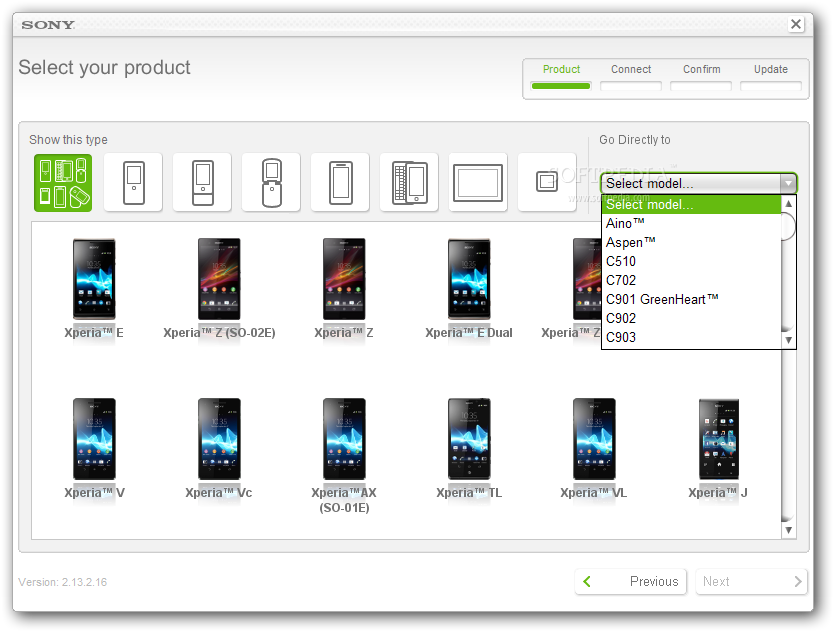
Sony Ericsson Update Service is an application designed exclusively for Sony Ericsson mobile phones and aimed at optimizing their stability by performing device software updates.
Sony Ericsson users who experience phone problems are strongly advised to run the Update Service, as most of the issues are related to old, unstable or corrupt software. In fact, even though you have the latest modules installed on your device, it’s still recommended to perform a quick update for optimum performance and stability.
Before launching the updater, make sure you backup up the information stored in the device, because the process may result in data loss (most of the times this is not the case, but it’s a good idea to have a safety net). Also, the battery needs to be charged to at least 50%, because the update process eats up a considerable quantity of juice.
In the next step, you are required to select your phone model and follow the on-screen instructions. Users of older models are required to remove and reinsert the battery, while owners of newer devices (such as smart phones) are supposed to turn off the phone and wait for 30 seconds.
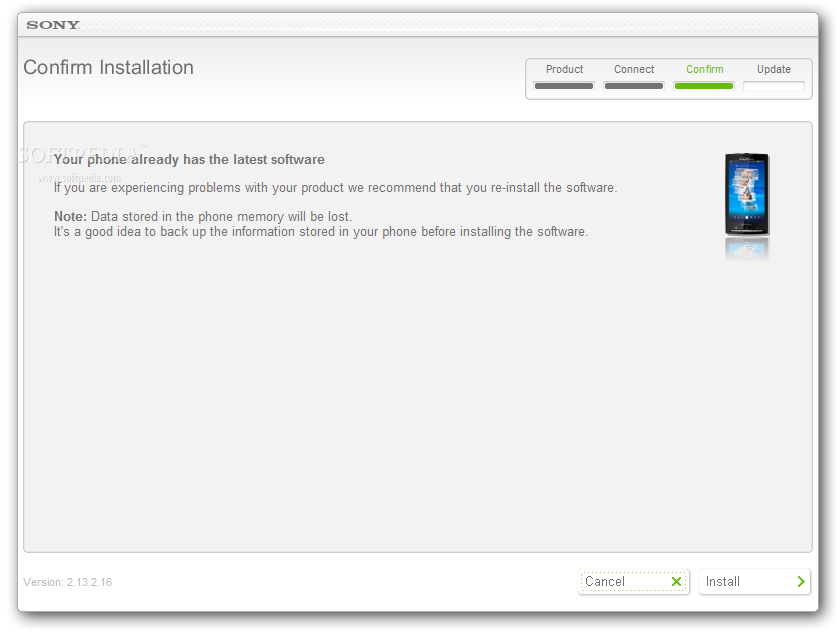
Following that, you need to connect the device while to your PC via a USB port, after which the software checks for missing updates. In case your phone already has the latest software, you will be notified accordingly. As mentioned before, there’s no harm in installing the update anyway, especially if you experience device issues.
In conclusion, Update Service is a must for Sony Ericsson owners. You can periodically run it to check for new updates and to apply them in order to benefit from maximum stability. Not to mention that each time a Sony phone / tablet model is released, the Update Service immediately becomes available for that particular device.
Sony Ericsson Update Service 2.14.10.201407111005
add to watchlist add to download basket send us an update REPORT- runs on:
-
Windows 8 32/64 bit
Windows 7 32/64 bit
Windows Vista 32/64 bit
Windows XP - file size:
- 47.7 MB

- main category:
- Mobile Phone Tools
- developer:
- visit homepage
4k Video Downloader

7-Zip

Zoom Client

Microsoft Teams

calibre

Bitdefender Antivirus Free

Context Menu Manager

IrfanView

ShareX

Windows Sandbox Launcher

- IrfanView
- ShareX
- Windows Sandbox Launcher
- 4k Video Downloader
- 7-Zip
- Zoom Client
- Microsoft Teams
- calibre
- Bitdefender Antivirus Free
- Context Menu Manager