
Software that uses ffmpeg to convert MP3, WMA or WAV audio files into AMR files #Audio converter #Convert MP3 #Convert audio #Convertor #Convert #Changer

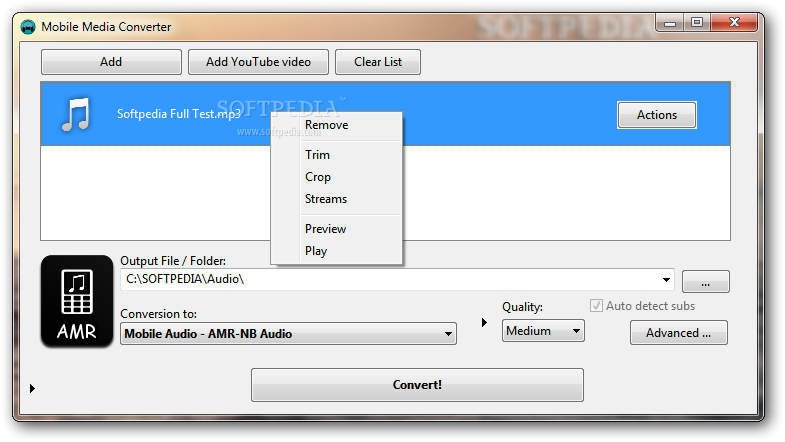
Mobile Media Converter is a software that can encode between several media formats, including WMA, WAV, AMR and MP3.
You should pay attention when installing this program. Since it is ad-supported, Mobile Media Converter offers to download some third-party components that it doesn't need to fully function, as well as to make some changes to your web browsers.
The interface of the program is clean and intuitive. You can add media to the list by using the file browser or the "drag and drop" method (batch processing is supported).
You can select the output format and destination, as well as select the quality level before initiating the conversion process.
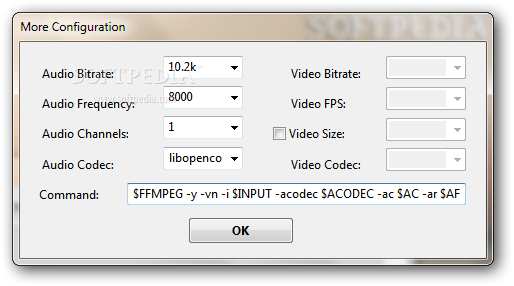
You can configure advanced settings which revolve around audio bitrate, frequency, channels and codec, as well as video bitrate, FPS, size and codec. Plus, you can use command-line parameters.
If you select a particular file, you can trim it (by setting the start and end time), crop it, select streams, as well as preview the track.
You can download a YouTube video (in the FLV format) by inputting its URL, output destination and quality, as well as set Mobile Media Converter to automatically detect subtitles.
This application uses a moderate quantity of system resources and completes a conversion task in a short amount of time, while keeping a good image and sound quality.
We haven't come across any problems during our tests but Mobile Media Converter doesn't include a help file. Even so, the program is very simple to handle and we recommend it to all users.
Download Hubs
Mobile Media Converter is part of these download collections: Convert MP3, Play AMR, Edit AMR, Open AMR
What's new in Mobile Media Converter 1.8.5:
- Fixed YouTube downloader
- Sync Windows and Linux version
Mobile Media Converter 1.8.5
add to watchlist add to download basket send us an update REPORT- runs on:
- Windows All
- file size:
- 13.9 MB
- filename:
- MMCsetup185.exe

- main category:
- Multimedia
- developer:
- visit homepage
7-Zip

ShareX

IrfanView

Windows Sandbox Launcher

Microsoft Teams

4k Video Downloader

Zoom Client

calibre

Bitdefender Antivirus Free

Context Menu Manager

- calibre
- Bitdefender Antivirus Free
- Context Menu Manager
- 7-Zip
- ShareX
- IrfanView
- Windows Sandbox Launcher
- Microsoft Teams
- 4k Video Downloader
- Zoom Client