Search Perform an advanced search query SOFTPEDIA
 
SOFTPEDIA
Updated one minute ago
HomeSubmit a program for being reviewedAdvertise on our websiteGet help on surfing our websitesSend us your feedbackGet information about our XML/RSS backend and how to use itBrowse the news archiveVisit our discussion forumVizitati forumul in limba romana


Program Finder NormalFreeware onlyShareware only

Songverter 1.003 Report spyware 

Click to download Songverter
View more Songverter screenshots (2)
 Downloads: 85
Rating: Excellent (5.0/5) | Rated by: user(s)
Add to download basket     Send us update information
 Developer: Micro Technology Unlimited | More programs by this producer
 License: Demo , 39.99 $ to buy 
 Size / OS: 2.86 MB, Windows 2K/XP/Vista
 Last Updated: March 27th, 2008, 20:03 GMT
 Category: C: \ Multimedia \ Audio \ Audio Convertors
 Read user reviews (0) Add a review Refer to friend Subscribe
    Download Songverter

Songverter description
Convert files to any popular format with this audio format converter software

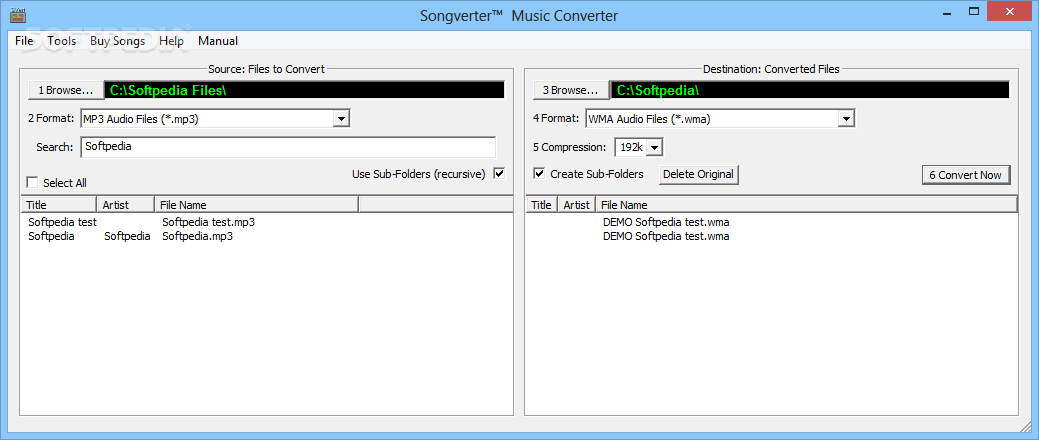
Songverter simply changes Karaoke CDG and Audio CD files on a hard disc from the following supported formats into any other supported format.

When Karaoke files are converted, the lyrics remain in synchronization to the music.

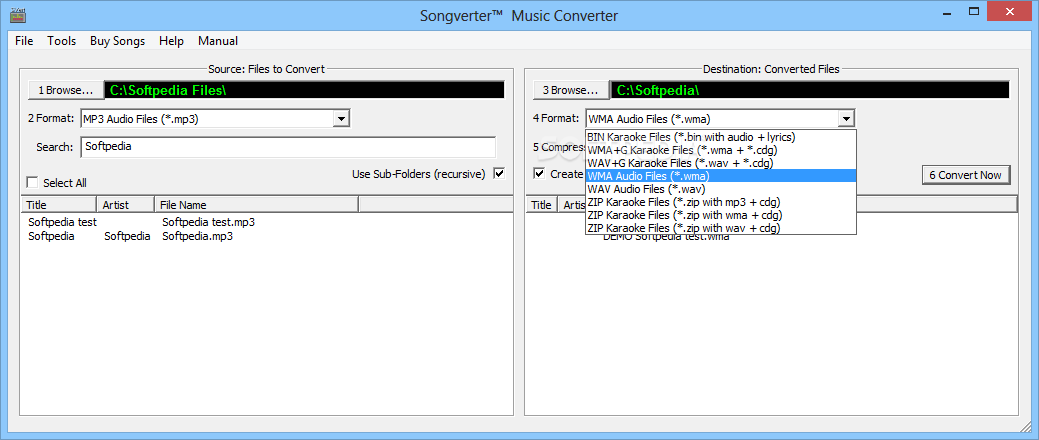
Songverter opens and converts to/from these file Types:
· KMA - MTU Hoster native Karaoke CD+G file format containing both the audio and graphics/lyrics data in the one file. These can contain various compressed data formats, but the native KMA from imported CDG tracks uses WMA compression. Typical files are 3MB to 5MB size.
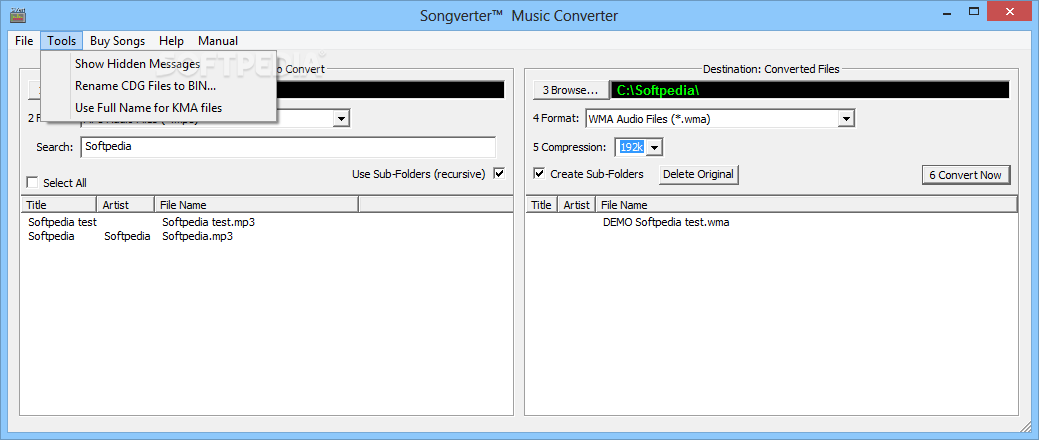
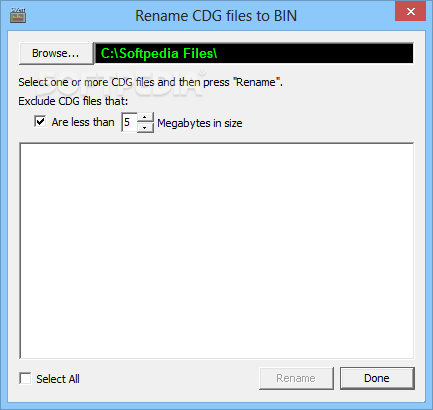
· BIN - These karaoke files contain uncompressed audio+lyrics data in one 30MB to 60MB file. These can be converted from any other type or the Tools menu Rename CDG Files to BIN command can find and rename MTU's .CDG files (discontinued) with audio+lyrics with the .BIN extension.
· WMA+G - Converted Karaoke CD+G composed of a pair of files; .wma extension for the audio (compressed with Windows WMA) and .cdg holding only the graphics/lyrics data. The WMA file will be 2MB to 5MB size, and the CDG will be 0.5MB to ~1.9MB
size.
· WAV+G - Converted Karaoke CD+G composed of a pair of files; .wav extension for the uncompressed audio and .cdg for the graphics/lyrics data. The WAV file will be 30MB to 60MB size, and the CDG will be 0.5MB to ~1.9MB size.
· MP3+G - Converted Karaoke CD+G file composed of a pair of files; .mp3 extension for the audio (uses MP3 compression) and .cdg for the graphics/lyrics data. The MP3 file will be 4MB to 8MB size, and the CDG will be 0.5MB to ~1.9MB size.
· ZIP - Converted Karaoke CD+G file containing one of three Audio+G file pairs zipped together using a zip compression. The three Target Formats ZIP selections can convert MAX compression to the same or other file formats with the STANDARD ZIP compression that Windows, WinAmp and most other programs can use.
· MP3 - Audio file using MP3 compression to be 4MB to 8MB size.
· WMA - Audio file using Microsoft WMA compression to be 2MB to 5MB size.
· WAV - Uncompressed audio CD track file. These files will be 30MB to 60MB size.

With Songverter you will be able to easily convert your files to any format.

Here are some key features of "Songverter":

· Convert Karaoke files with lyrics to any of these formats; Karaoke KMA, BIN, MP3+G, WMA+G, WAV+G and ZIP (MP3+G, WMA+G or WAV+G), or to Audio MP3, WMA or WAV files (lyrics removed).
· Convert Audio files to any of these formats; Audio MP3, WMA and WAV, or Karaoke KMA, BIN, MP3+G, WMA+G, WAV+G and ZIP (MP3+G, WMA+G or WAV+G) with black lyrics.
· Convert Max compression ZIP files to Standard compression that more programs use.
· Batch convert all selected format files in a folder, or select some files to convert.
· Keep or Delete Master Files after converting to the new format.


Requirements:

· 800Mz or faster Intel or AMD Processor.
· Internet connection.
· To use MP3 compression requires the lame_enc.dll file to be found in your computer Windows/system32 folder


Limitations:

· Will import only the first 45 seconds.
· The target file names begin with "DEMO".


What's New in This Release:

· CD/DVD Drives Disappeared - This happened when installing version1.002. We found and fixed the cause.
· Fixed ZIP Files Failing With Mismatch between mp3 and CDG Case - Songverter is now case insensitive to the included files that are zipped.
· New UNZIP Code - The Unzip code in Songverter 1.002 and prior would not unzip files with any type of error. We upgraded the Unzipper code to be more tolerant.
· More Microsoft Compliant - When installing on Windows 2000, XP and Vista, Songverter now creates all working files in C:Documents and Settings path. If updating an existing install, these files are now moved from C:Program Files path to the new path. Microsoft Vista now ENFORCES this by disallowing any changes to be made to files in the C:Program Files path.
· Problem Unzipping With "Delete Original" Checked - When trying to unzip files a folder with the "Delete original" checked, not all the files would process. All files now process correctly.
· Processing Now Continues After a Bad File - When a bad file is found and logged, in version 1.002 processing stopped. Processing now continues with the next files as expected.... [ read full changelog ]


Softpedia guarantees that Songverter 1.003 is 100% CLEAN, which means it does not contain any form of malware, including but not limited to: spyware, viruses, trojans and backdoors.

This software product was tested thoroughly and was found absolutely clean, therefore it can be installed with no concern by any computer user.

However, it should be noted that this product will be retested periodically and the award may be withdrawn, so you should check back on this page from time to time. (click here for more information)


Related downloads IT News Popular downloads New additions   Latest reviews  
SuperAVConverter 9.13
A powerful, all-in-one, multimedia converter
MP3 Converter Pro 4.2.29
MP3 Converter is an easy-to-use, fast, and powerful audio conversion software
MP3 Audio Converter 4.10
An useful application that will convert most popular audio formats.
Audio Convertor Plus 2.2
Audio Convertor Plus - A powerful audio conversion tool
Audio Conversion Wizard 2.0
It helps you to convert audio files of supported audio format from one format to another
OSS Audio Converter 6.0.0.4
Easily convert between any audio file types from one format to another
Aglare All to MP3 AAC AC3 AMR Converter 6.5
Can help you convert between popular audio formats.
Bluefox WMA MP3 Converter 2.01.08.0505
This software is an effective tool to convert audio from WMA to MP3.
Bluefox MP3 WAV Converter 2.01.08.0505
This software is a quick and easy-to-use audio conversion utility.

go to top Use the following code to link to this page:


Welcome!
Hello, Guest

Login if you have a Softpedia.com account.

Otherwise, register for one.

Main categories:
  • Antivirus
  • Compression tools
  • CD/DVD Tools
  • Office tools
  • Programming
  • Authoring tools
  • File managers
  • Desktop Enhancements
  • Internet
  • Network Tools
  • IPOD TOOLS
  • Mobile Phone Tools
  • Multimedia
  • Tweak
  • System
  • Security
  • Others
  • Science / CAD
  • UNIX
  • Windows Widgets
  • PORTABLE SOFTWARE

  • Week's best:
  • SP3 UxTheme Patcher ...
  • PECompact 2.82
  • Sony Vegas Movie Stu...
  • 3DMark Vantage 1.0
  • Total Commander 7.03
  • VistaMizer 2.5.1.0
  • AVG Free Edition 8.0...
  • Windows XP Service P...
  • Ashampoo Burning Stu...
  • XviD Media Codec 1.1...
  • Blu-ray Disc Ripper ...
  • Blu-ray Region Code ...
  • Adobe Photoshop Ligh...
  • PowerDVD 8.0.1531
  • EF Commander 6.54
  • Microsoft Windows In...
  • Nero 8 Lite 8.3.2.1
  • WebSite-Watcher 4.41...
  • EVEREST Ultimate Edi...
  • Nokia PC Suite 6.86....
  • VMware Workstation 6...
  • AnyDVD HD 6.4.2.0
  • Messenger Plus! Live...
  • The Bat! Voyager 4.0...
  • Windows Vista Servic...
  • Nero 8 8.3.2.1
  • Vipre 3.1.1997 Beta
  • Internet Explorer 8 ...
  • Norton 360 2.0.0.242
  • SmartFTP 3.0.1015.5
  • © 2001 - 2008 Softpedia. All rights reserved.
    Softpedia™ and Softpedia™ logo are registered trademarks of SoftNews NET SRL.
    Copyright Information | Privacy Policy | Terms of Use | Contact Softpedia | Update your software | Archive