Softpedia
 

WINDOWS CATEGORIES:


GLOBAL PAGES >>
SOFTPEDIA REVIEWS >>
MEET THE EDITORS >>

WEEK'S BEST

  • DAEMON Tools Pro (...
  • FlashFXP [ DISCOUN...
  • PowerISO 4.9
  • WebcamMax [DISCOUN...
  • Zemana AntiLogger ...
  • System Mechanic Pr...
  • Glary Utilities Pr...
  • All My Movies [DIS...
  • Ad-Aware Internet ...
  • Atlantis Word Proc...
  • Home > Windows > Multimedia > Audio > Audio Editors/Recorders
     Report malware

    Absolute MP3 Splitter & Converter 3.0.1

    download button

    Downloads: 28,066  View global page  Tell us about an update
    User Rating:
    Rated by:
    Good (3.5/5)
    68 user(s)
    Developer:

    License / Price:

    Size / OS:

    Last Updated:

    Category:

    Demo / USD 24.95 buy button
    2.3 MB / Windows All

    C: \ Multimedia \ Audio \ Audio Editors/Recorders

     Read user reviews (0)  Send to friend   Follow (1 user)

    EDITOR'S RATING

    Softpedia Editor's Review for Absolute MP3 Splitter & Converter

    An application that supports bitrate and frequency settings of audio formats.

    Written by Elena Opris on January 18th, 2012

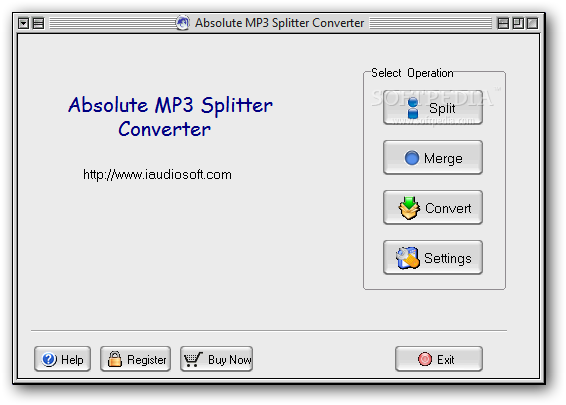
    Absolute MP3 Splitter & Converter is a tool that can split, merge and convert audio tracks of the MP3, WAV, OGG and WMA format.

    The user interface of the program is very intuitive, since every feature consists of an easy-to-follow wizard. The "drag and drop" method is not supported.

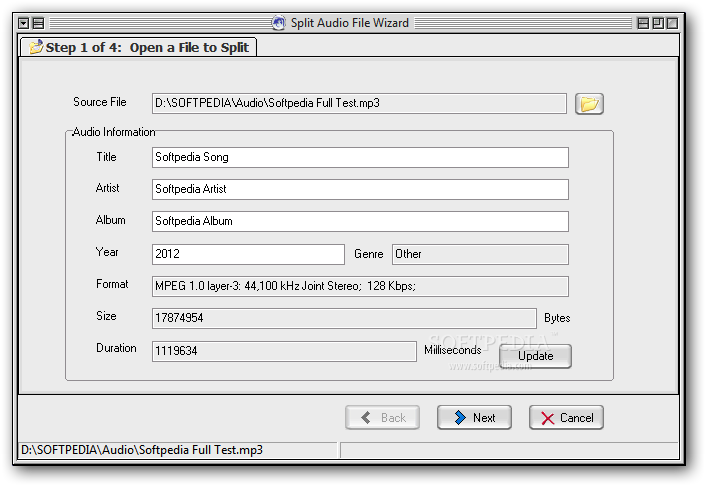
    In the "Split audio file" area, you can edit the audio information (title, artist, album, year), as well as view the genre, format, size and duration.

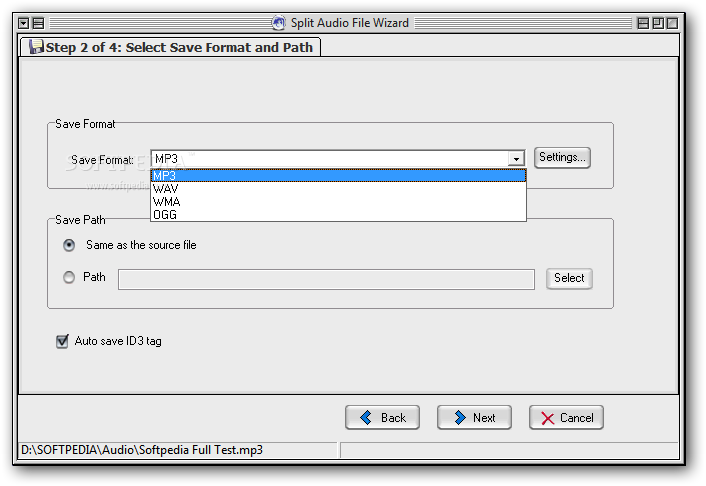
    Once you have selected the output format of the audio track, along with the destination, you can enable the option to automatically save ID3 tags and proceed to the next step.

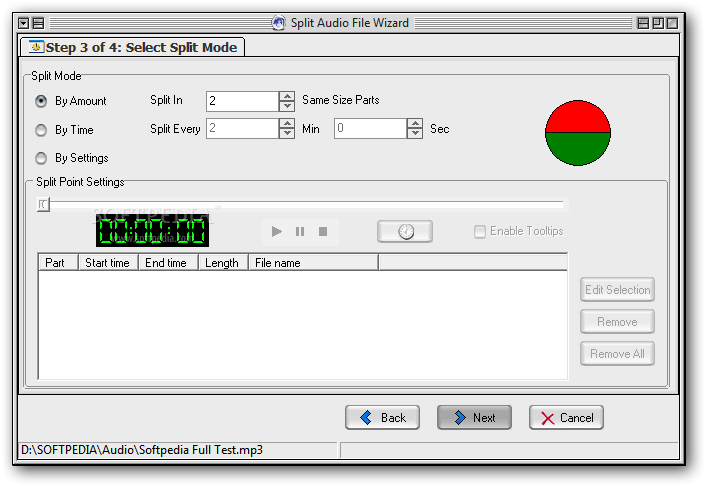
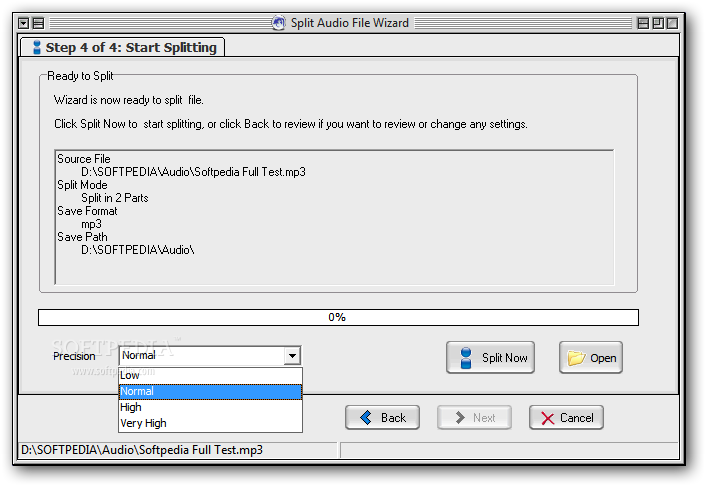
    The splitting mode can be done in three ways - by amount, time or by settings (you can play the song to mark the start and end time). The latter option also allows you to process several split chunks at once. Finally, you can set the precision level before initiating the cutting process.

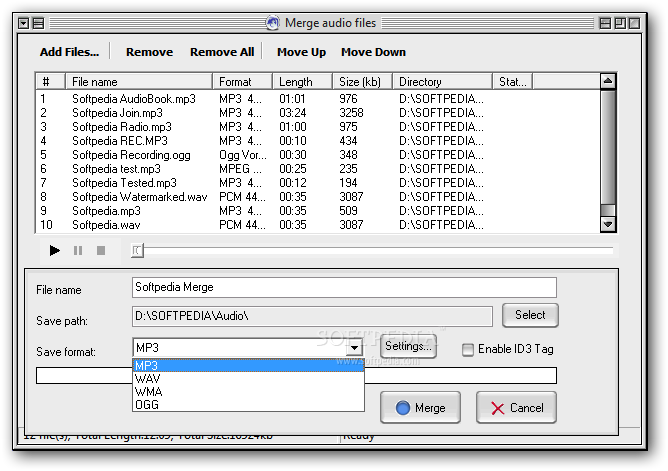
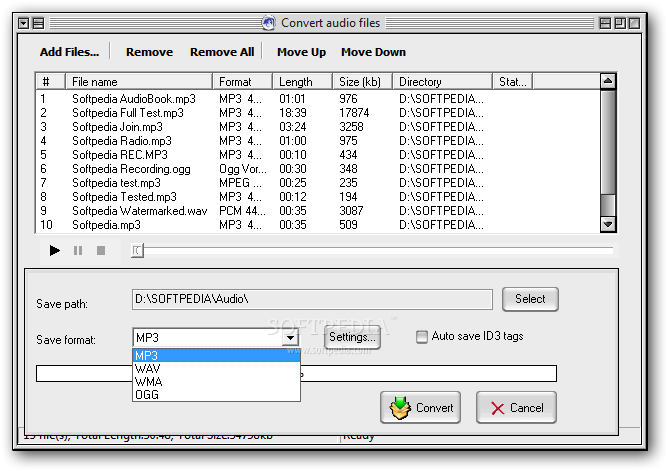
    In the case of file merging, you can add several files to the queue, arrange and preview them, set the output name, directory and extension, and enable ID3 tags. The "Convert audio files" process is similar to the merging one.

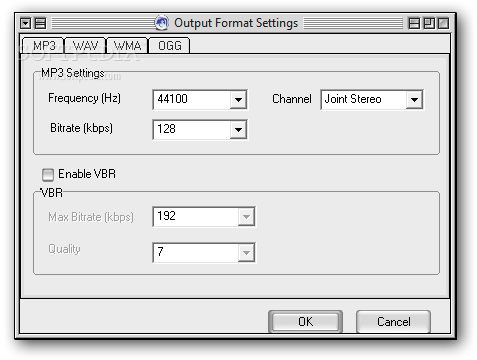
    Furthermore, you can configure the output settings for each format, such as sample frequency rate, channel, bitrate, VBR, bits per sample, WMA profile and quality. You can find these settings in the main menu, but they are also accessible in each aforementioned area.

    The program uses a very high amount of system resources, includes tips and a comprehensive help file with snapshots, and manages to complete a task in a short amount of time, while preserving an excellent audio quality.

    On the other hand, the demo version has limitations and we have encountered two problems during our tests: Absolute MP3 Splitter & Converter froze when we attempted to move the slider in "Select Split Mode" → “By Settings” (and we had to restart the application), but it also popped up an error when we tried merging files (so, we had to recreate the task from scratch). However, these issues occurred only once.

    Otherwise, Absolute MP3 Splitter & Converter is an excellent tool for cutting, merging and encoding audio files, and we strongly recommend it to all users.

    Absolute MP3 Splitter & Converter description

    Here are some key features of "Absolute MP3 Splitter & Converter":

    · Split audio file: Split a large audio file into small pieces in spite of the source format and target format.For example,you can split an mp3 file into several small mp3 files and even into wma,wav and ogg files according to your settings;
    · Merge audio files: Merge several audio files in one large file in spite of the source format and target format.For example,you can merge some mp3 files and even wma,wav and ogg files into a large mp3 file according to your settings.
    · Convert audio formats: Convert audio formats between MP3, WAV, WMA, OGG in batch mode.
    · Various Splitting Mode: You can split an audio file by three mode:1,by amounts:split in certain parts with the same length;2,by time:split by every certain time length;3,by user settings:You can set the start-time and end-time of cutting/joining when pre-listening to the song.
    · Step by step Wizard: The step by step wizard makes splitting job very easy to understand.
    · Frequency and Bitrate settings: Absolute MP3 Splitter&Converter supports frequency and bitrte settings. To get higher quality of target files, you can set the frequency, channels, and bitrate, before splitting or merging.
    · File Information: You can view splitting file information such as title,artist,album,and so on;You can also edit the Id3 tag information.
    · Direct-To-Disk splitting and merging, no temp files generated
    · User-friendly

    Requirements:

    · Pentium 200 Processor or better
    · 32M RAM

    Limitations:

    · Can only split each audio file into three parts and only merge or convert three files.

     Softpedia guarantees that Absolute MP3 Splitter & Converter 3.0.1 is 100% CLEAN, which means it does not contain any form of malware, including spyware, viruses, trojans and backdoors. [read more >]


    TAGS:

    MP3 splitter | merge audio | split audio | split | splitter | converter


    HTML code for linking to this page:


    Go to top

    WindowsGamesDriversMacLinuxScriptsMobileHandheldNews

    SUBMIT PROGRAM   |   ADVERTISE   |   GET HELP   |   SEND US FEEDBACK   |   RSS FEEDS   |   UPDATE YOUR SOFTWARE   |   ROMANIAN FORUM