
Create commercial-quality CD+G and MP3+G karaoke tracks, customize text settings, build CUE files and slideshows, as well as convert tracks. #Karaoke builder #Karaoke track #CD+G track #Karaoke #Builder #Build

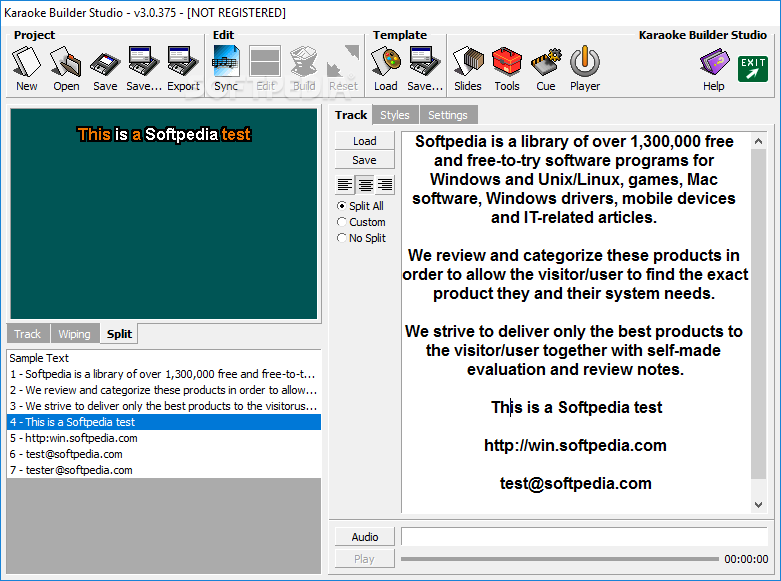
Karaoke Builder Studio is a feature-rich application suite that lets users easily create CD+G and MP3+G karaoke tracks, while it also contains a slideshow creation module.
The interface may seem confusing at first sight, yet the utility is quite easy to handle. Besides, you can use one of the templates to get started.
Audio files can be loaded into the workspace using the file browser, since drag-and-drop is not featured. The program supports popular formats, such as MP3, FLAC, WAV, WMA, AAC and OGG.
You can write lyrics directly in the main panel or load files with the TXT, MID or KAR format, as well as preview the display mode in the primary screen, including word wiping and splitting.
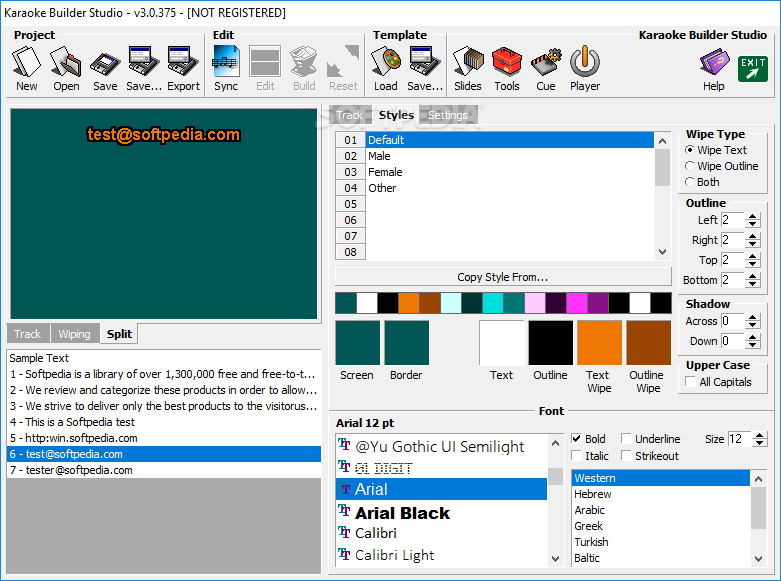
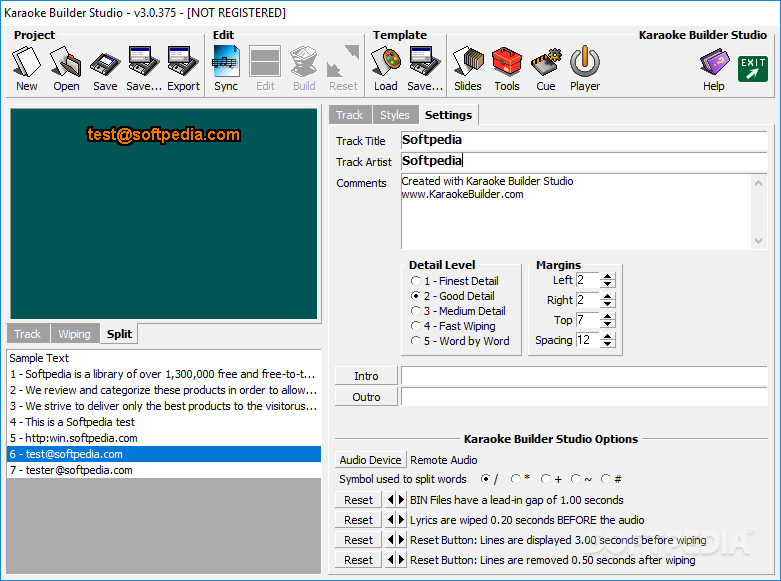
You can change the text alignment, customize styles (e.g. wipe type, outline, shadow, font), as well as edit track settings when it comes to the title, artist, comments, detail level, margins, intro and outro, symbol used to split words, and others.
It is possible to save projects to file for future modifications (common or templates), export lyrics to a plain text document, synchronize the lyrics to the audio track and edit sync points, build CUE files, and preview the track with the lyrics on screen.
The program encloses a slideshow creator, which can be customized in terms of special effects, size, alignment, cropping, font, color palette, and others. Karaoke Builder Studio lets you convert CD+G to AVI and configure settings (e.g. video size, borders, frames per second), create a BIN files from CD+G, WAV, or CD+G and WAV, as well as extract tracks from BINs.
The application suite includes Help documentation for less experienced users. It is very low-demanding when it comes to CPU and RAM, and has a good response time. No error dialogs were shown in our tests, and the app did not hang or crash.
Karaoke Builder Studio is a very good program for creating karaoke tracks, putting at your disposal a handy set of features.
Download Hubs
Karaoke Builder Studio is part of these download collections: Karaoke Player
What's new in Karaoke Builder Studio 5.1.260:
- Bug fix: Error while saving after sync has been resolved.
Karaoke Builder Studio 5.1.260
 Softpedia Editor's Pick
add to watchlist
add to download basket
send us an update
REPORT
Softpedia Editor's Pick
add to watchlist
add to download basket
send us an update
REPORT
- runs on:
-
Windows 10 32/64 bit
Windows 8 32/64 bit
Windows 7 32/64 bit
Windows Vista 32/64 bit
Windows XP 32/64 bit - file size:
- 11.6 MB
- filename:
- kbstudio.exe

- main category:
- Multimedia
- developer:
- visit homepage
Zoom Client

Bitdefender Antivirus Free

Context Menu Manager

calibre

Windows Sandbox Launcher

4k Video Downloader

7-Zip

Microsoft Teams

ShareX

IrfanView

- Microsoft Teams
- ShareX
- IrfanView
- Zoom Client
- Bitdefender Antivirus Free
- Context Menu Manager
- calibre
- Windows Sandbox Launcher
- 4k Video Downloader
- 7-Zip