
With support viewing and editing ID3 tags, this application provides a simple manner in which to split, cut, trim, or join MP3 files. #MP3 Editor #MP3 Splitter #MP3 Joiner #Splitter #Joiner #Combine

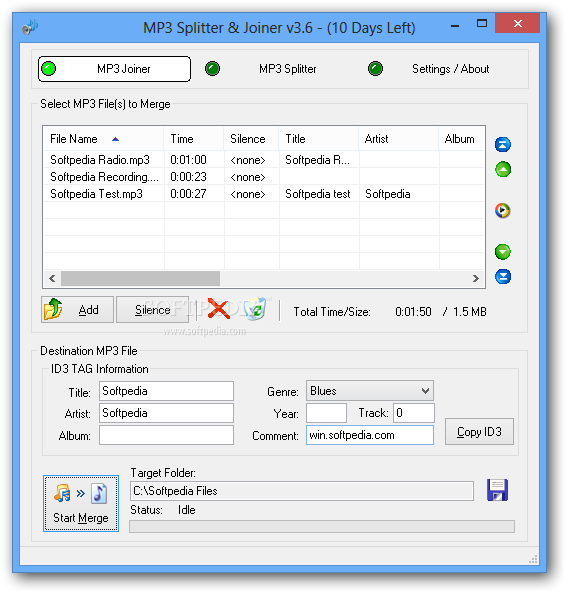
MP3 Splitter & Joiner is a tool that can divide and re-combine audio files in an MP3 format. The user interface of the program is standard, and you can insert an audio track by using the file browser or the "drag and drop" method.
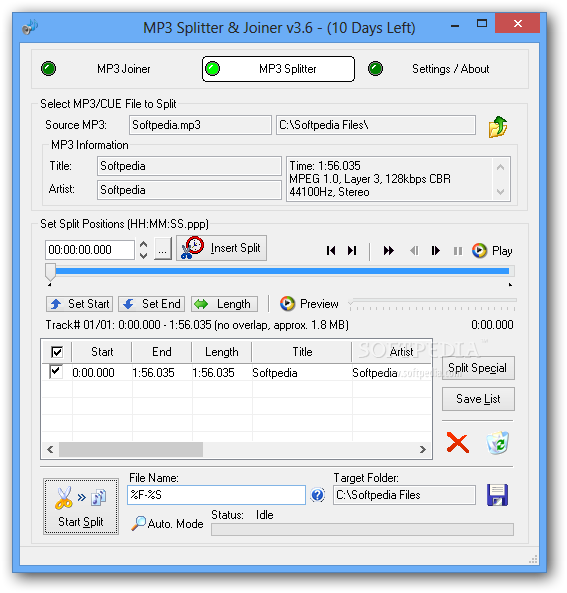
In the case of the MP3 splitter tool, you can view the MP3 source, title, artist, time and settings. Thus, you can set the output directory, insert a split, set the start and end point, preview the results, save the list as a CUE file, or use the "split special" feature (split to equal segments, with overlap, by silence).
When it comes to the MP3 joining tool, you can insert silence after a selected track (expressed in seconds) and enable a feature which automatically inserts silence when you load an MP3.
In addition to that, you can edit the ID3 tag information (title, artist, album, genre, year, track, commend), set the output path, copy the ID3 details, arrange audio files in the list and initiate the merging process.
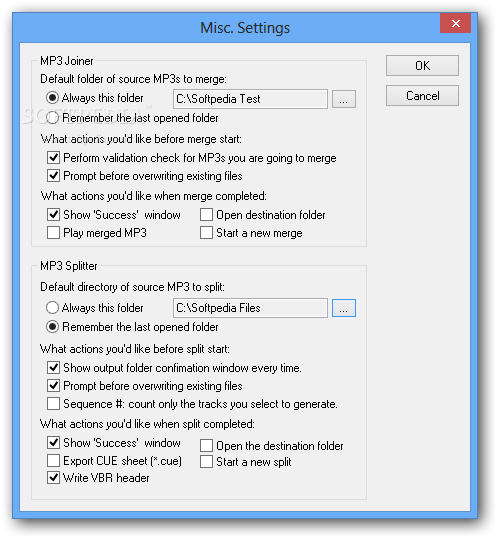
You can configure settings concerning the default source folder to merge or split, the actions you prefer before merging or splitting beginnings (e.g. prompt before overwriting existing files) and ends (e.g. show "Success" window, open the destination folder, write VBR header).
The program uses a very low amount of system resources, includes a well-drawn Help file and is able to complete a task in a surprisingly short amount of time, while keeping excellent sound quality.
We haven't come across any problems during our tests. Since MP3 Splitter and Joiner is simple to use by both beginners and experienced individuals, we strongly recommend it.
What's new in MP3 Splitter & Joiner 3.60 Build 1:
- Improved the core module
- Fixed some minor bugs
MP3 Splitter & Joiner 3.60 Build 1
add to watchlist add to download basket send us an update REPORT- runs on:
-
Windows 8 32/64 bit
Windows 7
Windows Vista
Windows XP
Windows 2K - file size:
- 1.1 MB
- filename:
- mp3mate.exe
- main category:
- Multimedia
- developer:
- visit homepage
Bitdefender Antivirus Free

Windows Sandbox Launcher

IrfanView

7-Zip

calibre

ShareX

Microsoft Teams

Context Menu Manager

4k Video Downloader

Zoom Client

- Context Menu Manager
- 4k Video Downloader
- Zoom Client
- Bitdefender Antivirus Free
- Windows Sandbox Launcher
- IrfanView
- 7-Zip
- calibre
- ShareX
- Microsoft Teams
