
Minimalistic and simple-to-handle utility which helps you cut MP3 files to a a desired length and listen to them from the main window #MP3 slit #Cut MP3 #MP3 segment #MP3 #Split #Cut

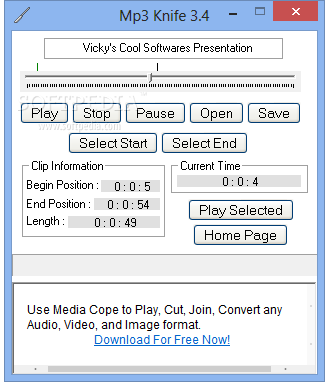
MP3 Knife is a software tool that provides users with a simple means of trimming the length of MP3 files, as well as playing them.
The setup process does not last very long, yet you should know it comes with some offers from third-party products, which can be declined with a click of the button. The interface you are met with encompasses multiple buttons and a pretty plain window. It is accessible to all user categories, including those with little or no previous experience with computers.
This utility helps you upload an audio track only by using the file browser, as the "drag and drop" method is not supported. You can only process MP3 files, which is considered to be a small setback, as there are plenty of other audio extensions which people use on a daily basis.
It is possible to play a song, pause or stop it with the help of the integrated playback controls, as well as view the current time, play the selected area and set the starting and ending point (by moving the slider).
The main window displays the beginning and ending positions, as well as the total length of the uploaded item. Once you have selected the output destination and name, you can press the "Save" button to initiate the splitting process. A message box will alert you whether the task was successful or not.
The program uses a moderate amount of system resources. Unfortunately, it does not include a help file, yet that's because it is very easy to handle, even by first-time users. It manages to complete a task in a short amount of time without freezing, crashing or popping up any errors.
MP3 Knife may lack any advanced settings you can configure yett it is a simple program which gets the job done. We strongly recommend it to all users.
Mp3 Knife 3.4
add to watchlist add to download basket send us an update REPORT- runs on:
-
Windows 8
Windows 7
Windows Vista
Windows XP - file size:
- 2.3 MB
- filename:
- MK.exe
- main category:
- Multimedia
- developer:
- visit homepage
4k Video Downloader

calibre

7-Zip

Microsoft Teams

Bitdefender Antivirus Free

Context Menu Manager

Windows Sandbox Launcher

IrfanView

Zoom Client

ShareX

- IrfanView
- Zoom Client
- ShareX
- 4k Video Downloader
- calibre
- 7-Zip
- Microsoft Teams
- Bitdefender Antivirus Free
- Context Menu Manager
- Windows Sandbox Launcher