
Cuts a part of a midi file and saves it into a new midi file #Midi file cutter #Cut midi file #Command line #Cutter #Cut #Midi file

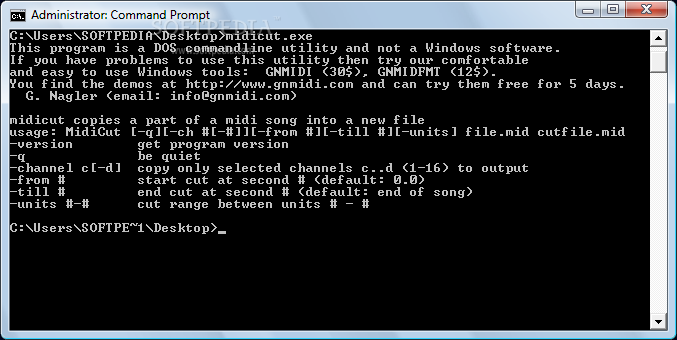
MIDICUT is a lightweight command-line app that gives you the possibility of cutting parts of a MIDI track to save it to a new file. But it comprises other useful options as well.
Some users prefer working with programs in Command Prompt rather than with applications with intuitive graphical interfaces, since a few command lines are enough to carry out a task is no time.
One of the advantages of a command-line utility is that no installation is required on the computer. You can run MIDICUT on any workstation with minimum effort.
This also means that the Windows Registry section does not get entry updates (minimizing the risk of system errors), and files do not remain on the hard disk after program removal.
MIDICUT allows you to read and write a binary Midi file, remove a part of it before the specified start time and after the end time, cut only selected channels (from 1 to 16), as well as enable silent mode. The tool copies important Midi events to the start or end of the song, in order to run it without errors.
MIDICUT does not put a strain on the computer or interfere with the runtime of other applications, since it requires a very low quantity of CPU and system memory. No error dialogs have been shown in our tests and the tool did not freeze or crash. However, MIDICUT has not been updated for a very long time.
What's new in MIDICUT 1.6:
- help for users that cannot use DOS utilities
MIDICUT 1.6
add to watchlist add to download basket send us an update REPORT- runs on:
- Windows All
- file size:
- 44 KB
- filename:
- midicut.zip
- main category:
- Multimedia
- developer:
- visit homepage
Microsoft Teams

Bitdefender Antivirus Free

Windows Sandbox Launcher

4k Video Downloader

Context Menu Manager

Zoom Client

ShareX

IrfanView

7-Zip

calibre

- IrfanView
- 7-Zip
- calibre
- Microsoft Teams
- Bitdefender Antivirus Free
- Windows Sandbox Launcher
- 4k Video Downloader
- Context Menu Manager
- Zoom Client
- ShareX