
Adjust the volume of your speaker with the wheel of your mouse by turning to this simplistic, yet effective app that can be easily installed. #Sound volume #Mouse volume control #Mouse control #Volume #Controller #Mouse

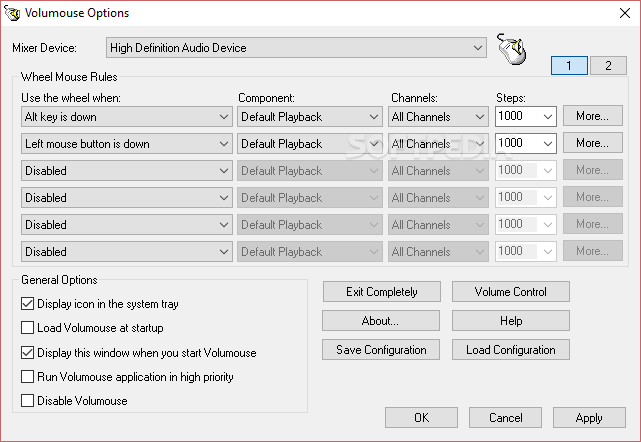
Volumouse is a simple-to-use program that allows you to adjust the volume of your computer via the mouse scroll. It can come in handy when you want to quickly adjust the volume while you're playing video games, working or watching movies.
This is a portable software, so installing Volumouse is not necessary. It means that you can place the tool on a removable device (like a USB flash drive), plug it into any computer and directly run its executable file.
What's more important is the fact that your Windows registry entries will not changed.
The application comes with a plain and user-friendly interface in which you can select the mixer device to get started.
You can establish the wheel mouse rules by specifying a trigger (e.g. when the "Alt" key is down or BSPlayer is focused), as well as selecting the component, channels and number of steps.
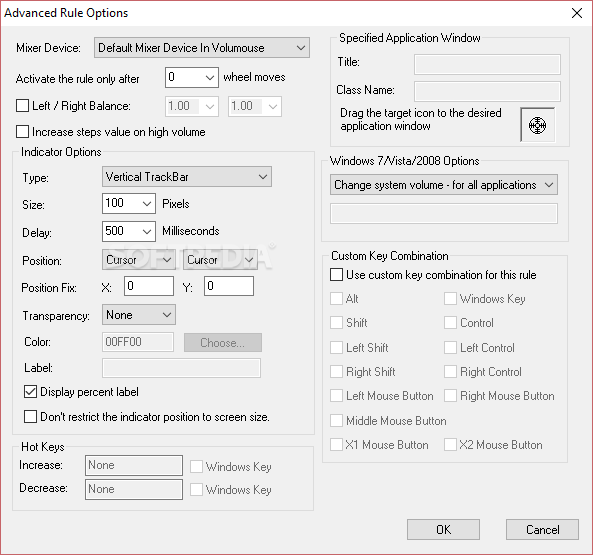
If you're an experienced user, then you are probably interested in configuring advanced rule options when it comes to the left and right balance, a specified application window, indicator settings (e.g. position and delay time), and others.
You can enable Volumouse to display an icon in the system tray, automatically run at system startup and to run in high priority, save the current configuration for further use, and more.
The simple-to-use program needs a barely noticeable amount of system resources and has a very good response time. No errors have popped up during our tests and Volumouse did not freeze or crash. Unfortunately, there is no help file available. But, even so, we highly recommend Volumouse to all users.
What's new in Volumouse 2.10:
- Volumouse now uses completely different method to hook the mouse wheel events. This change has multiple advantages:
- It fixes the problem with the taskbar of Windows 11.
- It fixes the problem with the trackbar indicator on Windows 10.
- There is no need for the hook DLL anymore (vlmshlp.dll)
Volumouse 2.10
add to watchlist add to download basket send us an update REPORT- runs on:
- Windows All
- file size:
- 130 KB
- filename:
- volumouse_spanish.zip
- main category:
- Multimedia
- developer:
- visit homepage
4k Video Downloader

Microsoft Teams

IrfanView

Zoom Client

Windows Sandbox Launcher

7-Zip

ShareX

Bitdefender Antivirus Free

Context Menu Manager

calibre

- Bitdefender Antivirus Free
- Context Menu Manager
- calibre
- 4k Video Downloader
- Microsoft Teams
- IrfanView
- Zoom Client
- Windows Sandbox Launcher
- 7-Zip
- ShareX