
Convert and downscale common graphic formats (e.g. JPG, BMP, PNG, PCX) to JPEG or PNG file format, adjust brightness and contrast, and change resolution. #Graphic format #Resize image #Image resizer #Resizer #Graphic #Resize

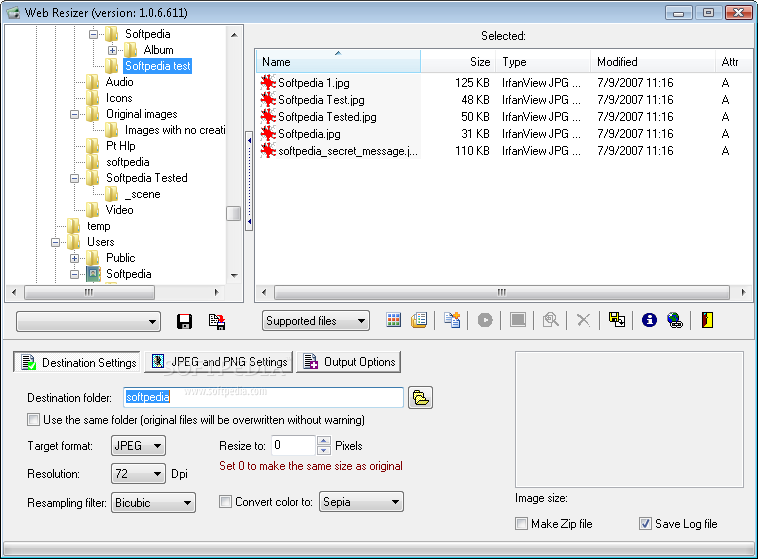
Web Resizer is a lightweight Windows application that helps with resizing images to standard web graphic formats.
The utility does not impress much in the visual department. The layout looks crowded and not so intuitive, so you need to experiment with the built-in features in order to understand how the program works.
It employs an Explorer-like GUI where you can easily browse throughout the content of the folders in your computer.
With just one click on a target directory, the tool automatically reveals a list with images, along with details about the name, size, type, date when it was modified, and attributes.
You can preview files with the aid of thumbnails and sort the images by file extension (e.g. JPG, BMP, PNG, PCX, GIF, TIFF), view the size of each photo, select all files with a single click, and open My Documents folder.
Web Resizer lets you pick the saving directory or use the folder where the original files are stored (data is overwritten without warnings), pick the output format (JPEG or PNG file format), adjust the resolution, choose the resampling filter, set the number of desired pixels, as well as change the color (sepia or black and white).
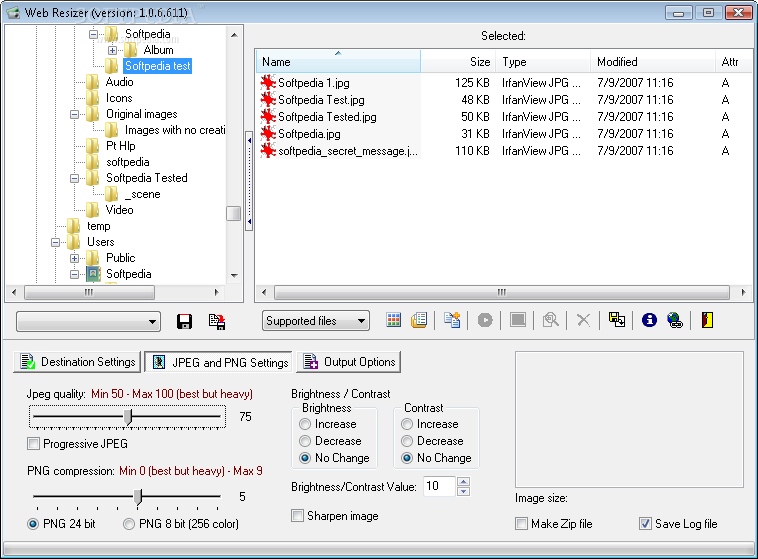
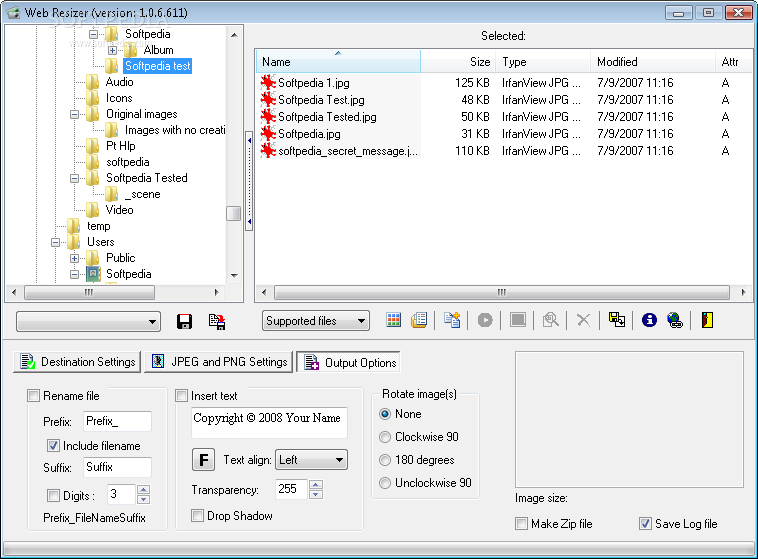
You are allowed to set the preferred JPEG quality, compress PNG files, alter the brightness and contrast, sharpen the image, rename files based on a custom prefix and suffix, embed text watermark (you can change the text in terms of alignment, transparency and shadow), rotate the images to different angles, and save all resized items to ZIP file format.
It supports batch processing so it can be used for processing multiple photos at the same time. Tests have shown that Web Resizer carries out a task quickly and provides very good output results. It doesn’t eat up a lot of CPU and memory, so the overall performance of the computer is not hampered.
Web Resizer doesn’t excel at providing a user-friendly GUI but it makes up for this inconvenient with its functionality. You may convert and downscale common graphic formats to JPEG or PNG file format.
Web Resizer 1.0.6.2604
add to watchlist add to download basket send us an update REPORT- runs on:
- Windows All
- file size:
- 2.4 MB
- filename:
- webres_setup106.exe
- main category:
- Multimedia
- developer:
- visit homepage
ShareX

Zoom Client

7-Zip

Context Menu Manager

IrfanView

4k Video Downloader

Microsoft Teams

Windows Sandbox Launcher

Bitdefender Antivirus Free

calibre

- Windows Sandbox Launcher
- Bitdefender Antivirus Free
- calibre
- ShareX
- Zoom Client
- 7-Zip
- Context Menu Manager
- IrfanView
- 4k Video Downloader
- Microsoft Teams