
Auto-save screen capturing application. #Screen Capture #Capture Screen #Take Screenshot #Screenshot #Snapshot #Capture

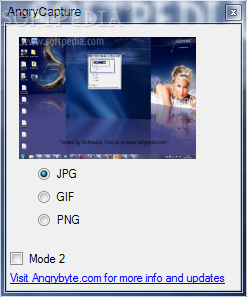
AngryCapture is a screen capture application that allows you to take snapshots of your current computer screen.
After you run the program, a window is displayed, requiring to select the image format that should be used by AngryCapture. You can select from the following formats: JPG, GIF or PNG. The user interface is really simple and you should get used to working with this program very quickly.
Basically, all you have to do in order to take a snapshot of your current screen is to pick the image format of your choice and then hit the “Print Screen” key on the keyboard. Hence, you can effortlessly create multiple snapshots of your current desktop.
Since it's only able to capture the whole screen, you could use AngryCapture with a separate photo editor to quickly crop a specific area of the screenshot. Microsoft Paint could easily do the job, so simply right-click one of the screenshots you've taken and hit the "Edit" option in the Windows Context Menu to launch Paint and crop a defined area.
It automatically saves all your files to the same folder as the application and thus you don't have to spend a lot of time to save each snapshot of your screen.
Compared to some other similar apps, AngryCapture is pretty easy to use, especially because there are no configuration settings to tinker with. This tool basically relies on the Print Screen button and doesn't ask its users to set up or define hotkeys for specific actions.
In conclusion, AngryCapture is a handy tool for all those who want to capture their current screen effortlessly. Thanks to its overall simplicity and simple layout, it can be used by beginners and professionals alike.
AngryCapture 1.0
add to watchlist add to download basket send us an update REPORT- runs on:
- Windows All
- file size:
- 11 KB
- filename:
- AngryCapture.zip
- main category:
- Multimedia
- developer:
- visit homepage
Microsoft Teams

Bitdefender Antivirus Free

7-Zip

IrfanView

Zoom Client

Windows Sandbox Launcher

calibre

Context Menu Manager

4k Video Downloader

ShareX

- Context Menu Manager
- 4k Video Downloader
- ShareX
- Microsoft Teams
- Bitdefender Antivirus Free
- 7-Zip
- IrfanView
- Zoom Client
- Windows Sandbox Launcher
- calibre
