
Capture screenshots with this compact and easy to use tool that offers many options for customization while maintaining a simple user interface. #Capture Screenshot #Take Screenshot #Image Capture #Screenshot #Capture #Snapshot

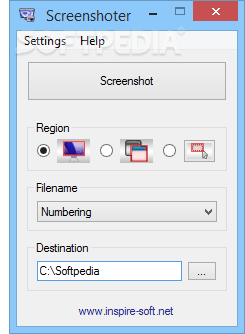
Screenshoter has title that pretty much explains its purpose - this software allows you to capture the screen of your monitor in several methods, in a user-friendly interface.
This is a portable product, so installing Screenshoter is not necessary. It means that you can place it on an external drive, plug it into any computer and directly run its executable file. Plus, no changes will be made to your Windows registry keys.
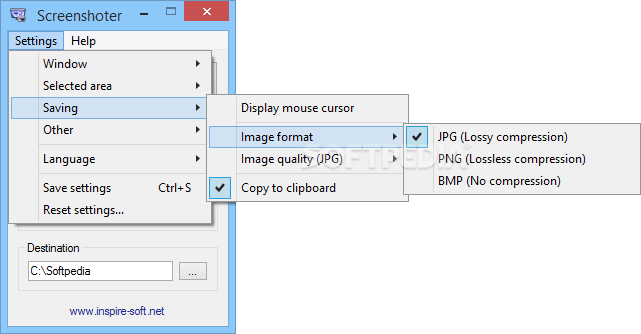
The interface of the application is based in a small, standard window in which you can select the region between full screen, window and selected area. But you can also specify the image format between JPG, PNG and BMP, along with the output directory.
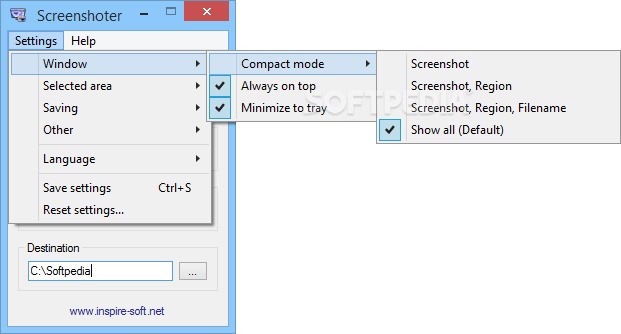
On top of that, you can enable Screenshoter to stay on top of other processes and to minimize to the system tray, include the mouse cursor, as well as set the JPG image quality and output filename.
You can enable Screenshoter to confirm before quitting, save the settings or restore them to their default values, change the interface language, and more.
The simple-to-use tool takes up a very low amount of system resources (which is barely noticeable), includes a brief help file for novices, has a good response time, quickly finishes a task and didn't freeze, crash or pop up errors during our tests.
Screenshoter doesn't exactly bring something new to the table. On the contrary, it offers pretty limited features. Plus, the interface is outdated. But the program comes equipped with the necessary and suffice elements for taking snapshots and we recommend it to all users who prefer a straightforward software.
What's new in Screenshoter 1.92:
- Added: Estonian translation
- Fixed: No screenshots were taken if the computer wasn't restarted for about three weeks (especially noticeable on Windows 8)
- Fixed: "Active Window Mode" sometimes failed when used directly after starting Screenshoter
Screenshoter 1.92
add to watchlist add to download basket send us an update REPORT- runs on:
-
Windows 8 32/64 bit
Windows 7 32/64 bit
Windows Vista 32/64 bit
Windows XP
Windows 2K - file size:
- 292 KB
- filename:
- screenshoter.zip
- main category:
- Multimedia
- developer:
- visit homepage
Windows Sandbox Launcher

Microsoft Teams

ShareX

IrfanView

Bitdefender Antivirus Free

calibre

7-Zip

Context Menu Manager

4k Video Downloader

Zoom Client

- Context Menu Manager
- 4k Video Downloader
- Zoom Client
- Windows Sandbox Launcher
- Microsoft Teams
- ShareX
- IrfanView
- Bitdefender Antivirus Free
- calibre
- 7-Zip
