
Grab snapshots of your windows for projects and tutorials you might have under development, quickly and easily without any issues. #Snapshot grabber #Screen capture #Image capture #Snapshot #Screenshot #Capture

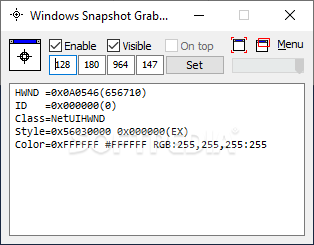
Taking quick snapshots of your OS does not fall under the category of things you rarely do. As such, you will need the help of a strong application such as Windows Snapshot Grabber, which can also help with resizing the windows you want to capture and offer plenty of information in the process.
Hotkeys are a thing, and the overall lightness of the app recommends it for any type of project or plan that involves taking snapshots of your screen.
The real magic happens when you want to take a snapshot of any item on the screen that is opened in a window. Dragging the window over this program will trigger snapshot mode, which then allows you to edit some particularities in terms of looks for your captured window.
In other words, if you do not like the size and ratio of the image it can be adjusted, offering 100% control over what you are doing over there.
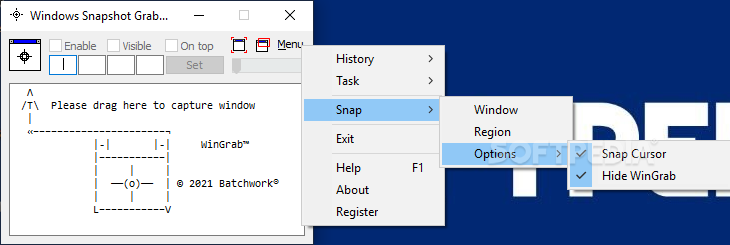
When taking a snapshot, things can be quite easy. There are plenty of options that allow the inclusion of your cursor in the pick or total removal, and also hide the app itself if need be.
The app needs to be told what to take a snap of, the choice being either region or window. The whole system is cut and easy to understand, not to talk about its high efficiency in the process. Windows Snapshot Grabber is a tiny yet powerful application that can help any user looking to capture certain aspects of their desktop actions and work.
It does offer above satisfactory results and in the end, it should turn out to be reliable in a multitude of situations and scenarios, all depending on the user, of course. I highly recommend this app for any light or complex desktop snapshot-taking.
Windows Snapshot Grabber 2024.16.323.3033
add to watchlist add to download basket send us an update REPORT- runs on:
-
Windows 11
Windows 10 32/64 bit
Windows Server 2012
Windows 2003
Windows 8 32/64 bit
Windows 7 32/64 bit
Windows Vista 32/64 bit
Windows XP 32/64 bit
Windows 2K - file size:
- 736 KB
- filename:
- setupwingrab.exe
- main category:
- Multimedia
- developer:
- visit homepage
ShareX

4k Video Downloader

Microsoft Teams

Context Menu Manager

calibre

7-Zip

Windows Sandbox Launcher

Zoom Client

IrfanView

Bitdefender Antivirus Free

- Zoom Client
- IrfanView
- Bitdefender Antivirus Free
- ShareX
- 4k Video Downloader
- Microsoft Teams
- Context Menu Manager
- calibre
- 7-Zip
- Windows Sandbox Launcher