
Perform advanced check-ups regarding signature or version for files on your computer by relying on this lightweight, handy application. #Check signature #Signature checker #Check version #Signature #Version #Timestamp
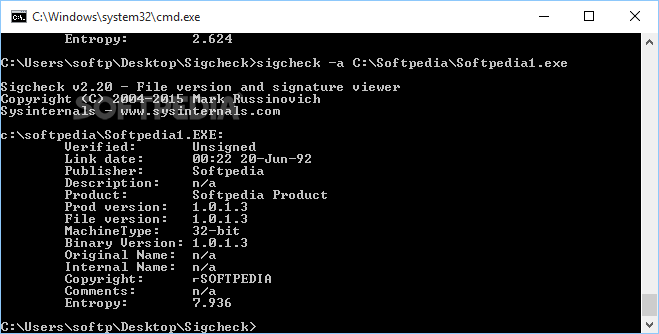
Performing regular checks on the files from your computer usually requires specialized tools, if you want to save yourself the hassle of manually processing each document. Although it is possible to check each item individually , relying on dedicated software, such as Sigcheck, can help you simplify your work by a great deal.
Since it can only be accessed through Windows' Command Prompt, this tool features no actual interface, which might put off some of its users. On the bright side, it comes with a wide variety of useful functions, thus providing you with a wider spectrum of possibilities.
Note that you need advanced PC operating skills in order to understand this application and make use of its functions entirely, with a minimum of effort.
This program can help you perform various check-ups on any file or folder on your computer and display signature information, version number and timestamp details.
In order to achieve this, you need to run the application from a Command Prompt window and assign it corresponding parameters. For instance, if you need to show extended information about a file, you can use the “-a” option and type the full path of the desired item. More so, this application allows you to use multiple options simultaneously.
You can rely on this application if you want to perform quick virus scans of your files by choosing the corresponding option from the list. This feature allows you to perform online malware queries based on file hash and view detailed reports.
Also, it is possible to display the contents of a catalog file on your computer and look for signature information within the specified document.
To sum it up, Sigcheck is a lightweight, command line application that allows you to perform advanced check-ups on the files on your computer. However, note that you need a certain level of PC operating skills in order to understand and operate it with minimum efforts.
Sigcheck 2.90
add to watchlist add to download basket send us an update REPORT- PRICE: Free
- runs on:
-
Windows Server 2019
Windows Server 2016
Windows 10 32/64 bit
Windows Server 2012
Windows 2008 32/64 bit
Windows 8 32/64 bit
Windows 7 32/64 bit
Windows Vista 32/64 bit - file size:
- 664 MB
- filename:
- Sigcheck.zip
- main category:
- Multimedia
- developer:
- visit homepage
Windows Sandbox Launcher

Bitdefender Antivirus Free

IrfanView

Context Menu Manager

calibre

Microsoft Teams

Zoom Client

7-Zip

ShareX

4k Video Downloader

- 7-Zip
- ShareX
- 4k Video Downloader
- Windows Sandbox Launcher
- Bitdefender Antivirus Free
- IrfanView
- Context Menu Manager
- calibre
- Microsoft Teams
- Zoom Client