
Convert AVI, DivX, XviD, MPEG, WMV, MOV, ASF, QuickTime into RM or RMVB with the help of this useful and easy-to-use software application. #Video converter #Video encoder #Video to rm #Converter #Conversion #Convert
Video conversion tools are one of the most spread types of programs on the Internet. That's mostly because there's a lot of video formats to choose from.
There are, of course, conversion tools that can convert just one video format to another, but A-Z RealPlayer Video Converter prides itself with the ability to convert video formats such as AVI, DIVX, WMV, ASF, MOV or MPEG, VCD, DVD videos to the RMVB (RealMedia Variable Bitrate) format.
The program has a user-friendly interface and can be easily accessed and used by the less experimented computer users out there.
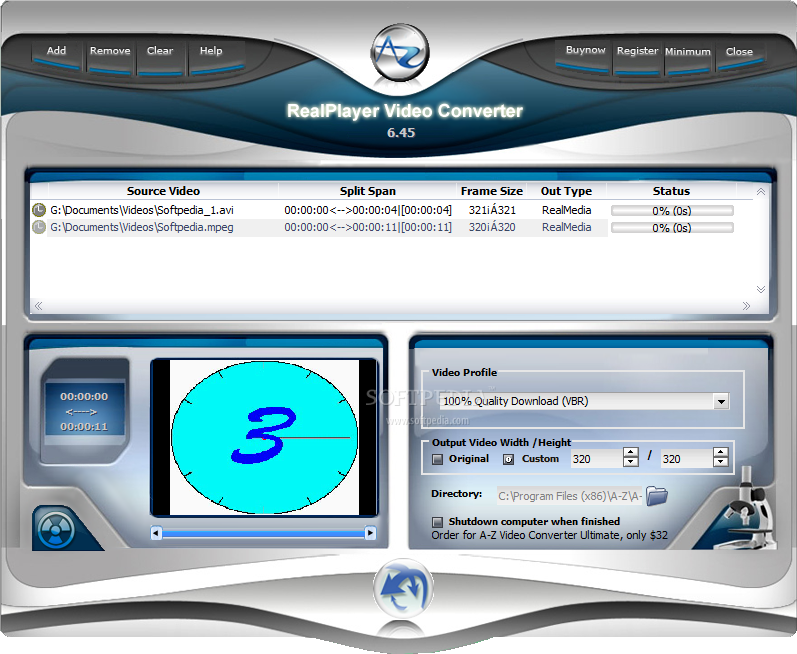
The top buttons of the software allow the user to add videos to the list or remove them. If you choose to add a file to the program, then you can view the source location, the split span, frame size and, of course, the conversion status.
However, before we get to the conversion part, you must know that you can preview all your videos, in case you have doubts about what videos you chose.
After previewing your video you have the possibility to select the video profile you want to use. The featured drop-down menu lets you pick from quite a long list of available profiles such as 150K LAN, 1M Surround Stereo, 350K Multichannel, 512k DSL or Cable, Lossless Audio, and many others. The video output size can be customized or it can be the same as the original.
You can leave your computer to convert your videos and program it to shut down after all the operations have been completed. Quite useful if you don't want to leave your PC running after the conversion process finishes.
A-Z RealPlayer Video Converter is a quick and handy conversion tool that can be quite useful if a user is quite passionate of the RMVB format.
Download Hubs
A-Z RealPlayer Video Converter is part of these download collections: RM Creator, Make RM, Convert ASF
A-Z RealPlayer Video Converter 5.46
add to watchlist add to download basket send us an update REPORT- runs on:
- Windows All
- file size:
- 7.9 MB
- filename:
- azrmconverter_2366935772.exe
- main category:
- Multimedia
- developer:
- visit homepage
ShareX

IrfanView

calibre

Context Menu Manager

7-Zip

Windows Sandbox Launcher

Microsoft Teams

Bitdefender Antivirus Free

Zoom Client

4k Video Downloader

- Bitdefender Antivirus Free
- Zoom Client
- 4k Video Downloader
- ShareX
- IrfanView
- calibre
- Context Menu Manager
- 7-Zip
- Windows Sandbox Launcher
- Microsoft Teams