
Powerful tool for helping you stream a live feed from cameras connected via USB or FireWire, and record video and audio stream separately or at the same time. #Flash encoder #Flash publisher #Capture video #Encoder #Encode #Publish
Recording live events that are broadcast via a streaming service requires a professional-grade utility, especially if the requirements are of the highest order.
Such a software program is Adobe Flash Media Live Encoder, an application that can handle several streams simultaneously and provide a wide array of dedicated functions.
This powerful tool is designed to be used with many different devices and can stream a live feed from cameras connected via USB or FireWire and which support DirectShow filters. Another very useful characteristic is the DVR functionality that enables you to enjoy time shifting or instant replay features.
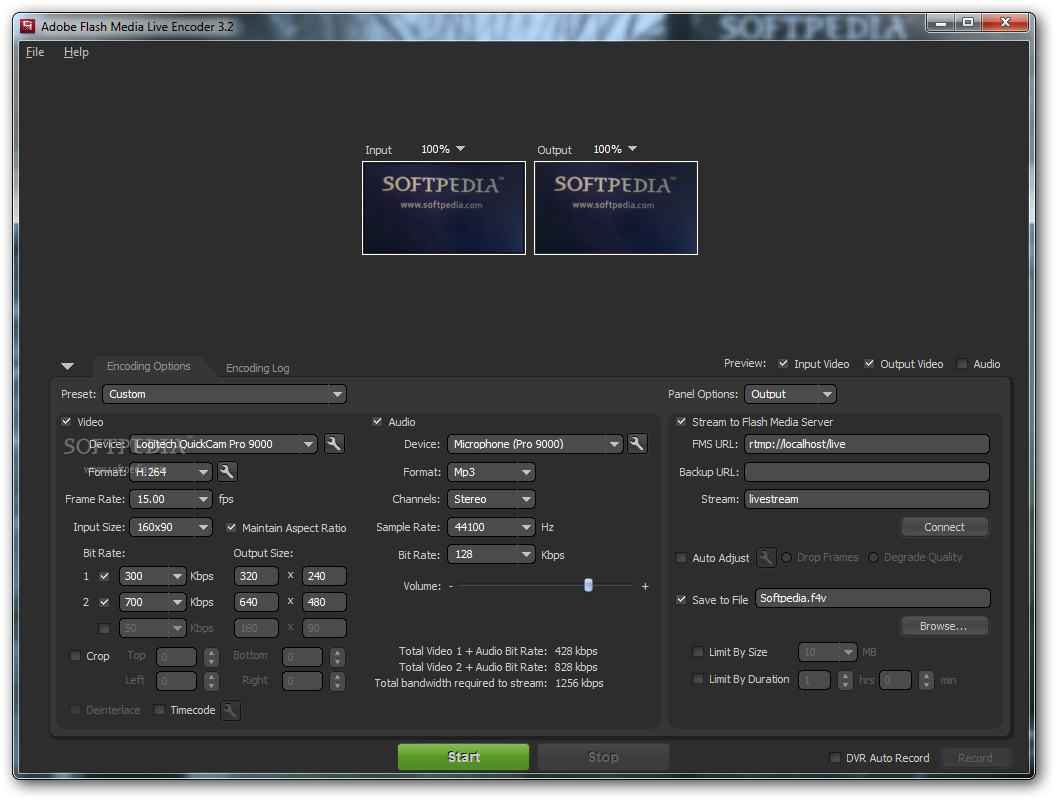
Thanks to a user-friendly interface, the full power of Adobe Flash Media Live Encoder is at your fingertips at all times. You can configure the encoding options on the fly and use either one of the built-in presets or create a custom one, according to your needs.
The application can record video and audio separately or at the same time, and all you have to do is activate the desired capture device. With both sound and image you can customize the format and bitrate and choose a specific frame rate for video and sample rate for audio.
In case you only need a specific portion of the image, it allows you to crop and preview the input as well as the output at the same time. If you need to stream the content to a Flash Media Server, you just have to insert the URL and connect on the fly.
Saving to file can be limited either by size or by duration and the software even offers a 'DVR Auto Record' feature if you want things done automatically. The support for On2 VP6 and H.264 formats ensures a high-quality encoding for your videos.
All in all, Adobe Flash Media Live Encoder provides quite a lot in a rather small package. Great features and easygoing operation are characteristics that make this application stand out from others in its category and earn a spot on the list of recommendations.
Download Hubs
Adobe Flash Media Live Encoder is part of these download collections: Convert AVI
What's new in Adobe Flash Media Live Encoder 3.2.0.9932:
- Flash Media Live Encoder crashes on more than 10 core machines while using Vp6 or resize option (#2430582, #2448409).
- Flash Media Live Encoder crashes on Win7 Starter Edition and exhibits rendering related crashes on other Win 7 flavours (#2741073, #2728197, #2718112).
- Flash Media Live Encoder sometimes hangs with latest drivers of Osprey 530 (4.4.0.59) on changing device settings. Workaround is to use older drivers (4.0.4.36) or beta drivers (#2486910).
- Server-side action script is required for DVR feature to work (#2337330).
Adobe Flash Media Live Encoder 3.2.0.9932
add to watchlist add to download basket send us an update REPORT- runs on:
-
Windows 2008
Windows 2003
Windows 7
Windows Vista
Windows XP - file size:
- 6.2 MB
- filename:
- flashmedialiveencoder_3.2_wwe_signed.msi
- main category:
- Multimedia
- developer:
- visit homepage
calibre

IrfanView

Context Menu Manager

4k Video Downloader

7-Zip

ShareX

Windows Sandbox Launcher

Zoom Client

Microsoft Teams

Bitdefender Antivirus Free

- Zoom Client
- Microsoft Teams
- Bitdefender Antivirus Free
- calibre
- IrfanView
- Context Menu Manager
- 4k Video Downloader
- 7-Zip
- ShareX
- Windows Sandbox Launcher