
Convert AVI, XVID, DIVX, RM, RMVB, MPEG, WMV, MOV TO MOV format with the help of this lightweight and useful software application. #MOV Converter #Video converter #Video encoder #Converter #Convert #Encoder

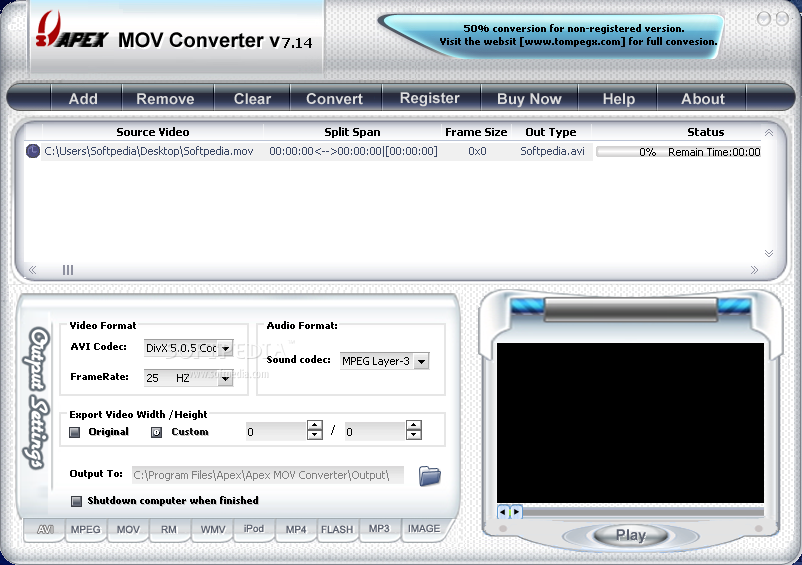
Apex MOV Converter is a simplistic program which allows you to convert AVI, MPEG, Windows Media, QuickTime and Real Player files to the MOV format.
The tool comes with a user-friendly interface in which you can import videos by using the file browser only, because the "drag and drop" method is not supported. Batch processing is possible.
In the queue you can view the source, split span, frame size, output type and status of each file.
After you establish the output destination, you can proceed with the conversion process.
You can configure audio and video settings when it comes to the codec, frame rate, size, rate and bitrate. Plus, you can preview the clip and cut it by marking the start and end time, as well as enable Apex MOV Converter to automatically turn off the computer when all tasks are completed.
The application uses a moderate-to-high amount of system resources and quickly finishes a conversion job while maintaining a pretty good image and sound quality. On the other hand, Apex MOV Converter froze several times in the middle of the conversion tasks during our tests, and we were forced to restart the application.
Plus, you cannot select multiple videos at once to import them into the list, nor specify the output video name. Also, other processes clearly run slower in the background, till the point that they temporarily freeze on a regular basis. We suggest you look for a more stable video encoder than Apex MOV Converter.
Apex MOV Converter 7.64
add to watchlist add to download basket send us an update REPORT- runs on:
- Windows All
- file size:
- 7.5 MB
- filename:
- apex-mov-converter.exe
- main category:
- Multimedia
- developer:
Microsoft Teams

calibre

Windows Sandbox Launcher

Zoom Client

Context Menu Manager

IrfanView

4k Video Downloader

ShareX

Bitdefender Antivirus Free

7-Zip

- ShareX
- Bitdefender Antivirus Free
- 7-Zip
- Microsoft Teams
- calibre
- Windows Sandbox Launcher
- Zoom Client
- Context Menu Manager
- IrfanView
- 4k Video Downloader