
An intuitive and lightweight application that is specially designed for calculating audio stream bitrates, based on movie size and audio options #Bitrate Calculator #Movie Bitrate #Sound Bitrate #Length #Bitrate #Codec
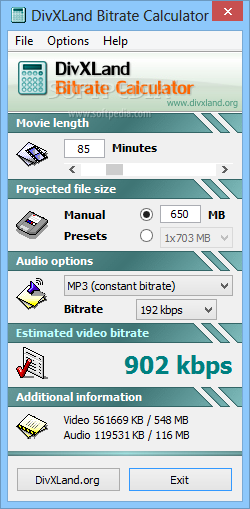
DivXLand Bitrate Calculator is a simple to use and reliable tool that enables you to estimate the proper audio and video bitrates for encoding DivX and XviD movies, when you have a specific target file size. The software can calculate the suitable video bitrate, based on movie length, file size and audio settings.
DivXLand Bitrate Calculator comes in handy when choosing the correct encoding for a movie with a specified maximum file size. Estimating the required bitrate enables you to obtain high video quality and avoid wasting unnecessary free space on your CDs or DVDs.
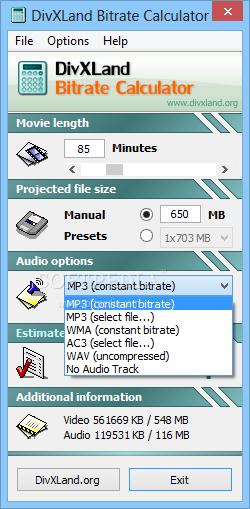
The software is compatible with all DivX and XviD codecs and supports multiple types of audio bitrates. You can choose between constant or variable audio bitrates, as well as select the input value.
In order to estimate an accurate video bitrate, you need to enter the movie approximate length and the targeted file size. You may select audio settings such as bitrate type and value. The supported types include constant or variable bitrate for MP3, WMA, AC3 and WAV files. If you choose a constant bitrate, you also need to specify its value, ranging from 16 to 320 kbps.
The movie length can be set by adjusting the slider to the proper position. The afferent value is displayed in the box above and it can range from one minute to a maximum of 400 minutes. The desired file size can be entered manually or you can choose from the preset values.
Additional information, such as the separate sizes of the video and audio streams contained in the movie are displayed at the bottom of the application’s window.
DivXLand Bitrate Calculator allows you to estimate the necessary parameters and choose the most suitable encoding options for your videos. Thus, calculating the suitable video and audio bitrate can help you obtain high quality and good compression for your movies. You can maximize video compatibility and prevent glitches or artifacts.
What's new in DivXLand Bitrate Calculator 2.9:
- Minor stability fixes, added and updated languages
DivXLand Bitrate Calculator 2.9
add to watchlist add to download basket send us an update REPORT- PRICE: Free
- runs on:
- Windows All
- file size:
- 528 KB
- filename:
- DivXLand_BitCalc_29.exe

- main category:
- Multimedia
- developer:
Context Menu Manager

Zoom Client

Microsoft Teams

7-Zip

Bitdefender Antivirus Free

calibre

ShareX

Windows Sandbox Launcher

IrfanView

4k Video Downloader

- Windows Sandbox Launcher
- IrfanView
- 4k Video Downloader
- Context Menu Manager
- Zoom Client
- Microsoft Teams
- 7-Zip
- Bitdefender Antivirus Free
- calibre
- ShareX