
All-in-one software to convert WMV, ASF to AVI, MPEG quickly and easily. #WMV to AVI #WMV to MPEG #WMV Converter #Convert #Converter #Conversion

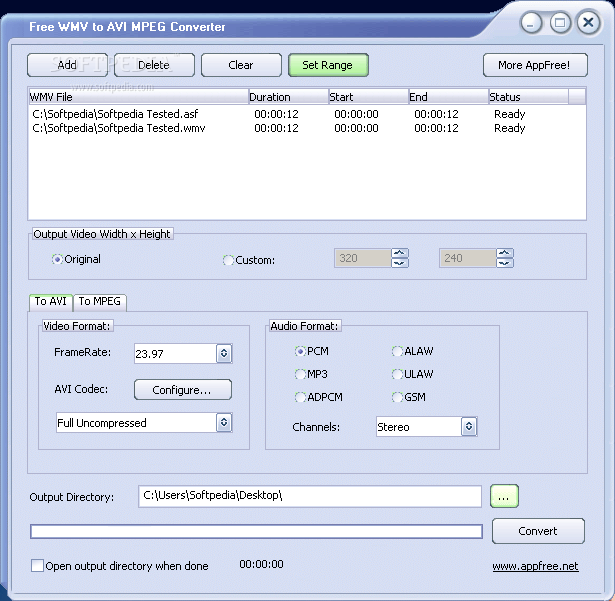
Free WMV to AVI MPEG Converter is a program with a pretty self-explanatory title - it allows you to convert video files with the WMV format (and ASF) to AVI or MPEG.
The interface of the tool is very plain and simple to navigate through. Videos can be imported into the queue via the file browser only, since the "drag and drop" method is not supported. Batch processing is allowed.
In the list you can check out the source, duration, start and end time, as well as status of each file.
All you have to do is establish the destination folder and format, and proceed with the conversion process.
You can configure audio and video settings for each output format when it comes to frame rate, size, bit rate, channels and compressor.
You can trim video clips by marking the start and end point, as well as enable Free WMV to AVI MPEG Converter to open the output directory once all tasks are done.
The video converter uses moderate system resources and quickly encodes a file. However, there is no help file available and the interface needs some major improvements, since it's outdated. Unfortunately, you cannot preview the video while trimming it. The image and sound quality in the output videos are generally good, but not great.
During our tests, Free WMV to AVI MPEG Converter failed to convert the image of an ASF file to AVI (the media player loaded only sound) and crashed out of the blue in case of a WMV-to-AVI conversion. We suggest you look for something more reliable than Free WMV to AVI MPEG Converter.
Free WMV to AVI MPEG Converter 1.2
add to watchlist add to download basket send us an update REPORT- runs on:
- Windows All
- file size:
- 4.2 MB
- filename:
- wmv2avi.exe

- main category:
- Multimedia
- developer:
- visit homepage
Windows Sandbox Launcher

4k Video Downloader

Zoom Client

7-Zip

ShareX

Bitdefender Antivirus Free

Microsoft Teams

IrfanView

Context Menu Manager

calibre

- IrfanView
- Context Menu Manager
- calibre
- Windows Sandbox Launcher
- 4k Video Downloader
- Zoom Client
- 7-Zip
- ShareX
- Bitdefender Antivirus Free
- Microsoft Teams