
A little program whose main purpose is to help you to quickly create an avatar photo out of a large image, using the Windows context menu. #Avatar Creator #Photo Avatar #Image Resizer #Resizer #Avatar #Resize
Avatar Maker is a very simple, yet effective utility that can re-dimension pictures to a custom size, which can be defined by the user.
It was designed mainly for generating avatars out of large pictures, which can then be used with various instant messengers or chat software.
The installation process requires you to press a few ‘Next’ buttons in order to accommodate the application on the system, after which you can get acquainted with its interface.
The program is rather simple, in terms of appearance. This is not necessarily a bad thing, since simplicity often comes with a high degree of accessibility, which is an advantage for less experienced computer users.
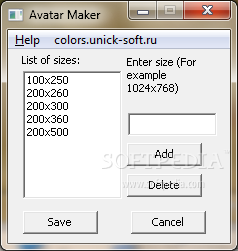
The main window provides a list of sizes available for the shrinking process that you can contribute to by adding your own custom pattern. Simply enter the desired size in the dedicated box and press the ‘Add’ button. Alternatively, you can also remove some of the presets if you don’t fancy them.
The actual resizing process can be started from the context menu that pops up when you right click a picture. Since the developer doesn’t mention the supported file formats, we’ve tried the program on the most popular image types, out of which only JPEG and PNG seemed to be compatible.
Depending on the size you’ve opted for (from the context menu), the program outputs the processed images in the same folder as the sources, but does not overwrite them. Instead, it saves them with a name that indicates the size to which the items were converted.
Overall, Avatar Maker shows enough potential, but lacks support for more image formats and a more appealing interface, which could persuade users into making it a personal asset.
Avatar Maker 1.0
add to watchlist add to download basket send us an update REPORT- runs on:
-
Windows 7 32/64 bit
Windows Vista 32/64 bit
Windows XP 32/64 bit
Windows All - file size:
- 250 KB
- filename:
- AvaMakerSetup.exe
- main category:
- Multimedia
- developer:
- visit homepage
7-Zip

Context Menu Manager

Microsoft Teams

4k Video Downloader

Bitdefender Antivirus Free

Windows Sandbox Launcher

Zoom Client

ShareX

IrfanView

calibre

- ShareX
- IrfanView
- calibre
- 7-Zip
- Context Menu Manager
- Microsoft Teams
- 4k Video Downloader
- Bitdefender Antivirus Free
- Windows Sandbox Launcher
- Zoom Client