
Convert and upload you favorite videos to your mobile device. #Video converter #Video2mobile encoder #Mobile file manager #Converter #Video2mobile #Encoder


Mobiola Video Studio is a simple solution to converting and transferring videos to mobile phones. The app supports several brands, such as Android, Nokia, Sony Ericsson, Motorola, BlackBerry, Apple, Sony, Palm and Windows Mobile.
The interface of the program is represented by a standard window with an uncomplicated layout. Mobiola Video Studio provides two modes for users, in accordance with their skill level.
In Predefined mode it is suffice to specify the device model and output directory, after which you can load videos for conversion via the "drag and drop" function.
Experienced users can switch to Advanced mode and tinker with some audio and video settings when it comes to the codec, bit rate, frames per second, coder, level, b-frames, size and frequency. Plus, you can create your own profiles as well as split files by size.
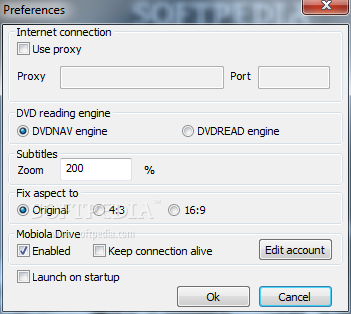
Additional settings are available through the Preferences screen. You can set proxy parameters, select the DVD reading engine (DVDNAV or DVDREAD), subtitle zoom level and aspect ratio, as well as make the app automatically launch at system startup.
The straightforward tool runs on a moderate quantity of CPU and system memory, has a good response time and finishes a task quickly, without hanging, crashing or popping up error dialogs. On the downside, Mobiola Video Studio has not been updated for a very long time, and this aspect can be noticed through the UI's appearance.
Mobiola Video Studio 3.1.33
add to watchlist add to download basket send us an update REPORT- runs on:
- Windows All
- file size:
- 10.1 MB
- filename:
- Mobiola_Video_Studio_v3_1_33.zip
- main category:
- Multimedia
- developer:
- visit homepage
Bitdefender Antivirus Free

IrfanView

Windows Sandbox Launcher

calibre

Microsoft Teams

7-Zip

Context Menu Manager

Zoom Client

ShareX

4k Video Downloader

- Zoom Client
- ShareX
- 4k Video Downloader
- Bitdefender Antivirus Free
- IrfanView
- Windows Sandbox Launcher
- calibre
- Microsoft Teams
- 7-Zip
- Context Menu Manager