
Easily process your subtitles. #Create subtitle #Subtitle creator #Make subtitle #Subpicture #Subtitle #Creator
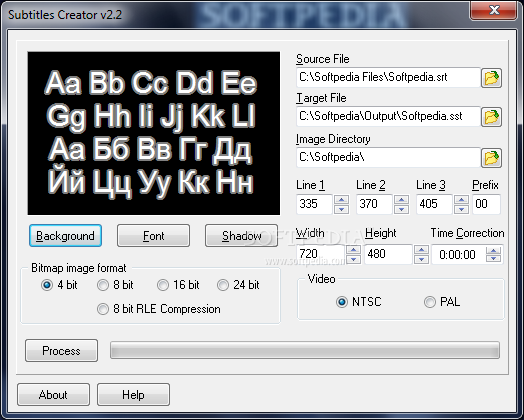
Subtitle creation is hard work. We can go on for hours talking about it and the complexity involved. This is not the case, though. Subtitles Creator doesn't do that. What it does is convert your SRT subtitle files to the SST format. For those of you that are not familiar with this format, here is a little insight.
The SST subtitle format is in fact a list of subpictures and the actual SST file to “rule them all”. This format is connected to the Sonic Scenarist DVD authoring software. The main role of the SST file is to set up the BMP format subpicture to show up at the given time. It also packs information regarding the font, line placement over the video stream and its color encoding technology.
Subtitles Creator installs in no time at all and doesn't require any extra intervention upon its start. The simplicity of the install is kept throughout the whole execution of the software. Everything is in place and there's nothing that will bother you in any way. The one word to fully describe the interface of the program is “cool”. We can start by customizing the appearance of the subtitle or the file locations.
They all take a few seconds to set and we'll have the end product ready for the Sonic Scenarist in a few more. Set the SRT source file, SST target file and image directory. The application provides up to three lines for subtitle display and customizable resolution. We can easily switch between the NTSC and PAL video encoding and also select the image format for the Bitmap subpictures (4, 8, 16 or 24 bit).
Users will be able to fully revise the background, font and shadow of the subtitle and even preview its look in a special section. These being said and done, there is only one thing left to do. Hit the `parse` button and let Subtitles Creator mix it all up and trim it to the SST subtitle format. It takes the lines from your provided SRT file and their timings and sequentially produces the correspondent images. With this application, converting subtitles to specific Sonic Scenarist format is extremely easy and fast.
Download Hubs
Subtitles Creator is part of these download collections: Make Subtitles, Subtitle Creators
Subtitles Creator 2.2
add to watchlist add to download basket send us an update REPORT- runs on:
-
Windows 2003
Windows 7
Windows Vista
Windows XP
Windows 2K - file size:
- 511 KB
- filename:
- subtitles_setup.zip
- main category:
- Multimedia
- developer:
- visit homepage
Context Menu Manager

4k Video Downloader

ShareX

IrfanView

calibre

Microsoft Teams

7-Zip

Windows Sandbox Launcher

Zoom Client

Bitdefender Antivirus Free

- Windows Sandbox Launcher
- Zoom Client
- Bitdefender Antivirus Free
- Context Menu Manager
- 4k Video Downloader
- ShareX
- IrfanView
- calibre
- Microsoft Teams
- 7-Zip