
Facilitates data transfer between iPhone, iPod and the PC. Support for audio, video , ebooks, apps, messages, contacts, and others #IPod to PC #IPod ripper #Transfer media #IPod2PC #Ripper #Extract

Xilisoft iPod Rip is a software application designed for transferring data between the PC and Apple devices, namely iPod and iPhone.
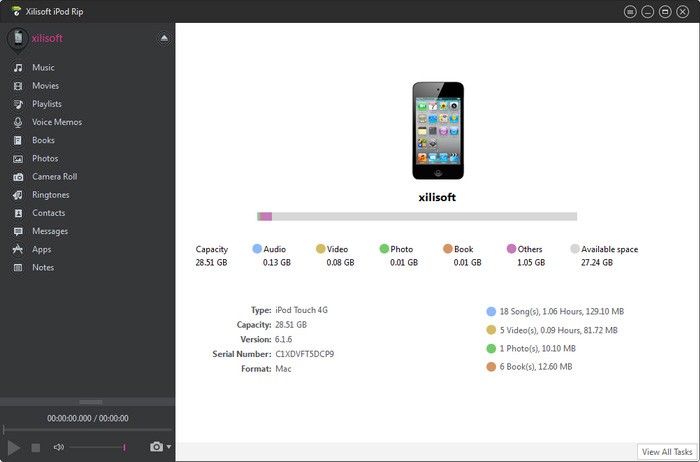
The interface of the program is represented by a clean window with a well-defined layout, where the content found in your Apple device is automatically loaded at initialization, provided that the iPhone or iPod is already plugged into the workstation.
The primary panel shows the current capacity and available space of the device, along with the size occupied by audio tracks, videos, photos, ebooks and other items. It reveals the type, capacity, version, serial number and format of the device, aside from the total songs, videos, photos and ebooks.
It is possible to preview audio and video items in a small, built-in media player and take snapshots, copy them to the Apple device, PC or iTunes, create and manage playlists, assign ratings, fill missing artwork, view file properties, and edit metadata; the latter option allows you to fill in details for multiple tracks at once, as long as they share particular fields.
Aside from the aforementioned categories, Xilisoft iPod Rip is capable of transferring voice memos, the camera roll and photo stream, ringtones, contacts (to HTML or TXT), messages (to CSV, vCard, VCF), apps and notes.
As far as program settings go, you can change the UI skin and language, default snapshot folder and format (JPG, BMP, PNG), prevent standby/hibernation when using the battery, as well as edit proxy parameters, among others.
Xilisoft iPod Rip uses a high amount of CPU and system memory, has a fair response time and may take a while to complete a task, whether we're talking about a simple metadata editing operation, or data transfer. However, no error dialogs have been shown in our tests and the program did not hang or crash. Thanks to its intuitive layout and features, Xilisoft iPod Rip should please the entire audience.
Xilisoft iPod Rip 5.7.41 Build 20230410
add to watchlist add to download basket send us an update REPORT- runs on:
-
Windows 11
Windows 10 32/64 bit
Windows 8 32/64 bit
Windows 7 32/64 bit
Windows Vista 32/64 bit
Windows XP 32/64 bit - file size:
- 77.5 MB
- main category:
- iPod Tools
- developer:
- visit homepage
4k Video Downloader

Microsoft Teams

Bitdefender Antivirus Free

calibre

Context Menu Manager

7-Zip

IrfanView

Zoom Client

ShareX

Windows Sandbox Launcher

- Zoom Client
- ShareX
- Windows Sandbox Launcher
- 4k Video Downloader
- Microsoft Teams
- Bitdefender Antivirus Free
- calibre
- Context Menu Manager
- 7-Zip
- IrfanView