
QuickTime Alternative plays QuickTime (MOV, QT) files without having to install QuickTime player, and it includes advanced settings. #Quick time alternative #Quicktime codec #Mov codec #Mov #Qt #Codec

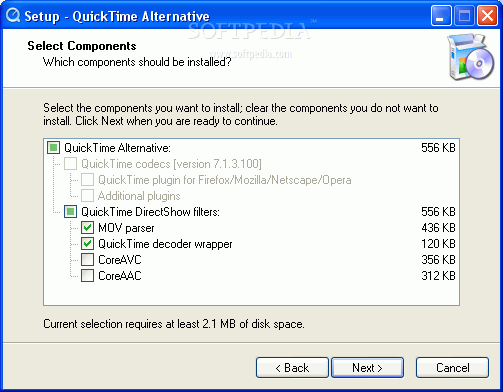
This is the light version of QuickTime Alternative, a solution for playing QuickTime-supported videos (MOV, GT) without needing to install the official product, as it contains QuickTime codecs required for playing such content.
The complete package includes plugins for ActiveX, Firefox, Mozilla, Netscape, and Opera, and you can select the components during installation.
When it comes to program configuration, you can select the audio playback and recording devices, enable safe mode for waveOut, set the audio output device latency, specify the output format supported by your audio devices (rate, size, channels), as well as pick the default music synthesizer.
Concerning web browsers, QuickTime Alternative is able to play movies automatically as they are downloaded. You can also enable kiosk mode for hiding the options to save movies and change QuickTime settings from the web browsers.
It is possible to select the connection speed supported by your hardware, override speed for downloads, enable Instant-On to play streamed media without delay and adjust the play streams, add media hotkeys, as well as set up advanced settings (e.g. streaming transport setup, download cache, video mode).
QuickTime Alternative is low-demanding when it comes to CPU and RAM, so it doesn't affect the computer's overall performance. It has a good response time and runs well. However, QuickTime Alternative Lite has not been updated for a pretty long time.
Download Hubs
QuickTime Alternative is part of these download collections: Open MOV
What's new in QuickTime Alternative 1.95 Lite:
- Updated QuickTime components to version 7.3.0.70
- Note: Requires Windows XP or newer
- Note: Requires a CPU that supports SSE instructions
QuickTime Alternative 1.95 Lite
add to watchlist add to download basket send us an update REPORT- runs on:
- Windows All
- file size:
- 10.3 MB
- filename:
- quicktimealt195lite.exe
- main category:
- Multimedia
- developer:
- visit homepage
Bitdefender Antivirus Free

4k Video Downloader

Windows Sandbox Launcher

Microsoft Teams

ShareX

Zoom Client

calibre

IrfanView

Context Menu Manager

7-Zip

- IrfanView
- Context Menu Manager
- 7-Zip
- Bitdefender Antivirus Free
- 4k Video Downloader
- Windows Sandbox Launcher
- Microsoft Teams
- ShareX
- Zoom Client
- calibre