
A practical application that allows you to create, play and stream both video and audio files found under some of the most commonly used formats. #Video Player #View Subtitle #Play Video #Viewer #Subtitle #Display

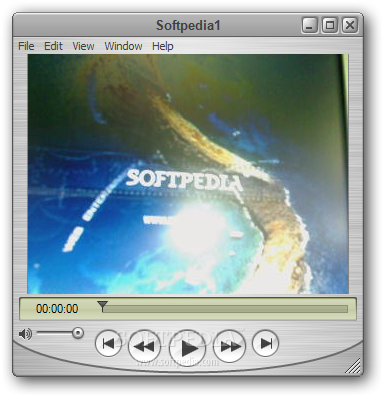
QuickTime is a full-featured media player and application framework that features support for all kinds of media types: audio, video, images and virtual reality movies. On MAC OS X, the product is included as a default feature, while on Windows platform it’s available as a standalone package, as well as integrated with iTunes.
QuickTime plays two major roles in the multimedia business. First off, it’s a media player; it can be used for high-quality playback of MOV, MPEG, MP3, H.264, 3GPP, AAC, JPEG, BMP, PNG, to name the most important ones.
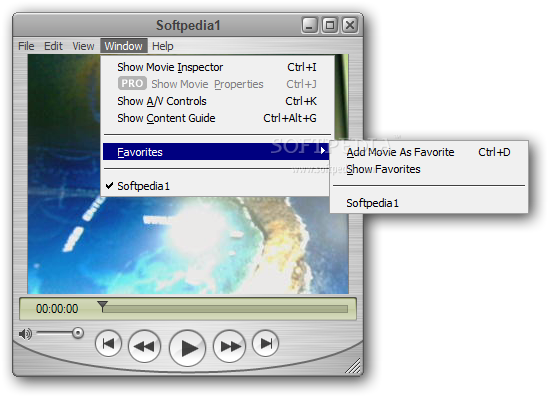
The interface looks very professional, and it's easy to understand by both beginners and advanced users. It’s not the most complex media player in its category, that’s for sure. It offers you basic playback controls (play / pause / resume) that most players feature.
But QuickTime is linked with many web browsers. You have probably already found some websites by now that required QuickTime to play videos. But the idea of using it as your main video player when there are others significantly more powerful than it may not be a concept that works for all users.
The second concept behind it (aside from being a media player) is that it acts as a multimedia architecture for third-party applications. In other words, software is being built on top of QuickTime, using its abilities for handling media content.
In conclusion, QuickTime is your usual media player. If you don’t use it for this purpose, you may be obliged to use it for a different reason, such as third-party software depending on it to be able to run. It does not bring anything new to the world of media players, but it managed to build up a name throughout the years, making it worth at least a try.
Download Hubs
QuickTime Player for Windows is part of these download collections: Play MP4, Play AVI, Video Players, MOV Player
What's new in QuickTime Player for Windows 7.7.9.1680.95.84:
- Impact: Viewing a maliciously crafted movie file may lead to an unexpected application termination or arbitrary code execution
- Description: Multiple memory corruption issues existed in QuickTime. These issues were addressed through improved memory handling
QuickTime Player for Windows 7.7.9.1680.95.84
add to watchlist add to download basket send us an update REPORT- runs on:
-
Windows 10 32/64 bit
Windows 8 32/64 bit
Windows 7 32/64 bit
Windows Vista 32/64 bit - file size:
- 39.9 MB
- filename:
- QuickTimeInstaller.exe
- main category:
- Multimedia
- developer:
- visit homepage
7-Zip

Context Menu Manager

Bitdefender Antivirus Free

Windows Sandbox Launcher

4k Video Downloader

Zoom Client

calibre

Microsoft Teams

ShareX

IrfanView

- Microsoft Teams
- ShareX
- IrfanView
- 7-Zip
- Context Menu Manager
- Bitdefender Antivirus Free
- Windows Sandbox Launcher
- 4k Video Downloader
- Zoom Client
- calibre