WINDOWS CATEGORIES:


NEWS ARCHIVE >>
SOFTPEDIA REVIEWS >>

WEEKLY HIGHLIGHTS

DVD Cloner45
Spyware Doctor40
1Click DVD Copy40
Apollo DVD Copy40
ABC Amber BlackBer...45
Protected Music Co...40

7-DAY TOP DOWNLOAD

#
Program
Avira AntiVir
Personal - Free
Antivirus 9.0.0.415

156,527
Windows Live
Messenger 2009
14.0.8089.726

133,723
Avira Antivir Virus
Definition File
Update November 27,
2009

115,807
Nexus Radio 4.2.2
115,644
FreeZ Online TV 1.30
87,708
Y! Multi Messenger
8.x and 9.x

67,581
Microsoft Office
2010 14.0.4536.1000
Beta / 2007

65,198
DVD Shrink 3.2.0.15
47,260
Windows Live
Messenger
8.5.1302.1018

47,185
AVG Free Edition 9.0
Build 707a1765

42,129

WEEK'S BEST

  • VirtualBox 3.1.0 r...
  • SiSoftware Sandra ...
  • Kaspersky Virus Re...
  • Faststone Image Vi...
  • Vuze (formerly Azu...
  • Softpedia Wallpape...
  • Softpedia Wallpape...
  • Softpedia Wallpape...
  • RSSOwl 2.0.1
  • Internet Explorer ...
  • Online Armor ++ 4....
  • cFosSpeed 5.01 Bui...
  • SONY Vegas Pro 9.0...
  • Firefox 3.6 Beta 4...
  • Nokia Photos 1.6.434
  • Windows Server 200...
  • Skype Portable 4.1...
  • Google Chrome Port...
  • PCMark Vantage Bas...
  • Kaspersky Anti-Vir...
  • Microsoft Virtual ...
  • Messenger Plus! Li...
  • WinX DVD Author [F...
  • SoftPerfect Networ...
  • System Mechanic Pr...
  • Ad Muncher 4.81 Bu...
  • Windows 7 Upgrade ...
  • Pidgin 2.6.4
  • OpenOffice.org Dev...
  • VirtualDub 1.9.7 B...
  • Home > Windows > Multimedia > Video > Video Recording
     Report spyware

    River Past Screen Recorder Pro 7.7.16.1904

    Download button

    Downloads: 4,327  Add to download basket  Tell us about an update
    User Rating:
    Rated by:
    Good (3.0/5)
    32 user(s)
    Developer:

    License / Price:

    Size / OS:

    Last Updated:

    Category:
    River Past Corporation | More programs
    Demo / USD 59.95 | BUY the full version
    8.2 MB / Windows All
    October 9th, 2008, 17:34 GMT [view history]
    C: \ Multimedia \ Video \ Video Recording

     Read user reviews (0)  Add a review  Refer to a friend  Subscribe


    River Past Screen Recorder Pro description


    Lets you capture screen to AVI/WMV/DivX/OGM/MKV or optional MOV/MP4/3GP

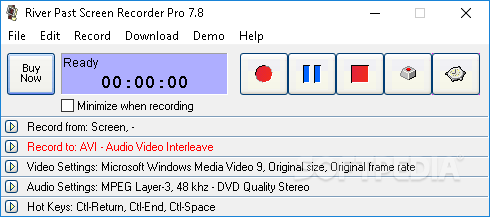
    River Past Screen Recorder is an easy-to-use, fast, and powerful screen video recording software.

    Record full screen, window (even if you drag it around the screen), fixed region, or cursor area. Output to AVI, DivX, XviD, MKV, OGM, WMV or MOV (optional) files, with choices of video codec with quality setting.

    It will load the video compressors dynamically on your system for the best power and flexibility. Common codecs include Cinepak, Indeo 3, 4, 5, Microsoft Video 1, Motion JPEG, DivX and XviD. Use the latter two for the best speed and quality.

    Optionally audio can be recorded from any sources, including microphone, line-in, or speakers. Recording volume can be adjusted manually even during the recording. Full control over the audio codec, sample rate, channle, bits per sample, and bitrate.

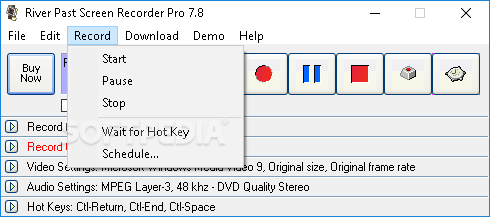
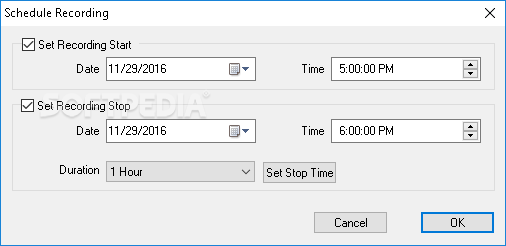
    River Past Screen Recorder Pro has a built-in scheduler for unattended recording. You can set the start time and/or the stop time. Record your e-learning sessions from the web or scheduled broadcasts when you cannot attend.

    River Past Screen Recorder Pro has been tested to be up to four times faster than other programs. Ideal for making demo, tutorial, and training videos.

    With the optional MOV Booster Pack, you can output to QuickTime movie.
    With the optional MPEG-4 Booster Pack, you can output to MP4 video.
    With the optional 3GP Booster Pack, you can output to 3GPP or 3GPP2 video.

    Here are some key features of "River Past Screen Recorder Pro":

    Input Control:
    · River Past Screen Recorder can capture AVI from the full screen, a window, a rectangle region, and a defined area around the cursor.
    · Drag-and-drop operation is used to define the window or the rectangle to be captured. When capturing from a window, the capture area follows the window, even if the window has been moved around the screen.
    · You can define the maximum frame rate to be captured, and thus control the output file size.

    Output Format
    · River Past Screen Recorder supports the following output format: AVI

    River Past Screen Recorder supports the following additional formats:
    · DivX
    · OGM (OGG Media)
    · MKV (Matroka)
    · MPG (MPEG-1)
    · MOV (MOV Booster Pack required)
    · XviD
    · WMV (Windows Media Video)
    · You have the full control over the codec of the AVI file. You can choose the video compressor, and its compression quality.

    Hot Keys:
    · Use hot keys to control the recording. You can define the hot keys to the combinations you prefer. Minimize River Past Screen Recorder, and start and stop recording by the hot keys. You can even pause the recording.

    Windows Media Video:
    · River Past Screen Recorder Pro allows you to record to WMV files using Microsoft's Windows Media Screen codec, which is specialized in producing high quality and small screen videos.
    · Record the video and post it on the web without any editing and conversion.


    Requirements:

    · Pentium III/Celeron CPU of 500 MHz or above
    · A sound card is required
    · DirectX 8.0 or above. We strongly recommend that you always use the latest the latest DX (currently 9.0b) because it provides better stability and performance.
    · WMF - For WMV output in River Past Screen Recorder Pro, you must have Windows Media Format Runtime 9 installed.


    Limitations:

    · A watermark is added to the recorded video, and the recording is limited to 2 minutes.

    What's New in This Release: [ read full changelog ]

    · [Change]Code base update.

     Softpedia guarantees that River Past Screen Recorder Pro 7.7.16.1904 is 100% CLEAN, which means it does not contain any form of malware, including spyware, viruses, trojans and backdoors. [read more >]


    TAGS:

    screen recorder | capture screen | video recorder | screen | recorder | capture


    HTML code for linking to this page:


    Go to top

    Windows tabGames tabDrivers tabMac tabLinux tabScripts tabMobile tabHandheld tabGadgets tabNews tab

    SUBMIT PROGRAM   |   ADVERTISE   |   GET HELP   |   SEND US FEEDBACK   |   RSS FEEDS   |   ENTER NEWS SITE   |   ENGLISH BOARD   |   ROMANIAN FORUM