Softpedia
 

WINDOWS CATEGORIES:


GLOBAL PAGES >>
SOFTPEDIA REVIEWS >>
MEET THE EDITORS >>
WEEK'S BEST
  • Bitdefender Total ...
  • Ocster Backup Pro ...
  • Hard Disk Sentinel...
  • FlashFXP [DISCOUNT...
  • DVDFab DVD Copy [D...
  • Kaspersky Internet...
  • Avast! Internet Se...
  • Avira Internet Sec...
  • Webroot SecureAnyw...
  • McAfee Total Prote...
  • Home > Windows > Network Tools > Bandwidth Tools
     Report malware

    ISP Monitor 5.7.5

    download button

    Part of the Bandwidth Managers download hub
    Downloads: 124,044  View global page  Tell us about an update
    User Rating:
    Rated by:
    Good (3.8/5)
    111 user(s)
    Developer:

    License / Price:

    Size / OS:

    Last Updated:

    Category:

    Freeware / $0
    3.1 MB / Windows All

    C: \ Network Tools \ Bandwidth Tools

     Read user reviews (1)  Send to friend   Follow (7 users)

    Softpedia Editor's Review for ISP Monitor

    EDITOR'S RATING:

    This tool can check your bandwidth usage and also display your bandwidth stats as mentioned on your providers website

    Written by Ciprian Paius on November 28th, 2011

    Not all Internet providers offer unlimited quotas to download and upload. Those who do not differentiate their services by the download speed, most certainly offer a fixed download and upload portion or a prepaid quota and charge you supplementary for each extra unit of data received or sent over the Internet.

    In both cases, an application to monitor the connection speed or the amount of data received and sent via your gateway should prove most useful. Be it that you just want to make sure you get the bandwidth you pay for or your traffic statistics match the ones from your Internet service provider, ISP Monitor should come in handy.

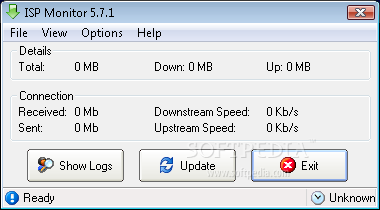
    The interface was kept simple and easy to use by any web surfer. It shows details regarding the amount of downloaded and uploaded information and the downstream / upstream speed. If you happen to use one of the supported Internet providers in Belgium or Netherlands, you can compare recorded data on your computer with their transfer statistics.

    ISP Monitor updates at regular intervals and even displays the percentage used of your total quota so you can adjust the network usage. In case you download large packs in a short period of time you can always update the information manually and get an idea on current quota.

    In addition to network monitoring, the application also features a disk monitor that offers real-time information on read/write speed or used disk space. This should come in handy when you plan to download large files and decide their location.

    If you want more out of the program, the application's settings allow you to customize warnings to help you better control your quota by setting limits for download and upload. Moreover, you can choose to allow ISP Monitor to disconnect the Internet connection in case of reaching a custom threshold.

    Considering that it provides all this for free, you might want to give it a try and start controlling you internet traffic costs.


    Read an in-depth analysis in our professional review for ISP Monitor

    ISP Monitor description

    Here are some key features of "ISP Monitor":

    · Real-time traffic monitoring. The built-in Traffic Monitor will show your current network speed. Select from 3 different graphic modes, all customizable to fit your needs.
    · Track your download statistics. Grabs the statistics from your providers website and keeps track of them. You will know exactly how much volume you have used at any time.
    · News and Mail Tracker. Shows a popup when you receive new mail or when your favorite site gets updated. You can easily add your own news feeds and mail accounts. Using the news panel you can also browse the latest headlines.
    · Test your Internet speed. Make sure you are getting the speed you actually pay for. Test your upstream, downstream, ping and packet loss and compare them with others.
    · Disk Monitor. No matter how much you want to download, you need free space on your hard disk! Our Disk Monitor can give you a quick overview of all your drives. The Disk Monitor shows your total and free space and even hard disk activity.
    · DDE Support. Allows other software like mIRC to read data from ISP Monitor. Click here to download our free mIRC Script.
    · Advanced Auto-Update. If a new version is available it will be automatically downloaded and installed to your computer in a matter of seconds. You'll never miss out on any new features or important bug fixes this way.
    · Show of your stats... and more! Support ISP Monitor and sign up for our premium service. You will become the owner of 5 slick signature bars and get access to more premium services.

       Softpedia guarantees that ISP Monitor 5.7.5 is 100% CLEAN, which means it does not contain any form of malware, including spyware, viruses, trojans and backdoors. [read more >]


    TAGS:

    traffic monitor | mail checker | disk monitor | bandwidth | check | checker

    Go to top

    WindowsGamesDriversMacLinuxScriptsMobileHandheldNews

    SUBMIT PROGRAM   |   ADVERTISE   |   GET HELP   |   SEND US FEEDBACK   |   RSS FEEDS   |   UPDATE YOUR SOFTWARE   |   ROMANIAN FORUM