
See how quickly your data goes from your computer to another computer on the internet by turning to this lightweight application. #Protocol monitor #TCP/IP monitor #Connection speed #TCP/IP #Protocol #Monitor

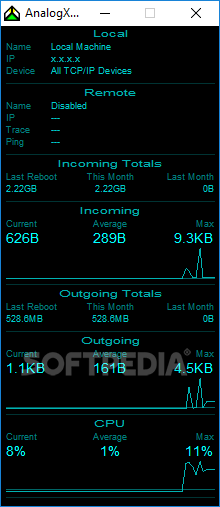
Netstat live is a simple application that monitors your Internet connection and provides information concerning the upload and download rates.
Although it’s far from the interface you may expect when dealing with this kind of application, the look of the program is clean and especially developed to display the stats and nothing more.
The layout is divided into multiple panels, each supposed to show a type of information with absolutely no click from the user.
For example, the “Local” tab shows the name of the local machine, IP and network adapter, while the “Remote” panel lets you ping a user-defined host, see the IP, trace and ping result.
What’s more, Netstat live also shows incoming traffic and incoming totals, with statistics concerning the traffic registered since last reboot, this and last month.
Obviously, outgoing figures are also available, and so are the threads and CPU usage.
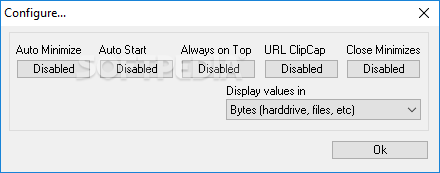
As you can see, Netstat live is a pretty basic application and there’s not much to configure about it. The minimal settings menu lets you pick the stats you wish to view in the main window, auto minimize and auto start the program with Windows and keep it always on top.
The impact on system performance is minimal, but we’ve discovered a drawback during our testing on Windows 7. The application doesn’t update traffic statistics in real time and refreshes the figures at a predefined interval, which means you may have to wait a few seconds before the latest stats are provided.
Netstat live is a handy piece of software, but advanced users may be disappointed with the lack of configuration options and the basic interface.
What's new in Netstat live 2.15:
- Fixed issue with multiple nics
Netstat live 2.15
add to watchlist add to download basket send us an update REPORT- runs on:
- Windows All
- file size:
- 366 KB
- filename:
- nsli.exe
- main category:
- Network Tools
- developer:
- visit homepage
calibre

Bitdefender Antivirus Free

ShareX

Microsoft Teams

Windows Sandbox Launcher

Zoom Client

IrfanView

4k Video Downloader

7-Zip

Context Menu Manager

- 4k Video Downloader
- 7-Zip
- Context Menu Manager
- calibre
- Bitdefender Antivirus Free
- ShareX
- Microsoft Teams
- Windows Sandbox Launcher
- Zoom Client
- IrfanView