
A tool to measure maximum TCP bandwidth, allowing the tuning of various parameters and UDP characteristics dedicated to advanced users. #Measure network performance #Measure UDP bandwidth #Measure TCP bandwidth #Measure #Measurement #Performance
Internet connection speed is constantly improving. In case issues are encountered, various tools provide troubleshooting and tweaking possibilities. Iperf is a handy and reliable command line utility designed to measure bandwidth performance and to tweak various TCP related parameters, as well as UDP characteristics.
The application doesn’t need to be installed; the EXE file that it comes packed in is portable, which means it doesn’t affect your computer registry. Being a command line utility, it can only run from a command prompt window.
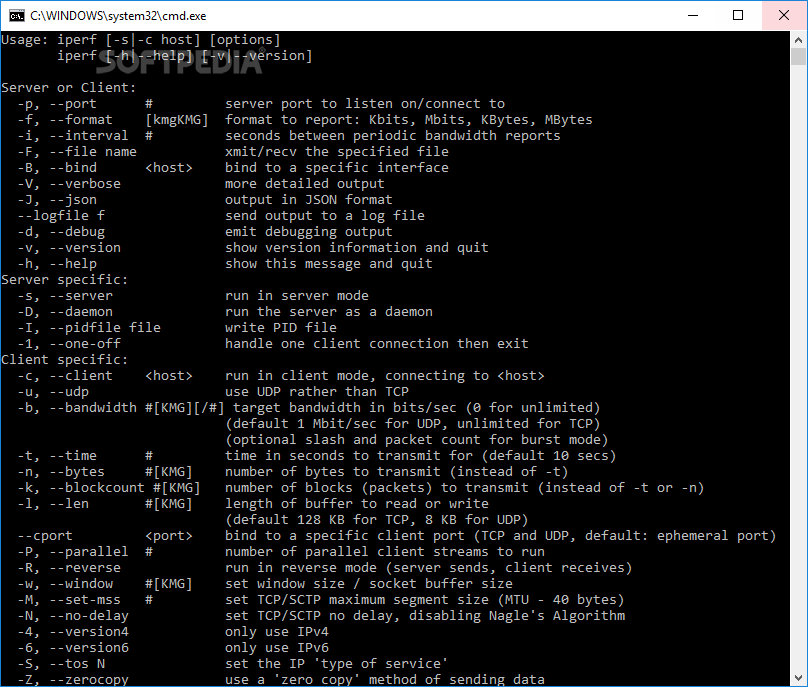
In order to learn about its usage, just run the application followed by the argument ‘-help’. Notice how the program features several individual options for Client and Server specific settings, as well as for Client and Server configurations altogether.
A quick summary of Iperf’s capabilities includes first of all, the possibility to report bandwidth parameters, MSS (maximum segment size) details, packet loss and delay jitter measurements and multicast support.
Also worth mentioning is its ability to handle multiple connections from both the server and the client. You can set it to run for a user-defined period of time instead of placing a restriction on the amount of transferred data.
Other settings include selecting the unit of measurement (Kilobits or Kilobytes, Megabits or Megabytes), reporting error messages, setting domains to IPv6 and running it as a Windows service.
Even though it may seem simple and accessible, Iperf was designed for advanced users. Proper usage requires network and server knowledge; the help section is only useful to those accustomed to terms specific to TCP / UDP monitoring. However, users who can understand its ways can get detailed reports regarding bandwidth performance.
Taking everything into consideration, we can say that Iperf can come in very handy for network administrators who constantly need to keep an eye on bandwidth performance. Even though it is but a command line, it manages to provide powerful assistance when it comes to tweaking.
Download Hubs
Iperf is part of these download collections: Bandwidth Managers
Iperf 3.1.3
add to watchlist add to download basket send us an update REPORT- runs on:
- Windows All
- file size:
- 1.4 MB
- filename:
- iperf-3.1.3-win32.zip
- main category:
- Network Tools
- developer:
- visit homepage
Context Menu Manager

ShareX

4k Video Downloader

IrfanView

calibre

Microsoft Teams

7-Zip

Windows Sandbox Launcher

Zoom Client

Bitdefender Antivirus Free

- Windows Sandbox Launcher
- Zoom Client
- Bitdefender Antivirus Free
- Context Menu Manager
- ShareX
- 4k Video Downloader
- IrfanView
- calibre
- Microsoft Teams
- 7-Zip