
Use your machine to set up a wireless network in order to provide Internet access to any device capable of connecting to meet various requirements #WiFi Hotspot #WiFi Connection #Manage WiFi #WiFi #Connection #Hotspot
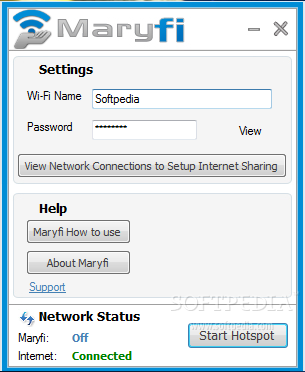
MaryFi is a smart and reliable utility designed to make use of the built-in Wi-Fi card of your computer in order to share your Internet connection wirelessly. Any other Wi-Fi enabled device including phones, laptops or gaming systems can then connect to it and enjoy Internet access at no fee.
The scenarios that require this type of software are numerous; either you’re in a building that charges money for each connection or you can’t get web access in a room of your home because of router proximity issues, the necessity of creating a virtual router is undeniable.
By enabling a Wi-Fi hotspot, you can share an Internet connection with your friends in hotels, coffee shops or airports and pay only once; for home routers, MaryFi is able to extend their range, thus bringing you the benefit of continuous Internet access no matter where you are inside the house.
In spite of its complex purpose, MaryFi is easy to use and doesn’t need a lot of resources to work. The only requirement is the Microsoft Virtual Wi-Fi Adapter, which takes little to install and doesn’t need any configurations.
MaryFi’s interface is simplistic, with all the settings in plain view, which makes it user-friendly and accessible to all the categories in the audience. Your efforts are reduced to entering the Wi-Fi name, together with a password and to press the ‘Start Hotspot’ button.
If the operation is successful and the hotspot Status is On, it means that you can start sharing your connection. Just provide your friends or colleagues with the password you have previously set and they should be able to get access to your Wi-Fi connection.
The best part is that even if you don’t have an active Internet connection, you can still create a hotspot in order to share local resources on the network or to join LAN game parties.
Considering all of the above, we can only say that MaryFi is a wise choice for sharing Internet access wirelessly. It’s a simple, yet powerful solution to make the most of your Internet connection by making it available for your preferred devices.
MaryFi 1.1
add to watchlist add to download basket send us an update REPORT- runs on:
- Windows 7
- file size:
- 2.1 MB
- filename:
- Maryfi-AR.exe
- main category:
- Network Tools
- developer:
- visit homepage
Context Menu Manager

ShareX

4k Video Downloader

calibre

IrfanView

Zoom Client

Bitdefender Antivirus Free

Windows Sandbox Launcher

7-Zip

Microsoft Teams

- Windows Sandbox Launcher
- 7-Zip
- Microsoft Teams
- Context Menu Manager
- ShareX
- 4k Video Downloader
- calibre
- IrfanView
- Zoom Client
- Bitdefender Antivirus Free