
A professional tool to manage printer jobs and avoid any mishap that may occur when having multiple PC units deal with one single printer #Queue Manager #Printer Manager #Network Printer Queue #Printer #Manager #Network

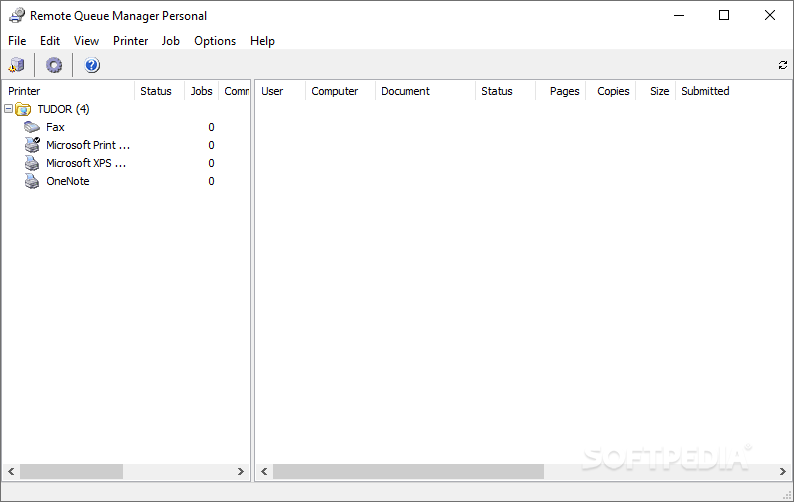
Remote Queue Manager Personal is a stripped-down version of the application known simply as Remote Queue Manager. It's meant as a helpful tool to organize and deal with printers or print queues at a personal or local level, hence the name. While from a distance one could actually miss the differences between these two variants of the program, rest assured that you can feel them if the situation requires a little more than the personal version offers.
Yes, RQMP does manage to keep the essence of its counterpart. It's simple to use and it organizes your printers and printing ques just the same. The only problem with this version is you won't be able to access printers connected to other PCs, as this option is missing. You can still manage the queues for the printers your PC has access to, and if you're dealing with a small group of people or you're trying to better manage your home printing habits, you won't require more features from this tool.
Probably the feature you'll miss most, especially if you've tried the trial for the more complex variant of RQM is the ability to preview documents from the printing spool. This means you can't issue reprints from there either. It really reduces your array of options and turns the application exclusively into a printing manager. While it retains much of the usefulness of RQM, the personal version lacks some of the gimmicks you'd probably make good use of.
In a nutshell, Remote Queue Manager Personal is a stripped version of the same RQM and while one can definitely feel that there are missing features, the program itself can still be used for an overall simpler printing experience. It retains its capabilities to organize printers and printing jobs alike making this application still worth the taking.
What's new in Remote Queue Manager Personal 6.0:
- Added IPv6 computer names determination
- Added support of XPS page description language
- Added preview of the documents for XPS printers (many printers with new Type 4 drivers)
- Added preview of the documents for POSTSCRIPT, HPGL/2, PDF and TIFF using external viewers
Remote Queue Manager Personal 6.0
add to watchlist add to download basket send us an update REPORT- PRICE: Free
- runs on:
-
Windows 10 32/64 bit
Windows 8 32/64 bit
Windows 7 32/64 bit
Windows Vista 32/64 bit
Windows XP - file size:
- 1.5 MB
- filename:
- rqm-personal.zip
- main category:
- Network Tools
- developer:
- visit homepage
IrfanView

calibre

4k Video Downloader

ShareX

Microsoft Teams

Windows Sandbox Launcher

Context Menu Manager

Bitdefender Antivirus Free

7-Zip

Zoom Client

- Bitdefender Antivirus Free
- 7-Zip
- Zoom Client
- IrfanView
- calibre
- 4k Video Downloader
- ShareX
- Microsoft Teams
- Windows Sandbox Launcher
- Context Menu Manager