
Use your computer as a method to connect other WiFi enabled devices to the Internet with the help of this easy to use application. #WiFi Hotspot #WiFi connection #Create hotspot #WiFi #Hotspot #Wireless

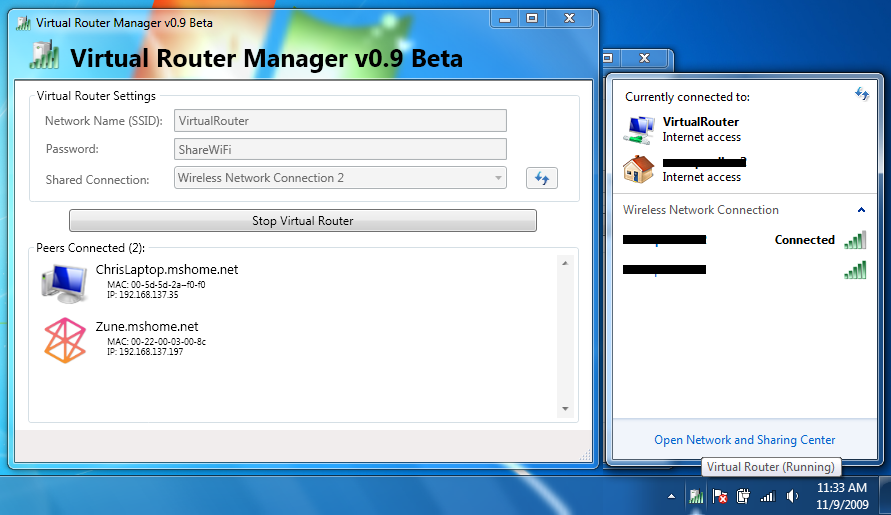
Setting up an ad-hoc wireless network in Windows 8 is no longer possible and turning your computer into a Wi-Fi hotspot requires a third party, dedicated application. Such a tool is Virtual Router Plus, designed to help you share your Internet connection with any Wi-Fi enabled devices, such as a smartphone or a tablet.
Virtual Router Plus comes in handy for anyone who needs to share a wired Internet connection via Wi-Fi. Since it comes with just a few configuration options, this application is suitable for any type of user, whether it is a beginner or a more experienced one.
The main interface prompts you to configure the connection by providing the name of the network, the password that clients have to enter in order to access the new wireless network (which must have a length of minimum 8 characters), as well as select the connection you want to share.
Other than that, simply press the 'Start' button and the Wi-Fi network is ready to use, without any additional configuration requirements. Once this easy setup process is over, a notification message is displayed and the application starts running silently in the system tray.
Any Wi-Fi enabled device detects the newly created network, enabling you to navigate over the Internet using the laptop or the computer as an access point.
The application uses the WPA2 protocol for encrypting the connections, in order to make sure that the data transfer is secure and prevent information theft.
Designed with ease of use in mind, Virtual Router Plus enables you to set up the new hot spot in no time. It provides you with a simple method for turning the computer or laptop into a Wi-Fi router and gets Internet access on other Wi-Fi devices without a lot of hassle.
Virtual Router Plus 2.6.0
add to watchlist add to download basket send us an update REPORT- runs on:
-
Windows Server 2012
Windows 2008 R2
Windows 8 32/64 bit
Windows 7 32/64 bit - file size:
- 1.8 MB
- filename:
- VirtualRouterPlusSetup.exe
- main category:
- Network Tools
- developer:
4k Video Downloader

Microsoft Teams

calibre

Windows Sandbox Launcher

Context Menu Manager

Zoom Client

Bitdefender Antivirus Free

IrfanView

7-Zip

ShareX

- IrfanView
- 7-Zip
- ShareX
- 4k Video Downloader
- Microsoft Teams
- calibre
- Windows Sandbox Launcher
- Context Menu Manager
- Zoom Client
- Bitdefender Antivirus Free