
Change the MAC (Media Access Control) address of wired and wireless network adapters by using this reliable and handy piece of software. #Change MAC #Reset MAC address #MAC changer #MAC #Changer #Change

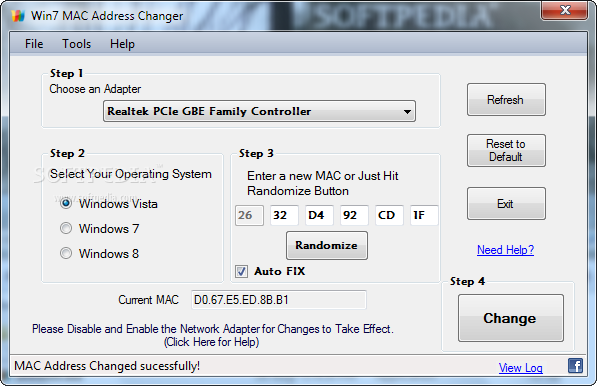
When having to manage network connections for multiple computers, changing the MAC address might be one of the required tasks. Win7 MAC Address Changer is a very simple application designed to change the MAC address used for identifying a specific network adapter or computer in a network.
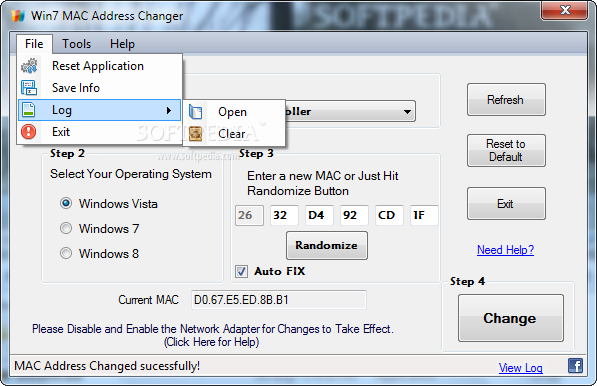
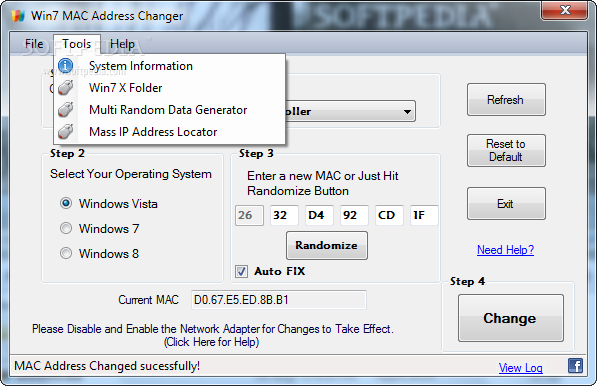
Win7 MAC Address Changer boasts a rather simple interface that can be safely used by beginners as well, at least as long as they know how a MAC change affects the computer.
The clean interface prompts the user to choose the adapter whose MAC is to be modified, while step number two prompts to select the operating system, which can be Windows 8, 7 and Vista, all three being fully supported.
Next, you are required to enter the new MAC or, in case you wish to switch to a random one, it's enough to hit the “Randomize” button and let the application generate one automatically. The current MAC address is displayed in a dedicated field.
Once you've reached this step, there's nothing more to do than to press the big “Change” button and watch Win7 MAC Address Changer modify the address. You need to disable and enable the network adapter back in order to apply the new settings.
If for some reason you want to switch back to the original MAC address, Win7 MAC Address Changer comes with a dedicated “Reset to Default” button that allows you to reset the new MAC and enable the one you've used prior to the modification.
This is one of the easiest MAC spoofing tools, but it does nothing spectacular compared to the other tools in its category. It serves its purpose just right, being available to all levels of experience, even if the task should not be managed by everyone.
What's new in Win7 MAC Address Changer 2.0:
- Lots of tweaks and improvements.
- Probability of working MAC Address generation increased.
Win7 MAC Address Changer 2.0
add to watchlist add to download basket send us an update REPORT- runs on:
-
Windows 8 32/64 bit
Windows 7 32/64 bit
Windows Vista 32/64 bit - file size:
- 741 KB
- filename:
- Win7_mac_address_2.0.zip
- main category:
- Network Tools
- developer:
- visit homepage
Microsoft Teams

Zoom Client

4k Video Downloader

IrfanView

ShareX

Bitdefender Antivirus Free

calibre

7-Zip

Windows Sandbox Launcher

Context Menu Manager

- 7-Zip
- Windows Sandbox Launcher
- Context Menu Manager
- Microsoft Teams
- Zoom Client
- 4k Video Downloader
- IrfanView
- ShareX
- Bitdefender Antivirus Free
- calibre